
Q88 Dry Onboard User: Based on the access level granted, you will have access to this calculator for the vessel assigned to you.
Accessing DWT/Draft Calculator
You can calculate the Dwt/Draft for your listed vessels from the top bar menu under Tools → DWT/Draft Calculator:

-
The tool is also available for all registered vessels on the platform.
Search for a Vessel
Select the vessel you want from the Search functionality and click on the Dwt/Draft Calculator Tab.
A new window will appear for you to select the vessel from your list, then click on the Show button.
How to Use the DWT/Draft Calculator
Once you are on this page, you will need to do the following:
-
Select the relevant fleet and vessel name → click on the Show button.
-
Under the Specify Criteria, select either Cargo or Draft → enter MT of the cargo or height of the Draft.
-
Fill out the necessary information for both Vessel Details and Additional Information → click on the Calculate button.
-
The system will provide the relevant calculation at the bottom of the screen.
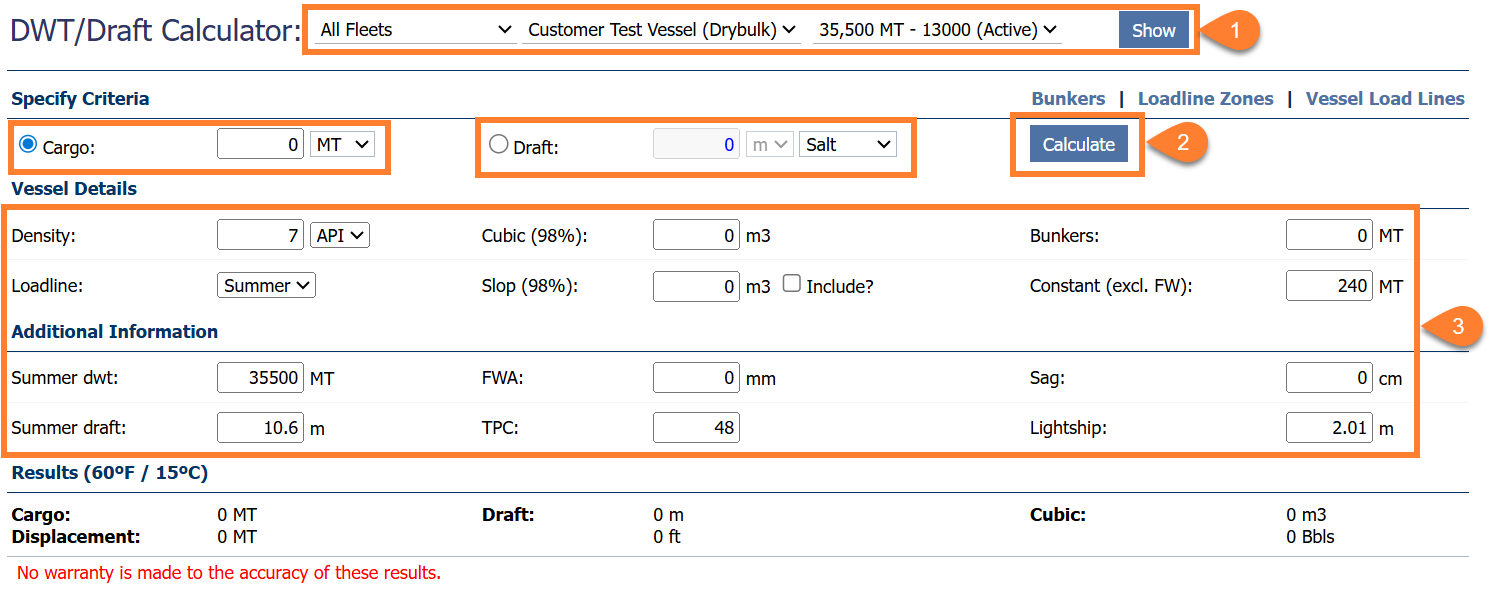
Add data to calculate