
In the Certificate & Docs module, users can copy a certificate along with any attachments to another vessel/entire fleet. This feature is useful in situations where the certificate applies to multiple vessels or all the vessels in your fleet.
How to Copy a Document
-
Navigate to the Vessels tab → Certificates & Docs → select the Edit icon → under the Actions menu, you will find the Copy Document function.

Once you click the Copy Document link, the following pop-up window will appear and you can select the vessels that you want to copy the certificate information to.
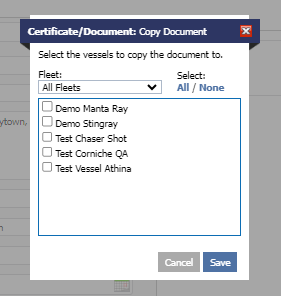
a. Select the vessels and click the Save button to perform the copy function.