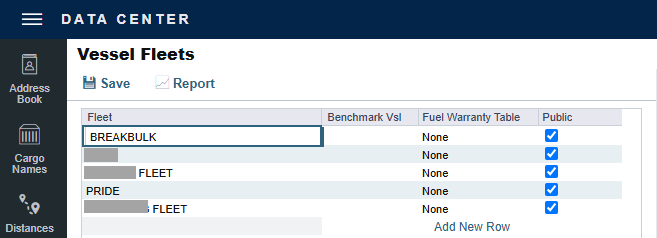
Vessel Fleets terms are used on the Vessel, Tow, and Boat forms.
On the Data Center menu … > under Vessels > click Vessel Fleets.
For each Vessel Fleet, you can specify the Fuel Zone Set and the unit of measure.
Related Configuration Flags
|
Name/Flag
|
Description
|
|
New Chartering
CFGNewChartering
|
Allows the assignment of multiple fleets to the vessel card. Also adds the Fleet tab to this screen.
When Enabled, users can access Market Insights and Action Cargoes as features within the Chartering Module without any additional licensing. Market Insights will provide the ability to search through vessel positions in the market using operational data and the latest AIS positions that a vessel reports, and narrow your search to find matching vessels that can meet theoretical laycan windows. Action Cargoes will use your existing Cargo Book and allow you to find vessels that could meet the specific demand. The tool will use aspects of the cargo as filters as well as the laycan window to narrow the search for matching vessels.
|
|
Vessel Require Vessel Fleet
CFGVesselRequireVesselFleet
|
Vessel Fleet is a required field in the Vessel card.
|