
🔑 This is a Key Topic, with high value for all users.
Configuration flag CFGAllowEstLaytime enables demurrage estimating to make the P&L projection more accurate. When the actual demurrage is entered, it overrides this amount.
-
-
In the Voyage Manager, select

-
-
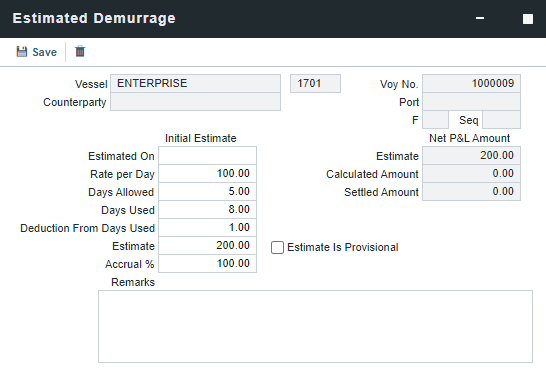
Enter the Estimated On date.
-
Do one of the following:
-
Enter the Rate Per Day, Days Allowed, and Days Used. The Estimate of the Demurrage amount is calculated.
For a Tanker, if Days Used is less than Days Allowed, the amount is 0 unless Allow Despatch is selected on the Vessel form. -
If days and rates are not known, enter an Estimate. The Estimate is used on the voyage P&L until your first Demurrage calculation.
-
-
Do any of the following:
-
To have the voyage P&L reflect the percentage of Demurrage and Demurrage Commission you expect to be collected, enter an Accrual %.
-
To include an estimated value for Demurrage in the voyage P&L, select the Estimate is Provisional checkbox. Then the value of this Estimate is used in the Actual column until it is superseded by calculated and settled amounts; when you enter any actual amounts, they are subtracted from it.
-
For example, if the Estimate value is $100,000, and you enter an actual amount of $50,000, the voyage P&L shows $50,000 provisional and $50,000 actual. If you enter another $60,000 actual, the voyage P&L shows $110,000 actual and no provisional Demurrage.
-
When the calculation status is Settled, the Agreed Amount is included in the voyage P&L. When the status is No Demurrage or Canceled, no demurrage or despatch is included in the voyage P&L.
-
When all Demurrage calculations are done and Claims are created, clear this checkbox so that only calculated and settled amounts are represented in the P&L.
Note: If the checkbox is not cleared when monthly accruals are run, then the Estimated Demurrage appears under the respective Mon YYYY Accrual period of the Compare dropdown menu in the P&L. -
If this checkbox is not selected, the estimated demurrage amount is included until the first Laytime Calculation amount is included.
-
-
To account for the estimated time to be deducted from Days Used, include a value in Deduction From Days Used.
-
To capture notes that provide additional context for estimated demurrage calculations, include them in Remarks.
-
To synchronize the demurrage and despatch rates from the Cargo contract with the estimated demurrage rate, select the Auto-update from itinerary checkbox.
-
Note: Auto-update estimated demurrage is only compatible with single cargo portcalls.
-
-
The Estimated Demurrage Amount appears on the voyage P&L. When the Laytime calculation is set to settled status, this will remove the estimated demurrage amount from the P&L (it overwrites the estimated amount). Estimated Demurrage accessibility is controlled by the Voyage Manager selection. (Operations → Quick Links → Voyage Manager)
Optimized Estimated Demurrage
Starting on the Estimate, port congestion data can be entered manually or imported via webhook (Oceanbolt and Portlog). This provides an an end-to-end solution for Estimated Demurrage that minimizes manual action and increases the accuracy of the voyage P&L.
Setting Enhancements
-
CFGAutoCreateEstVoyageDemurrage
-
CFGEnableMultiEstDem
-
Voyage Template Additions

With these enhancements, data you enter or webhook updates related to port congestion apply to Estimates, reflect the demurrage in the Estimate P&L, and transfers port data to the Voyage to create an accurate voyage P&L.
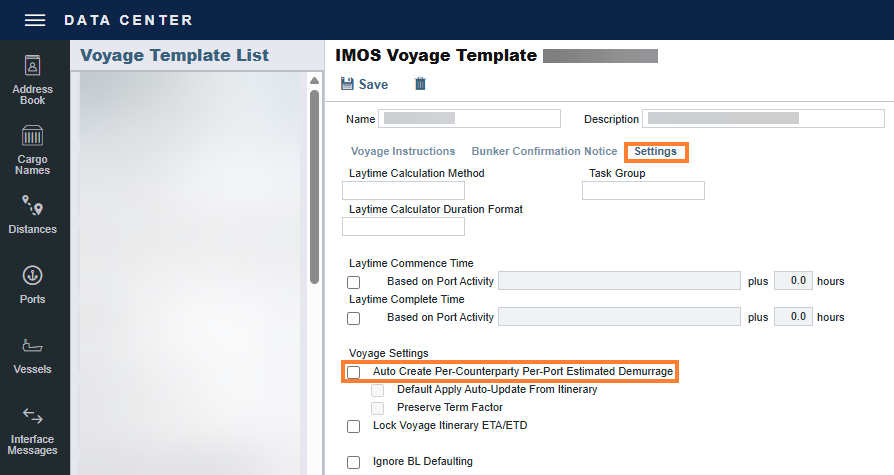
When both CFGAutoCreateEstVoyageDemurrage and CFGEnableMultiEstDem are enabled, the Voyage Template setting Auto Create Per-Counterparty Per-Port Estimated Demurrage is available. When this setting is enabled, IMOS automatically creates per-counterparty, per-port estimated demurrage records and manages them throughout the voyage lifecycle, not only at voyage creation. Any estimated demurrage records you enter manually are preserved during automatic updates and are not overwritten.
When you enable Default Apply Auto-Update From Itinerary, the Auto-Update From Itinerary checkbox on Estimated Demurrage is selected by default. Changes to the Voyage Itinerary are then automatically applied to the Estimated Demurrage.