
Home > Analytics > Exporting & Importing a Report Definition
For a Public or a Private report (not a Built-in report), you can export a report definition and save it. It can then be imported into IMOS.
Exporting a Report Definition
To export a report definition, do the following:
-
In the Report List, open the report for which you want export a report definition.
-
At the top of the report, click on

-
Once downloaded, select a location and Save the report definition locally as a .form file.
Importing a Report Definition
Note: Only report definitions with file type FORM File can be imported. If you receive a report definition from another user and you trust the source, make sure to remove .unsafe from the file name so that it converts to a FORM File.
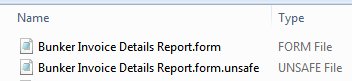
To import a report definition:
-
On the Report List, click + and then click Import Report Definitions.
-
Browse for the report definition FORM File, select it, and then click Open.
The report appears in the Report List, from which you can Run, Copy, or Design it.