
See all of the latest product updates for Position List.
Q4 2026
Vessel Finder Redesign NEW
Here’s an overview of what’s new:
-
Vessel Specification view is moving.
The Vessel Specification pop-up is being retired from its current location. You can still open it at any time from the Other Actions menu. -
Bulk updates work the same way.
To update multiple vessels at once, click Compact to switch to compact view, then make your updates as before. -
Six months of history at a glance.
Vessel Finder now shows up to six months of position history and port calls for each vessel. -
Instant vessel snapshot.
A new panel at the top of the page gives you a quick summary of each vessel's position, AIS data, and Q88 status as soon as you open it.
Q3 2026
Vessel Finder Replaces Position Updater Update
Vessel Finder replaces the Position Updater. To open Vessel Finder, press U on your keyboard or select the compass icon in the top-right corner of the workspace.
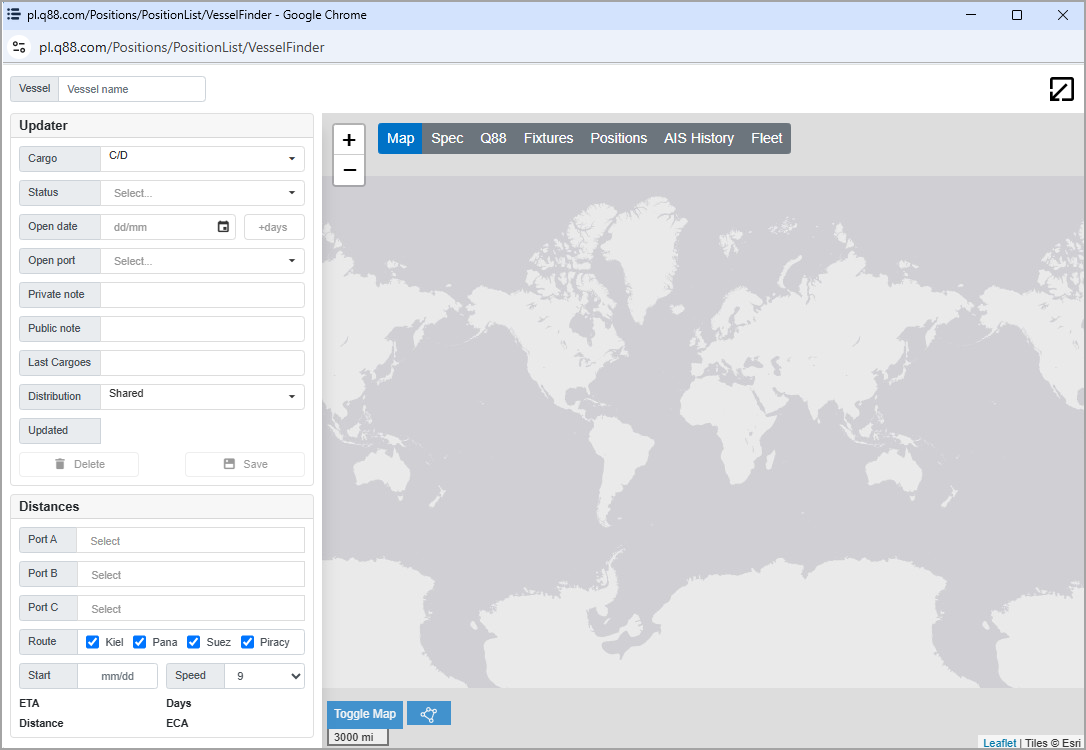
Vessel Finder is an all-in-one search tool that lets you:
-
Locate any vessel on the platform.
-
Update its open position.
-
Calculate ETAs.
-
Find distances between ports.
All existing functionality from the Position Updater is available in Vessel Finder.
Q2 2026
Portfolios
Portfolios introduces a persistent, fleet-centric view within Position List. Unlike search-based position queries, Portfolios maintains a fixed vessel list regardless of AIS status or trading location.
Portfolio management — Portfolios are created via a wizard supporting saved searches, fleet groupings, direct vessel selection, or AIS zone filtering. Multiple named portfolios can be created and managed; all persist across sessions.
Fleet monitoring — The portfolio grid displays Open Port, Open Date, ETA, distribution type, and last-updated information for every vessel in the list. A hover tooltip identifies the last editor and timestamp.
Inline editing — Open Port, Open Date, notes (public and private), and distribution type are editable directly in the grid via double-click. Keyboard navigation and date masking are supported.
Search Simulator — Position and AIS keyword filters, plus a laycan date range, can be applied as a view overlay without modifying the underlying vessel list.
Auto-refresh — The grid supports configurable automatic refresh intervals. Refresh pauses during active inline edits to prevent overwrite.
Portfolio sharing — Portfolios can be shared with colleagues within the same organization. Shared portfolios expose the vessel list itself, not search parameters.
Personalization — Column visibility and grid layout preferences persist across sessions. Dark theme is supported.
Update new feature Security