
Home > Data Center > Port Functions
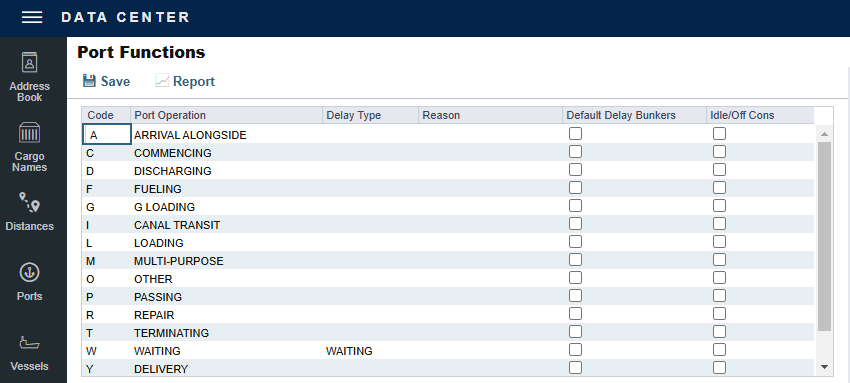
Port Functions terms are used on the Cargo/VC In and COA and displayed on forms with Itineraries.
On the Data Center menu 
-
Idle/Off Cons (for new or unused Port Functions that are not L, D, or M only): Select to calculate In Port Consumption based on Idle/Off Rate (from Vessel Details) and Total Voyage Port Days.


Port Function Codes
Do not change the Port Function Codes. Editing Port Functions is for advanced users only.
|
Code |
Port Function |
Description |
|---|---|---|
|
C |
Commencing |
Designates the first port for all voyages and marks the start of the sea passage time. |
|
D |
Discharging |
Requires a Cargo Handling line and B/L Information. |
|
F |
Fueling |
Although you can track received bunkers on other functions (such as L or D), use this function to designate a call for bunkers only. It also lets you build in waiting or fueling time. |
|
I |
Canal Transit |
Used for transit through a canal or cape, or for a route that must pass through a specific point due to proximity; you cannot track cargo handled here. When you select this Port Function on an Estimate, a Tolls line item appears in the P&L Estimate column, and all estimated port expenses are recorded under this item only. To list a canal expense under Port Expenses instead of Tolls in the P&L, enter the expense under Detailed Port Expenses in Voyage Estimate Other Revenues/Expenses. |
|
L |
Loading |
Requires a Cargo Handling line and B/L Information. |
|
M |
Multi-Purpose |
Combines load and discharge operations at a single port. Also required for ports used in Interservice Cargo workflows. The M function is not enabled by default; contact Veson Support to enable it for your environment. Note: Port expenses on the first itinerary line at an M port are forced to the vessel/voyage base currency. Verify the currency on Detailed Port Expenses after saving. |
|
O |
Other |
A miscellaneous Port Function that lets you track time and fuel used at a given location; commonly used for At Sea delays. |
|
P |
Passing |
Defines a route that passes through a specific location; you cannot track port activities, port expenses, or bunkers received. |
|
R |
Repair |
Similar to O, but specifies that the ship is undergoing repairs. |
|
T |
Terminating |
An optional function commonly used to designate a repositioning port. |
|
W |
Waiting |
Similar to O, but specifies that the ship is ordered to wait outside the port. Included in waiting and unused time for reports. |
|
Y |
Delivery |
Note: Time Charter (TC) only. Specifies the exact time when a time-chartered ship is delivered. Required for TC Out voyages because it syncs time and fuel between the Voyage Manager and TC forms. |
|
Z |
Redelivery |
Note: TC only. Use the Z (Redelivery) function in the itinerary when the vessel is redelivered to the owner at a port different from the discharging port. The T (Terminating) port function is not required in this case. Specifies the exact time when a time-chartered ship is redelivered. Required for TC Out voyages because it syncs time and fuel between the Voyage Manager and Time Charter forms. |
Linking a Port Function with a Delay
Entering Delay Type and Delay Reason values in the Delay Type and Reason columns links the Port Function with a Delay. When that Port Function is used in an Estimate or a voyage, and the Port Days value is not zero, a Delay is created with the linked port dates and time zone; it can only be edited in the Voyage Manager Itinerary.
Example:
-
Define this Delay Type:
-
WA, Waiting, Time Does Not Count
-
-
Define these Delay Reasons:
-
WAITING FOR LAYCAN, WAITING, UNPLANNED OFFHIRE
-
WAITING FOR ORDERS, WAITING, UNPLANNED OFFHIRE
-
-
For Port Function W:
-
Set Delay Type to WAITING
-
Set Reason to WAITING FOR LAYCAN
-
-
To generate a Waiting Delay, insert a port with Port Function W.
To have default Delay Bunkers values recorded when a Waiting delay is automatically created for a Port Function, select the Default Delay Bunkers check box; the Port Function must have an Delay Type selected.
-
Quantity defaults to consumption per fuel type at the related W port.
-
Price defaults to the initial voyage price per fuel type.
Specifying Port Activities for Port Functions
You can specify default Port Activities for a Port Function, or Port Activities for a Voyage Template.
To specify Port Activities for a Port Function, whether default or for a Voyage Template:
-
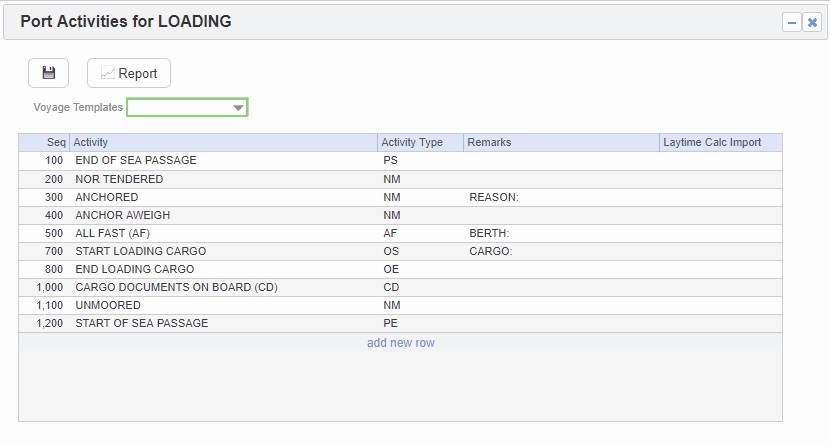
Right-click the Port Function for which you want to set up Port Activities, and select Activities List.
-
The Port Activities for FUNCTION form displays the default activities for the Port Function.
-
For a Voyage Template only, select the Voyage Template and click

-
-
To add or remove a Port Activities, right-click a line item and then click Insert or Delete. A Sequence is assigned to each Port Activity.
-
Continue to select and adjust Port Activities for each function.