
Operators Sending Offline Questionnaires
-
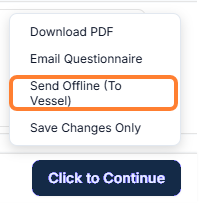
Once you have created a questionnaire, scroll to the bottom of the page → click on the Click to Continue button → select the Send Offline (to vessel).
-
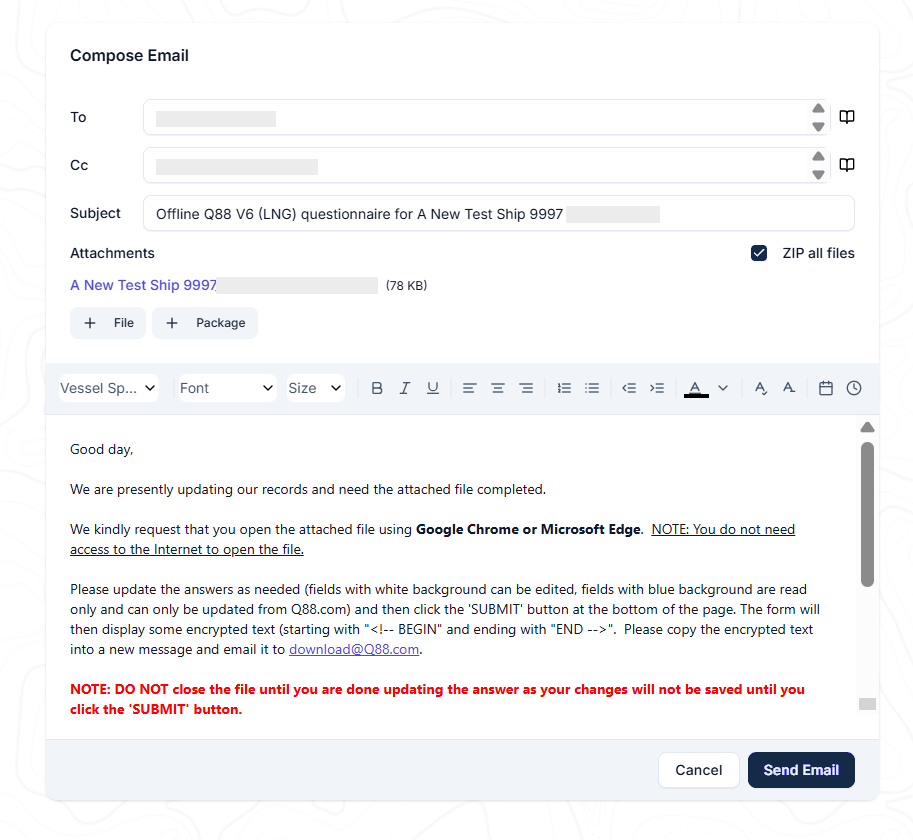
The Compose Email window appears.
-
The vessel's email address will be added automatically as retrieved from the questionnaires and you can add more recipients if necessary.
-
The Subject line can also be edited and you can attach more files by pressing Add File or Add Package.
-
The HTML file will be automatically attached and ready to be shared with the vessel.
-
A pre-filled message displaying the questionnaires will appear in the body of the email and can be edited as needed.
-
Once reviewed, click on Send Email button.
Vessels Updating and Sending Questionnaires
-
The vessel must open the attached file and complete the questionnaire. Once completed, click on the Submit button at the bottom of the page.
-
If the Master needs to get a copy of the completed/submitted questionnaire in Word format, the Click here and a copy of the completed questionnaire will be sent to you by return email checkbox must be unchecked.
-
-
By clicking on the Submit button, the questionnaire will be transmitted into an encrypted text, which needs to be copied and sent via email to download@q88.com.
-
After 10-15 minutes, the server will receive the file and update the online platform with all of the included changes.
-
The user that initiated the process and any other user included in the Scheduled report: Create Questionnaire/Offline Questionnaire will receive a notification advising that the Questionnaire has been updated by the vessel along with a table to display all applied changes.
a. Same list of updated items can be viewed within the Questionnaire by selecting the Updated Offline view.
If You Receive an Error Reply
If Q88 can't process an offline questionnaire you send to download@q88.com, you receive an automated reply from no-reply@q88.com. Find your reply below.
The file you sent us cannot be recognized
Q88 couldn't read your submission. Check that:
-
You pasted the encrypted text (it starts with
<!--BEGINand ends withEND-->) as plain text into the body of the email. -
No files are attached to the email.
If you still receive this reply after sending the encrypted text from a newly created offline questionnaire, contact Veson Support.
The email you sent us is not authorized in our system
The email address you sent from isn't the authorized email address for the vessel. The reply lists the authorized address.
-
Vessel: Resend the encrypted text to download@q88.com from the authorized email address shown in the reply.
-
Operator: If the authorized email address is no longer valid, change the authorized email address for the vessel in Q88, then ask the vessel to resend.
…the form has expired
Offline questionnaires must be completed within 30 days of the original request. After that, Q88 doesn't accept the submission.
-
Vessel: Contact your shore office to request a new copy of the questionnaire.
-
Operator: Create a new questionnaire and send it to the vessel as described in Operators Sending Offline Questionnaires.