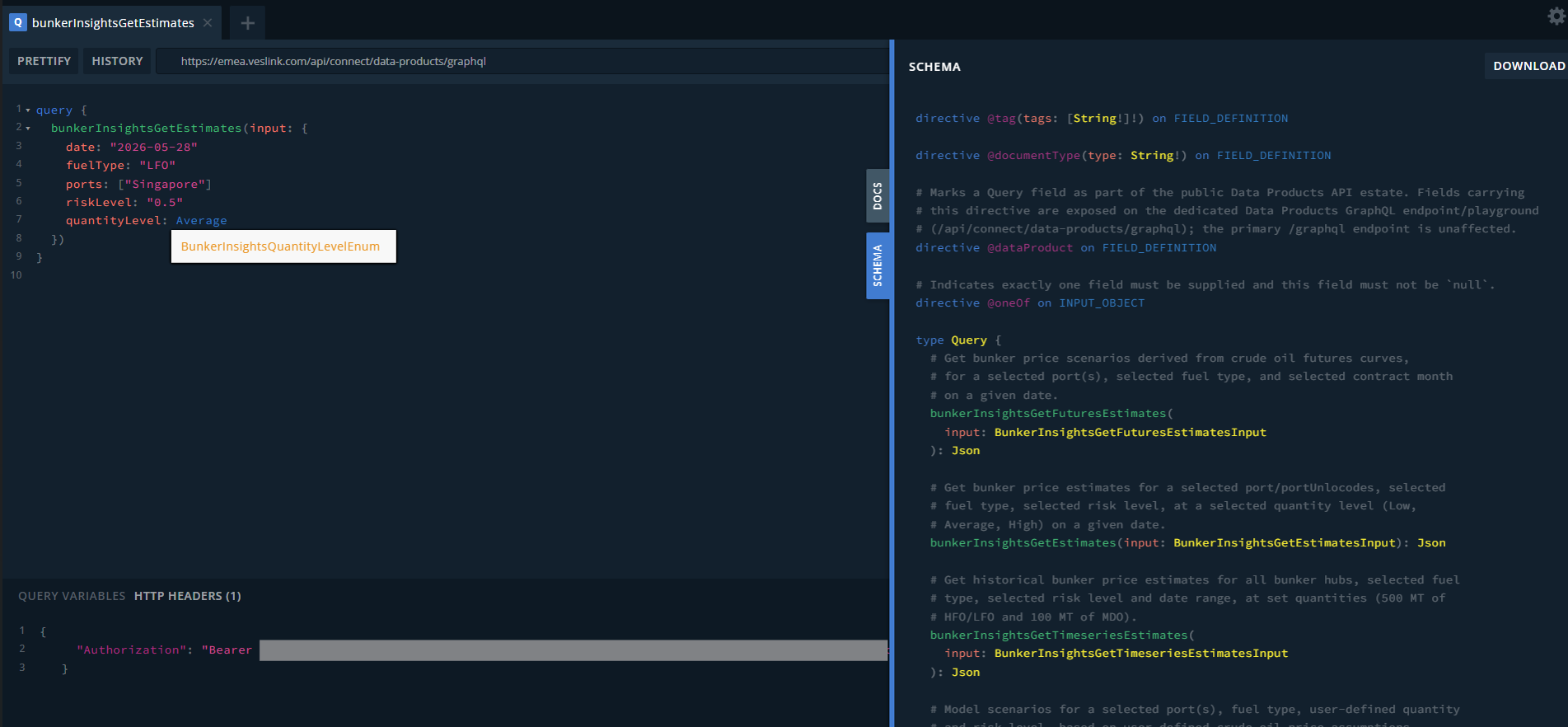
The GraphQL Playground lets you explore and test our Data Product APIs directly in your browser. You'll need an API access token for Authorization in the Playground to make live API calls.
Click here to access the interactive API Playground.
Step 1 - Get your token
-
Data Product API access is for paid subscription tiers only. Speak to your Account Manager for access.
-
Once you have access, API access tokens are self-service and can be found under "Settings" in the Veson Platform. Within "Settings", see "API Access" and click on "Show API Bearer Token". This will display your live token, that can be used to Authorize API calls.
Step 2 - Add your token to the Playground
-
Open the Playground and click into the bottom panel
-
Select the HTTP Headers tab
-
Paste:
JSON{ "Authorization": "Bearer <your_token_here>" } -
Without this, every query will return an authorization error - that's expected until the token is in place.
Step 3 - Explore the schema
-
Click SCHEMA (right-hand tab) to browse available queries, fields, and types before writing a query.
-
Fields marked with ! are required.
-
Hover/autocomplete will show enum options (e.g. quantityLevel: Average) and inline field descriptions.
Step 4 - Run an example query
-
Now you should be ready to use the Playground.
-
Example request:
query {
  bunkerInsightsGetEstimates(input: {
    date: "2026-05-28"
    fuelType: "LFO"
    ports: ["Singapore"]
    riskLevel: "0.5"
    quantityLevel: Average
  })
}
-
Refer to Insights API documentation for our full API catalogue.