
CoCaptain AI lets you interact with your data using plain, conversational language. Instead of navigating reports or building queries manually, you can ask questions directly and receive answers without leaving the platform.
What can CoCaptain do?
CoCaptain draws answers from your Veson Platform environment. All responses are grounded in your organization's own data. CoCaptain works in two modes, depending on what you need.
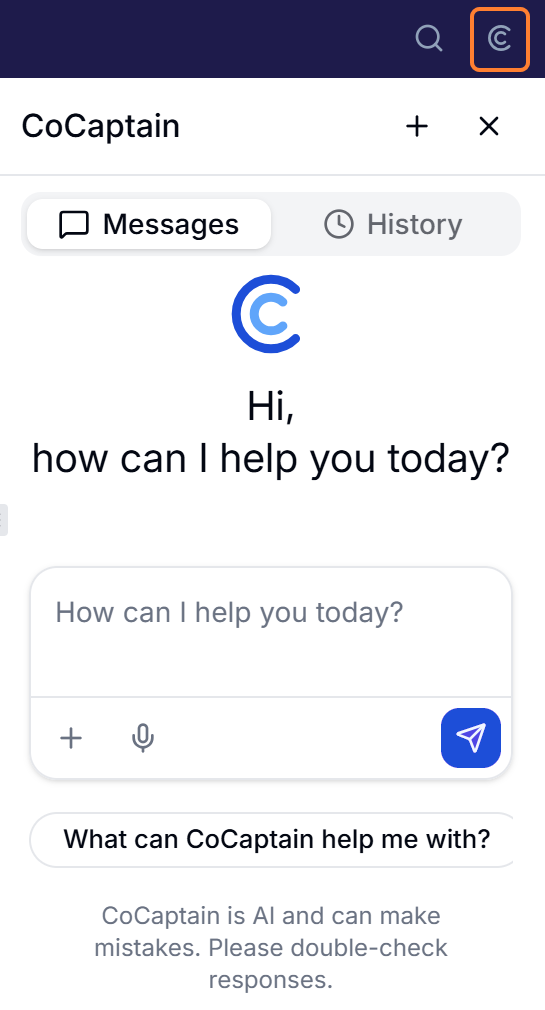
Context-aware CoCaptain assistance
This option in the upper right focuses on what's right in front of you. It reads the window or panel you currently have open and surfaces insights, explanations, and assistance specific to that view. Use it when you have a question about the screen you're on — what a field means, how to complete the task in front of you, or what the data you're looking at is telling you. Because it's anchored to your current context, you don't need to explain where you are or what you're working on.
Broad CoCaptain assistance
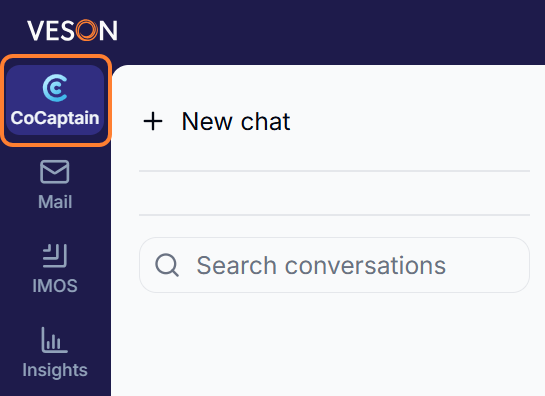
The CoCaptain workspace in the main menu looks beyond your current screen. It searches across available resources to answer wider questions and pull together information that may live in different places. Use it when your question isn't tied to a single view — when you're researching, comparing, or trying to find something without knowing exactly where it lives. Give it as much detail as you can about what you're looking for, and it will do the legwork of finding and connecting the relevant pieces.
Additional CoCaptain features
In addition to text-based chat, CoCaptain offers optional features that let you interact in the way that works best for you. Explore these options whenever you want to move beyond typing.
-
Voice-to-text – Speak your message and have it transcribed directly into the chat. This is helpful for quick input, accessibility, or when typing isn't convenient. The voice-to-text feature inherits your browser’s language settings.
-
Text-to-speech – Have CoCaptain’s responses read aloud, making it easier to follow along hands-free or reduce screen time.
These features are optional and can be turned on or off at any time to match how you prefer to work.
What can CoCaptain help me with?
CoCaptain is built to help with a range of tasks, and here are a few to get you started.
Data Access & Analysis
-
Search and filter records across multiple data models, including:
-
Vessels, Voyages, Port Calls
-
Time Charter Contracts (In/Out)
-
Cargoes and COAs (Contracts of Affreightment)
-
Claims, Invoices, Agents
-
Forms, Emails, and Documents
-
-
Retrieve information about specific records
-
Autocomplete and suggest values for various fields
-
Summarize individual records, such as a single voyage
List & View Management
-
Create custom list views to organize your data
-
Filter and sort information based on your needs
-
Query across different data types to find what you need
Actions on your data for IMOS
CoCaptain can take a defined set of actions: updating records, creating records (cargoes, claims, workflows, list views, sharing rules, and more), submitting maritime forms, running voyage/estimate calculations, managing tags, and handling form approvals for IMOS.
CoCaptain confirms before it writes. Any prompt that changes data in IMOS like creating or updating a record shows you what it's about to do before committing. IMOS remains the system of record; CoCaptain writes through it, not around it.
Knowledge searches
CoCaptain can now answer how-to and product questions by semantically searching the Veson Help Center (http://help.veson.com ). It returns the most relevant article sections, and on a strong match it opens the full article and cites the source link so you can verify it. Answers can now include images from the article — diagrams and screenshots render inline alongside the text.
Knowledge answers are a starting point, not the final word. CoCaptain searches published Help Center docs, not your tenant data, so it complements rather than replaces the data tools above. When there's no exact match, it surfaces the closest available content — check the cited source to confirm it applies to your situation.
Tips for Better Prompts
A few things to keep in mind as you work with CoCaptain across data tasks, actions, and knowledge searches alike.
-
Give it context. Contextual CoCaptain can see the form you're on. Open the record first and it already knows what you mean (for example, open a voyage in Voyage Manager and ask it to analyze the cause of demurrage). For knowledge questions, the Help Center spans the entire Veson Platform, so the same term can mean different things in different places. Mention your workspace (e.g., in IMOS, in Mail, in this Estimate worksheet) to get the most relevant answer.
-
Be specific with names and IDs. "Summarize [Voyage Name] voyage 10" gets a better answer than "summarize my voyage." Include the vessel name, voyage number, port, cargo ID, or form GUID whenever you have it.
-
Chain your prompts. After a result, you can keep the conversation going by saying, for example: "now update the remarks," "open that voyage," "give me that as a table."
-
Refinement across turns supported:
Find all Suezmax tankers→Now just the ones built after 2018→Which of those are DP2?
CoCaptain Example Prompts
Quick-reference list of example prompts, organized by role.
🚢 Chartering
|
Use Case |
Prompt |
|---|---|
|
Screen open cargoes |
|
|
Look up / summarize a cargo (needs a valid cargo ID) |
|
|
List recent estimates |
|
|
Update port costs/ballast + log a note (needs an estimate open in the Estimator) |
|
|
How-to: contract types |
|
|
Look up a vessel record |
|
|
Look up a COA and its lifting schedule |
|
|
Find estimates for a vessel |
|
|
Find estimates by port |
|
|
Find estimates for a cargo |
|
|
Compare saved estimates side by side |
|
|
Check a vessel's market/DCF value
|
|
|
Get a vessel's dimensions
|
|
|
Check certificate status before fixing
|
|
|
Look up a chemical/cargo's properties
|
|
|
Look up a vessel by IMO
|
|
|
Get a specific questionnaire answer
|
|
|
Search your fleet by numeric range
|
|
|
Search your fleet by feature
|
|
|
Compare two vessels side by side
|
|
|
Check a vessel's assigned loadlines
|
|
Note: Estimate search and comparison is across saved estimates. Filtering estimates by "created by me" isn't supported yet — filter by vessel, port, cargo, or status instead.
⚖️ Claims Analyst
|
Use Case |
Prompt |
|---|---|
|
Diagnose demurrage and record the finding (needs the voyage open) |
|
|
Extract a Statement of Facts (needs the SOF uploaded) |
|
|
Calculate laytime used |
|
|
Needs Attention claims queue |
|
|
Review a suggested claim |
|
|
Open-claims / exposure view |
|
|
Summarize a specific claim |
|
|
How-to: demurrage vs. despatch |
|
|
How-to: sharing a claim package |
|
📋 Operations
|
Use Case |
Prompt |
|---|---|
|
Find voyages loading at a port |
|
|
Find problem voyages |
|
|
Vessel history on the current voyage
|
|
|
Create a bunker lifting
|
|
|
Enter an off-hire delay |
|
|
How-to: port expenses |
|
|
How-to: off-hire delay |
|
|
Why is a form stuck? |
|
✔️ Vetting & Compliance*
|
Use Case |
Prompt |
|---|---|
|
Check when a specific certificate expires
|
|
|
Fleet-wide certificate expiry window
|
|
|
View a vessel's officer matrix
|
|
|
Check an officer's experience
|
|
|
Screen your fleet by crew experience
|
|
|
Find stale officer matrices
|
|
|
Last inspection and observation count
|
|
|
Inspection history
|
|
|
Open observations
|
|
|
Spot repeat findings across your fleet
|
|
|
SIRE 2.0 fleet performance
|
|
|
Recent inspections across your fleet
|
|
|
Refine across turns
|
|
*Note: Q88 access in CoCaptain is read-only and scoped to your account. CoCaptain can't update particulars, certificates, officer matrices, or loadlines, send questionnaires, or import inspection reports. Import inspection reports in the Vetting module instead.
📊 Financials
|
Use Case |
Prompt |
|---|---|
|
Outstanding freight invoices |
|
|
Invoices pending approval |
|
|
P&L summary on a voyage
|
|
|
Profit-generating voyages report |
|
|
How-to: invoice types |
|
|
How-to: posting invoices |
|
|
Draft a freight invoice (needs freight terms in place; review before submit) |
|
|
Chart of accounts detail |
|
|
TC hire and off-hire |
|
|
Why is a posting stuck? |
|
🔎 Research*
|
Use Case |
Prompt |
|---|---|
|
Search the fleet by spec
|
|
|
Ownership lookup
|
|
|
Market value range
|
|
|
Rank / top-N
|
|
|
Comparative valuation
|
|
|
Sale comps
|
|
|
Charter benchmarking
|
|
|
Fleet → Deals follow-up
|
|
|
Read a portfolio
|
|
|
Cross-portfolio comparison
|
|
|
Build a portfolio from a search
|
|
🌐 Market Data
|
Use Case |
Prompt |
|---|---|
|
Screen cargoes by trade area and laycan window
|
|
|
Find a charterer's orders in a date range
|
|
|
Find cargoes by load region
|
|
|
Find open tonnage in a region
|
|
|
Find ships opening in a time window
|
|
|
Filter by cargo type and broker count
|
|
|
Find where a vessel is open
|
|
|
Look up a vessel's recent open positions
|
|
|
Search a charterer's orders by vessel size and load region
|
|
*Primarily for Shipfix
🔄 Cross-Functional / General
Here's a list of general prompts that could be useful across functions.
Querying
-
Find all voyages for vessel X. -
Show me open claims. -
List port calls in the next 30 days.
How-to (knowledge search)
-
How do I set up a sharing rule? -
What does the fouled consumption mode do? -
Walk me through creating a custom list view.
Analysis in context
-
What's the TCE on this estimate? -
Break down the P&L of this voyage. -
Summarize this cargo.
Actions
-
Set the vessel's trade area to… -
Log a miscellaneous expense on the voyage you're working in.
Cross-object queries
-
Show me all cargoes loading in June. -
Which vessels are open for a 60k DWT cargo next month? -
What did we last estimate on USGC to ARA?
Current Scope
CoCaptain leverages your security permissions when interacting with it. It cannot surface or change any data you cannot access directly.
Outside of the Current Scope
CoCaptain is powerful, but there are boundaries to what it can do today. Knowing where to set expectations and when to use the standard tools instead helps you get the most out of it. Review the points below to understand where CoCaptain performs best and where to rely on the platform's standard tools.
-
Accessing data outside your environment: CoCaptain has no connection to the internet or to external systems beyond those integrated with the Veson Platform, and it cannot reference data that has not been connected or synced.
-
Reaching features outside the open record: CoCaptain works within the record you have open and focuses on the data available there. Tools that live in separate panels, such as the Carbon Calculator and Sustainability Panel, can be difficult for CoCaptain to reach, so these are best accessed directly in the platform.
-
Detailed audit/change-tracking: CoCaptain is best used alongside your system of record rather than in place of it when tracking changes across voyages. For a detailed history of what changed, when, and by whom, refer to the platform's standard audit and change-tracking tools.
-
Replacing professional judgment: Responses are informational and should be reviewed by a qualified person before being used to make significant business, financial, or operational decisions.
-
Contacting Veson Support: These requests are handled through the Support channel, which is dedicated to answering knowledge base questions and helping you reach Veson Support. For now, CoCaptain focuses on working with your data, while Support covers help article lookups and support requests. The two experiences are expected to come together in the future.
-
Not a general chatbot: CoCaptain is purpose-built for maritime data, documentation, and workflows.