
Access the Veson Platform
-
Go to app.veson.com.
-
Click Sign up. Enter your email address and follow the instructions provided.
View Shared with me
-
Using the sidebar menu, go to the Cargo - List in the IMOS workspace. Turn on the Enhanced view toggle.
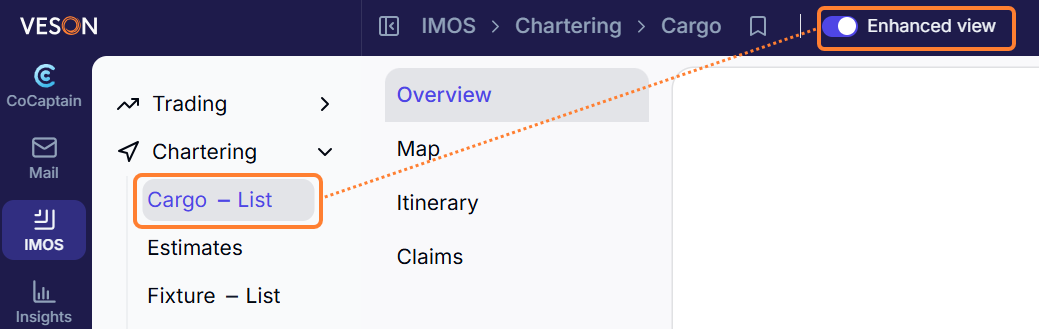
-
In the List view, view the Shared By/Shared With column.
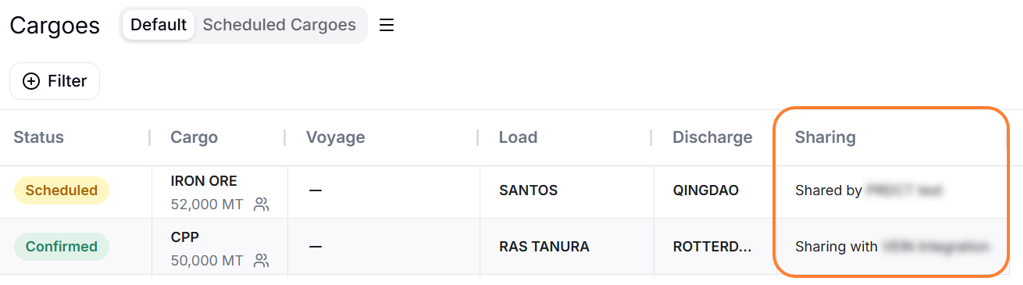
Shared cargoes appear on the List and Map views. In the Map view, the card in the right panel shows additional details about the voyage or cargo, including a Sharing icon with the counterparty name.
To see shared cargo data on the map, the voyage must be in Scheduled or Commenced status, and a vessel with an IMO number is required.
FAQs/Troubleshooting
Why am I not seeing any shared data?
If an operator has not shared information with you, no data will show in the Veson Platform.
If an operator has shared information with you, but you are not seeing it in your environment, you may need assistance with your Veson Platform setup. Contact Veson Support for assistance.