
Home > Operations > P&L Calculation Options
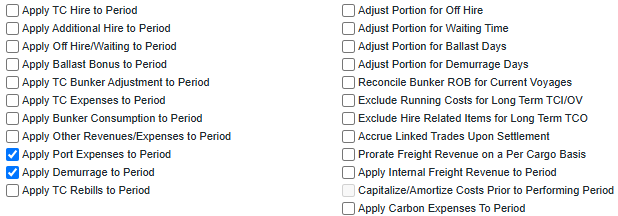
Monthly Accruals can be configured by configuration flags, and each of the P&L calculation options (check boxes) affects the calculation of certain types of P&L accounts. By selecting these options, you can modify certain areas of the P&L calculation, typically by using a prorated calculation or a more specific calculation for certain values. You can select all of them by default through configuration flags, so you do not need to select them every time you run Monthly Accruals.
Setting up the P&L Calculation Options
To set up the P&L Calculation Options, complete the following steps:
-
Enable CFGShowPNLCalcOptions to use the P&L Calculation Options in Data Center → Settings.
-
Navigate to Data Center → Security → Select specific user → Click on Access Rights → Financials. Depending on your access rights, you or your IT admin need to enable the following module rights:
-
Financials → Actions → Modify P&L Calculation Options.
-
With the Modify P&L Calculation Options Module Right selected under Financials → Actions in Security List, you can toggle the P&L calculation options on the Monthly Accruals, Voyage Period Journals, and Voyage P&L Summary Report forms. Without it, you can only use these forms with the P&L calculation options as set by the configuration flags that begin with Default P&L Calc.
Option Descriptions
Each of the following options has one or more possible configurations; for more information, see Related Configuration Flags on this page. You can use these flags to set the default states of the checkboxes.
If no P&L calculation options are changed from their defaults, all P&L items are calculated according to configuration flag settings. Offhire is included in voyage duration and is thus reflected in the Portion %.
|
Option |
Description |
|---|---|
|
Apply TC Hire to Period |
TC Hire is not prorated; instead, TC Hire is calculated based on the hire rate and actual voyage days in the period. CVE and commissions are applied only to the period in which they occur. In Monthly Accruals, TC Commission is applied to period when set as a percentage of the Hire in the contract. |
|
Apply Additional Hire to Period |
For Time Charter voyages, 100% of an XHIRE (additional hire) amount is allocated to period based on TCIP (Time Charter In Payment) or TCOB (Time Charter Out Bill) Invoice Date. |
|
Apply Off Hire/Waiting to Period |
Offhire is allocated to the actual period, that is, full deduction of offhire in the period when the offhire occurred. |
|
Apply Ballast Bonus to Period |
Ballast Bonus and Ballast Bonus Commission for TCI and TCO are allocated to the period of voyage commencement. The P&L Period Range begins before the voyage commences. |
|
Apply TC Bunker Adjustment to Period |
For Time Charter voyages, 100% of a Bunker Adjustment amount is allocated to period based on operations ETA for delivery (TCO) or redelivery (TCI). For Time Charter Out Voyages, if the TCO contract is set to Bunkers on Consumption, the Bunker Adjustment is allocated to the period containing the departure from the Z port. |
|
Apply TC Expenses to Period |
For TCIP and TCOB INTHC (Intermediate Hold Cleaning), ILOHC (In Lieu of Hold Cleaning), and VOYEX (Voyage Expenses), 100% of the line item amount is allocated to period based on the Invoice Date of the invoice in which it is included. Items included on incremental invoices are still allocated based on their original invoice's date. |
|
Apply Bunker Consumption to Period |
Bunker expense is not prorated but is calculated based on the actual consumed amount in the period. |
|
Apply Other Revenues/Expenses to Period |
For invoice types VEXP (Voyage Other Expense, Lumpsum) and VREV (Voyage Other Revenue, Lumpsum), 100% of the invoice amount, including linked non-freight rebills, is allocated to period based on a specific date, determined by configuration. |
|
Apply Port Expenses to Period |
100% of a Port Expense amount, including linked non-freight rebills, is allocated to period based on a specific date, determined by configuration. |
|
Apply Demurrage to Period |
When this option appears on a form, its effect depends on the values of configuration flags CFGDefaultPnlCalcApplyDemurrage and CFGDefaultPnlCalcAdjustForDemurrageDays; for more information, see Compliance with IFRS 15 & 16 Regulations. |
|
Apply TC Rebills to Period |
When this option is selected, any TC Rebill line items are recognized in the month of the accounting date of the original expense item when that expense is posted. When the original expense is not yet posted, the TC Rebill item is recognized in the month of the invoice date of the original expense item. |
|
Adjust Portion for Demurrage Days |
The portion percentage for other P&L items is adjusted based on the demurrage days in the period. |
|
Adjust Portion for Off Hire |
Offhire time is considered when determining the percentage. For example, if you have a 2-month voyage and it is offhire for the entire first month, the voyage is considered 0% complete after the first month and 100% complete after the second month. If the check box is cleared, the system considers the voyage 50% complete after the first month and 100% complete after the second month. |
|
Adjust Portion for Waiting Time |
Waiting Time is considered when determining the percentage. For example, if you have a 2-month voyage and it is waiting for the entire first month, the voyage is considered 0% complete after the first month and 100% complete after the second month. If the check box is cleared, the system considers the voyage 50% complete after the first month and 100% complete after the second month. |
|
Adjust Portion for Ballast Days |
Load-to-discharge or delivery-to-redelivery is used as the P&L recognition basis when the check box is selected. Otherwise, the full voyage duration is used as the basis. Voyage revenues and expenses are allocated within the L/D period (for voyage charters) or Y/Z period (for TC Out voyages). Note that this does not affect revenues and expenses that are applied to the period; these are still allocated to the period in which they were incurred. The change affects only revenues and expenses that are prorated. For more information, see Compliance with IFRS 15 & 16 Regulations.
|
|
Reconcile Bunker ROB for Current Voyages |
Accruals include ROB rows up to the accrual period with new bill codes of the format ROB_FuelType in current voyages. The accrual is based on the ROB from the most recent Activity Report in the accrual period rather than on the bunker planning estimate. For consecutive voyages, when no commenced voyage exists for the vessel, the most recently completed voyage is considered current. For non-consecutive voyages, all voyages (except closed voyages) are considered current. When you run Monthly Accruals for a TCTO with this option selected, only the net ROB (ROB minus the TCO delivery quantity) is displayed. |
|
Exclude Running Costs for Long Term TCI/OV |
There is no accrual for running costs on OV vessels and vessels on a Long Term TCI contract. |
|
Exclude Hire Related Items for Long Term TCO |
For long-term Time Charter Out contracts (which can be defined only through inter-company mirroring), hire-related items, such as Hire, Offhire, CVE, Hire Commissions, Offhire Commissions, and Offhire CVE, are excluded from P&L calculations. |
|
Accrue Linked Trades Upon Settlement |
Only settled periods of trades linked to the Voyage P&L are included in Monthly Accruals; exposed periods are excluded. |
|
Prorate Freight Revenue on a Per Cargo Basis |
When selected, the accruals program uses the BL Date for each cargo and the BL quantity for each cargo to calculate the accrual percentage and amount to accrue for freight when there are multiple cargoes on the voyage. |
|
Apply Internal Freight Revenue to Period |
When selected, freight revenue with an internal counterparty on the voyage, excluding demurrage, is allocated 100% to the period based on the BL Date for the contract. Demurrage is still allocated according to the Apply Demurrage to Period option. When Adjust Portion for Ballast Days is also selected, the Adjust Portion for Ballast Days setting takes precedence. |
|
Accruals for Closed Voyages |
When selected, the system runs accruals only for voyages that are marked as Closed during the specified Accrual Month. |
|
Capitalize/Amortize Costs Prior to Performing Period |
When selected, the costs incurred between the Nomination Date and the Start of the First Load port are capitalized and then amortized over the performing period, as defined by the Start of First Load to the end of Last Discharge on the voyage. The amortization is calculated as a percentage of the performing period completed on the accrual date. If a corresponding Apply X to Period option is not selected for a cost category, performing-period expenses of that type are prorated over performing-period days only, not total voyage days. Requires CFGNominationDateonFixtureandVoyage to be enabled, as well as specific business rules configuration. For more information, see Capitalization and Amortization Configuration and Calculation Details. |
|
Apply Carbon Expenses to Period |
When selected, the system looks at the actualized emissions recorded on the voyage, based on the bunker consumption details actualized on the voyage, and accrues based on that information instead of prorating across the voyage. When selected along with the Capitalize/Amortize Costs Prior to the Performing Period profile flag on the accruals form, the emissions during the N-L window of the voyage are capitalized and then amortized over the performing (L-D) period. Requires business rules to be created to support the new expense type. |
Option Availability
These options are available in several areas where P&L calculation is performed but may not be valid in all areas. This table shows where the checkbox has an effect when selected.
Table Legend
✓ = Option is applied to calculation/report
X = Option is not applied to calculation/report
|
Option |
Period-Based Voyage P&L |
Monthly Accruals |
Voyage Period Journals |
Voyage P&L Summary Report |
|---|---|---|---|---|
|
Apply TC Hire to Period |
✓ |
✓ |
✓ |
✓ |
|
Apply Additional Hire to Period |
✓ |
✓ |
✓ |
✓ |
|
Apply Off Hire/Waiting to Period |
✓ |
✓ |
✓ |
✓ |
|
Apply Ballast Bonus to Period |
✓ |
✓ |
✓ |
✓ |
|
Apply TC Bunker Adjustment to Period |
✓ |
✓ |
✓ |
✓ |
|
Apply TC Rebills to Period |
✓ |
✓ |
✓ |
✓ |
|
Apply TC Expenses to Period |
✓ |
✓ |
X |
✓ |
|
Apply Bunker Consumption to Period |
✓ |
✓ |
✓ |
✓ |
|
Apply Other Revenues/Expenses to Period |
✓ |
✓ |
X |
✓ |
|
Apply Port Expenses to Period |
✓ |
✓ |
X |
✓ |
|
Apply Demurrage to Period |
✓ |
✓ |
X |
✓ |
|
Adjust Portion for Demurrage Days |
✓ |
✓ |
X |
✓ |
|
Adjust Portion for Off Hire |
✓ |
✓ |
✓ |
✓ |
|
Adjust Portion for Waiting Time |
✓ |
✓ |
✓ |
✓ |
|
Adjust Portion for Ballast Days |
✓ |
✓ |
✓ |
✓ |
|
Reconcile Bunker ROB for Current Voyages |
✓ |
✓ |
X |
✓ |
|
Exclude Running Costs for Long Term TCI/OV |
✓ |
✓ |
✓ |
✓ |
|
Exclude Hire Related Items for Long Term TCO |
✓ |
✓ |
X |
✓ |
|
Accrue Linked Trades Upon Settlement |
✓ |
✓ |
X |
✓ |
|
Prorate Freight Revenue on a Per Cargo Basis |
✓ |
✓ |
✓ |
✓ |
|
Apply Internal Freight Revenue to Period |
✓ |
✓ |
X |
✓ |
|
Accruals for Closed Voyages |
✓ |
✓ |
X |
X |