
Home > Operations > Sustainability > Offhire Emissions
Prerequisites
-
The configuration flag CFGSustainability must be enabled and CO2 factors must be set up.
-
To calculate offhire emissions, the additional configuration flags described below must also be enabled.
-
Voyage P&L visibility of offhire emissions requires schema version 52.5 or higher.
Overview
When a vessel goes offhire, for example, dry dock, repairs, breakdown, or a delay event at an EU port, it can still consume fuel and incur EU ETS allowance costs and FuelEU Maritime compliance obligations. Without dedicated offhire tracking, emissions generated during that period cannot be attributed to EU ETS or FuelEU, and the resulting costs cannot flow through the Voyage P&L.
The offhire emissions workflow in IMOS calculates EU ETS and FuelEU emissions for each delay you enter on the Delays form, exposes the per-delay totals in the Carbon Calculator, and surfaces the resulting costs in a dedicated section of the Voyage P&L. From there, the costs can flow into the related Time Charter invoicing, Freight invoicing, FuelEU Pooling Journals, and accruals.
This article describes how to configure offhire emissions, how IMOS calculates them, and where the results appear.
Configuration Flags
Offhire emissions are governed by the following configuration flags. Enable them in the following order: calculation first, followed by defaulting, and finally the two P&L flags. Enabling some while leaving others off results in gaps.
|
Flag |
Layer |
What it Controls |
|---|---|---|
|
CFGCalculateOffhireEmissions |
Calculation |
Whether FuelEU and EU ETS emissions are calculated for offhire periods at all. |
|
CFGDefaultQtyEmissionsOffhire |
Defaulting |
Whether the Qty Emissions check box is pre-selected when a new offhire delay is created. |
|
CFGEnableOffhireEmissionsPnl |
P&L exposure |
When enabled, EU ETS offhire costs appear in the Voyage P&L and flow into TC invoices, freight invoices, head fixtures, and accruals. |
|
CFGEnableOffhireFuelEUPnl |
FuelEU P&L Exposure |
When enabled, FuelEU offhire costs appear in the Voyage P&L and flow into TC invoices, freight invoices, FuelEU pooling journals, head fixtures, and accruals. |
CFGCalculateOffhireEmissions
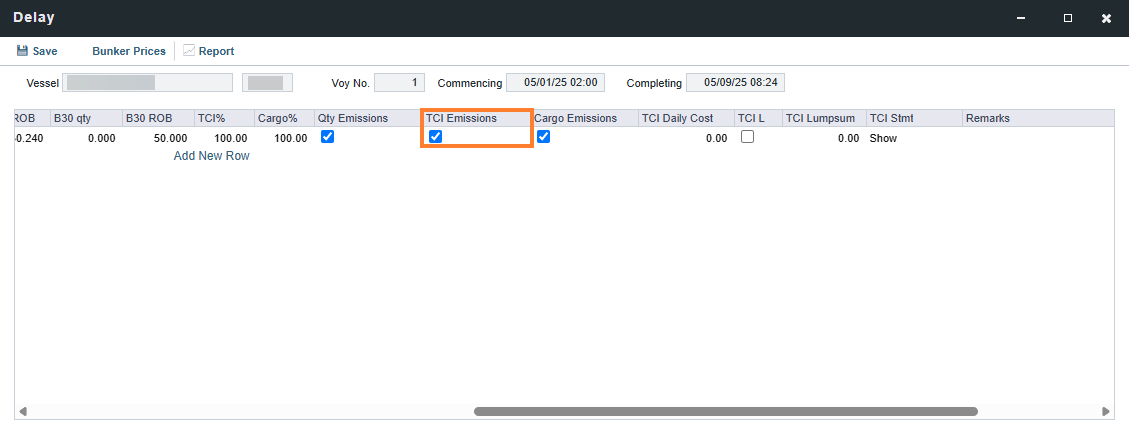
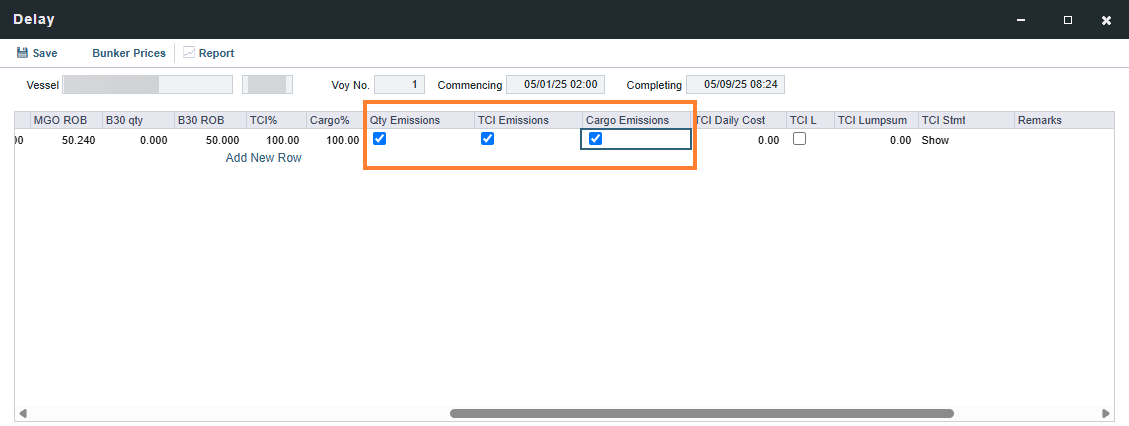
Enables FuelEU and EU ETS emission calculation for each offhire delay based on the From/To period entered on the Delay form. Emissions are only calculated when the TCI Emissions check box is selected on the delay row. To calculate offhire emissions for a Cargo contract, also select the Cargo Emissions check box.
CFGDefaultQtyEmissionsOffhire
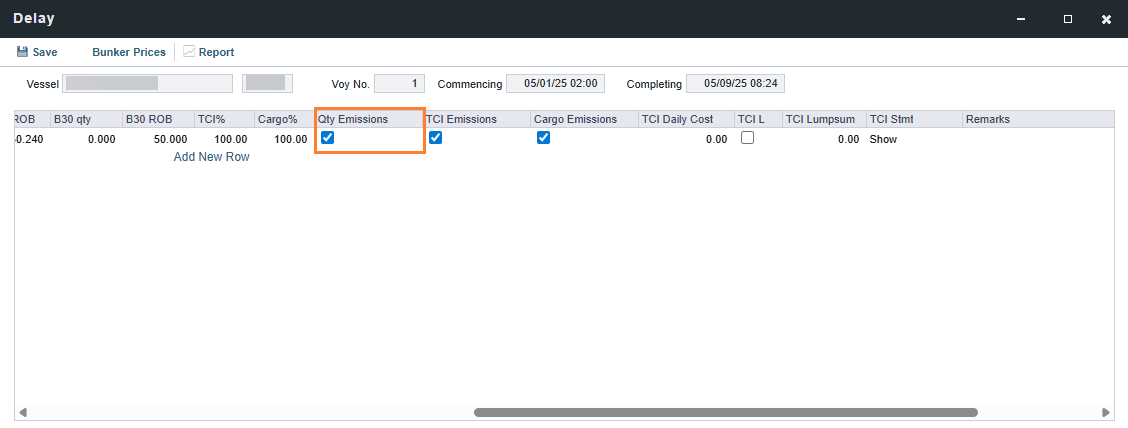
Controls whether the Qty Emissions check box is pre-selected for new offhire delay rows. Existing delays are unaffected. Enable this flag if the majority of your offhire delays should use Qty mode; disable it if Qty mode is the exception, to avoid accidentally selecting it for delays that do not require it.
CFGEnableOffhireEmissionsPnl
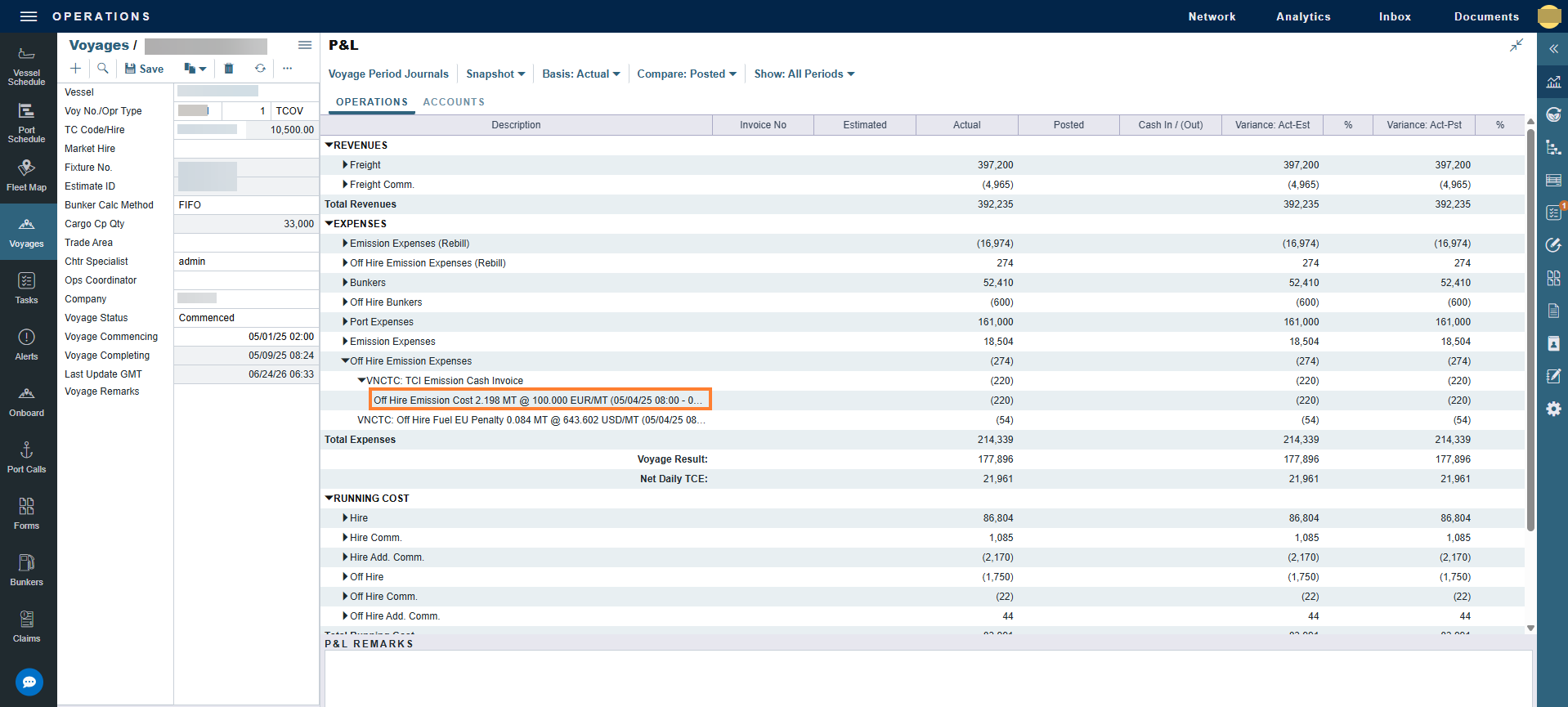
Adds an Offhire Emissions section to the Voyage P&L for EU ETS costs, using bill code OHCARBON via a dedicated business rule.
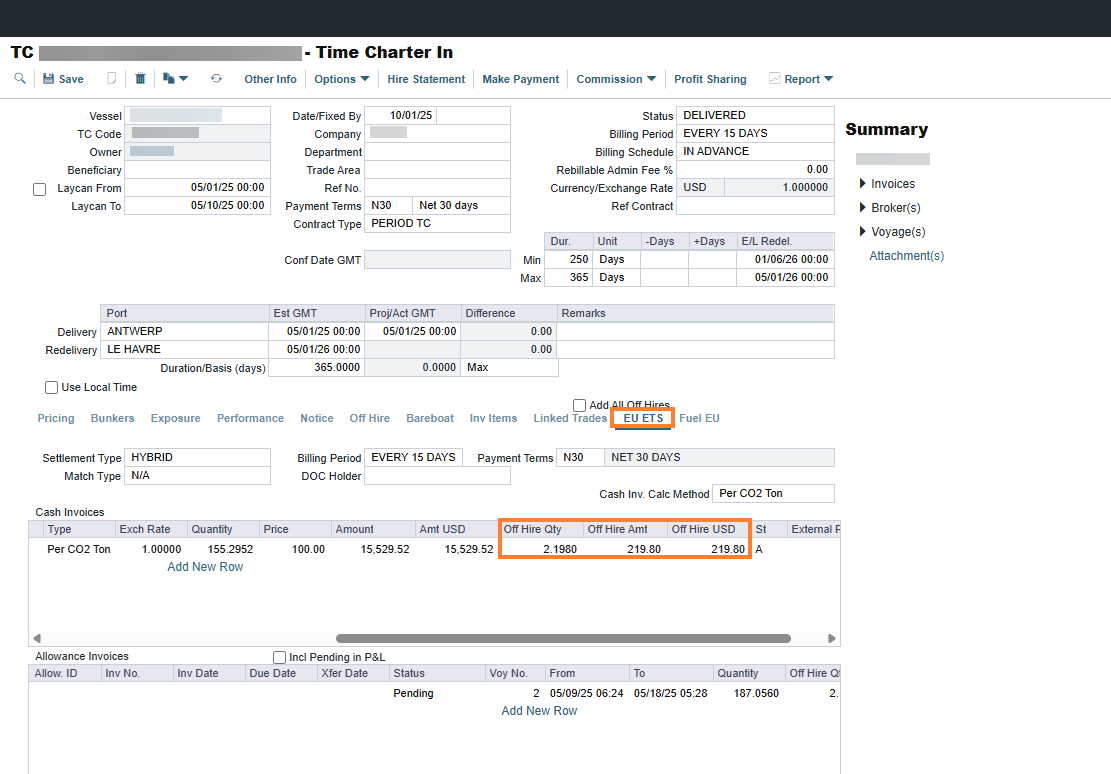
Also exposes Offhire Qty and Offhire Amt columns in the Cash Invoices section under the EU ETS tab for Time Charter, Head Fixture, and Cargo contracts.
CFGEnableOffhireFuelEUPnl
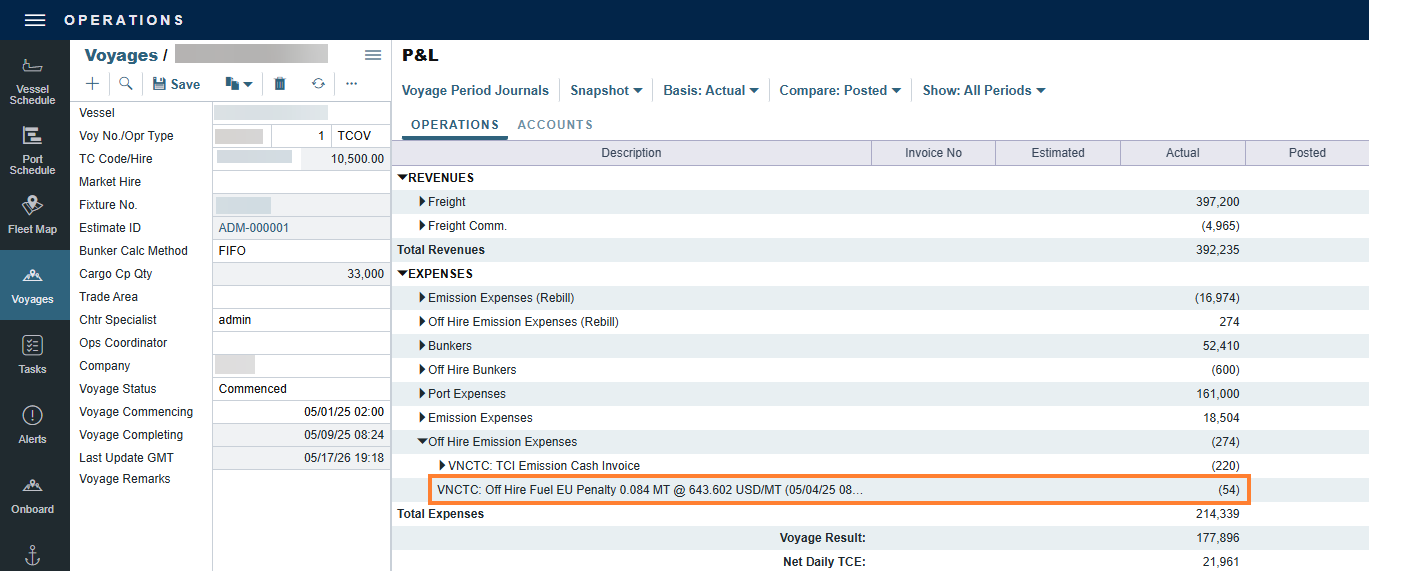
Adds FuelEU offhire costs to the same Offhire Emissions section in the Voyage P&L, using bill code OHPENALTY via a dedicated business rule.
Entering Offhire on the Delays Form
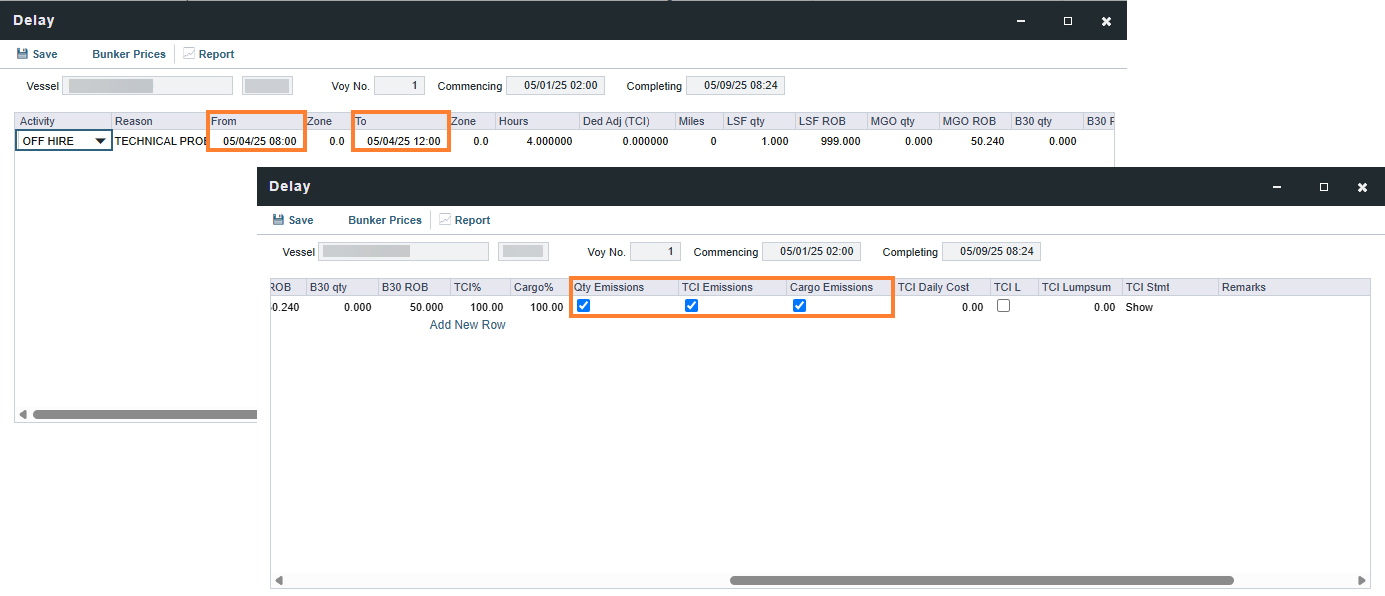
Offhire emissions are derived from the records you enter on the Delays form. The following fields and check boxes determine how emissions are calculated for each delay.
-
From and To: The start and end of the offhire period. These dates define the window used to apportion emissions across the affected port and sea legs.
-
TCI Emissions: Select this check box to calculate offhire emissions for the Time Charter In side of the voyage. Emissions are calculated only when this check box is selected.
-
TCO Emissions: Select this check box to calculate offhire emissions for the Time Charter Out side, for TCTO voyages.
-
Cargo Emissions: Select this check box to calculate offhire emissions for the Cargo contract or VC In contract.
-
Qty Emissions: When selected, the offhire calculation uses the manually entered fuel quantity from the Bunkers tab on the delay. When cleared, the calculation apportions emissions based on the From and To dates only.
Calculation Modes
The combination of Qty Emissions and TCI or TCO Emissions check boxes determines how IMOS calculates offhire emissions.
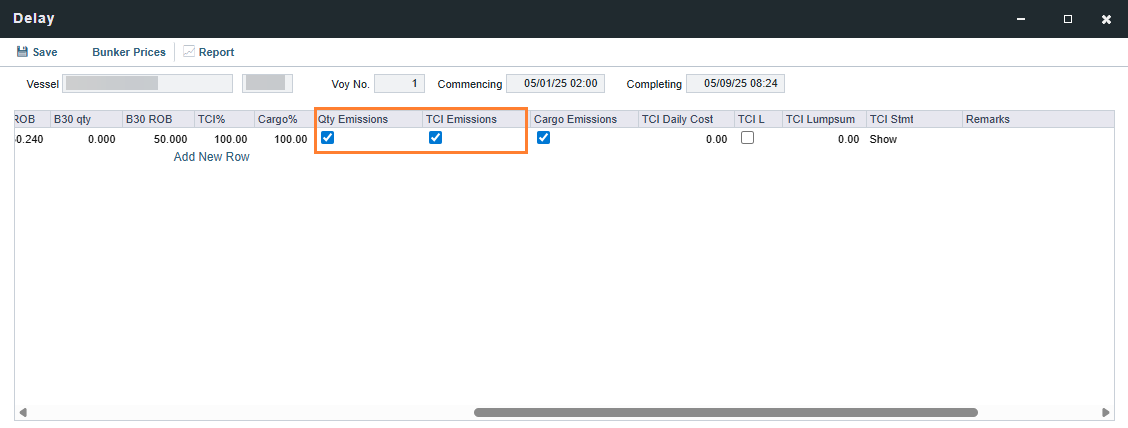
Mode 1 — Qty-based (Qty Emissions + TCI or TCO Emissions selected)
IMOS allocates offhire bunker consumption to the delay using the manually entered fuel quantity on the Bunkers tab, weighted by the intersection of the delay window with the port or sea leg it overlaps. The delay hours field is ignored. Use this mode when you have a reliable bunker reading for the offhire period, such as a dry dock with documented consumption.
Mode 2 — Date-based (TCI or TCO Emissions selected, Qty Emissions cleared)
IMOS uses the delay's From and To dates to allocate the port or sea leg's emissions over the delay window. Manual quantities and delay hours are not consulted. Use this mode when no specific bunker reading exists and you want IMOS to estimate emissions from the leg's overall consumption profile.
Mode 3 — Cargo Emissions: Rebill routing
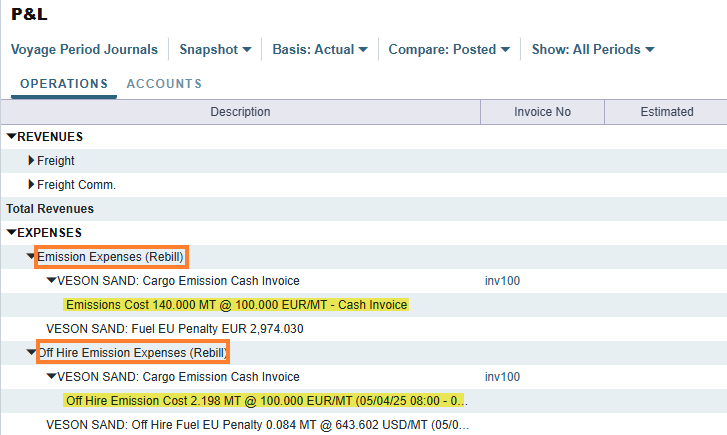
When Cargo Emissions is selected alongside either mode, IMOS attributes the calculated cost to the Cargo or VC In contract as a rebillable expense. The result appears as an Offhire Emissions Expenses (Rebill) line in the Voyage P&L. Use this when the charter party requires the charterer to bear emission costs incurred during offhire.
Allocation Logic
The allocation logic depends on where the delay falls relative to the voyage itinerary:
-
Delay covers an entire port stay or sea leg: The full port or sea leg emissions are treated as offhire.
-
Delay covers a partial port stay or sea leg: Only the portion falling inside the delay window is treated as offhire, the rest remains on-hire.
-
Delay crosses the boundary between a port stay and a sea leg: Emissions for each affected portion are apportioned independently and then summed.
Multi-year Delays
When a delay spans more than one EU ETS phase-in year (for example, a delay that begins in 2025 and ends in 2026), IMOS splits the delay at the year boundary. The applicable phase-in percentage (70% for 2025, 100% for 2026) and the year-appropriate emission factors are applied to each segment. Both segments are summed and reported under the same delay in the Voyage P&L. For more information on phase-in logic, see the IMOS - Carbon Calculator article.
TCTO Rebill Voyages
For TCTO voyages with both TCI% and TCO% set, each side is calculated independently. Each delay surfaces as both an Offhire Emissions line and an Offhire Rebill Emissions line in the Voyage P&L.
End-to-End Workflow
-
Set up the configuration.
-
Enable the four configuration flags in Data Center → Settings.
-
Confirm schema version is 52.5 and above.
-
Add the new business rules and depending on your organization you may also need to add a new Chart of Accounts.
-
-
Enter the delay.
-
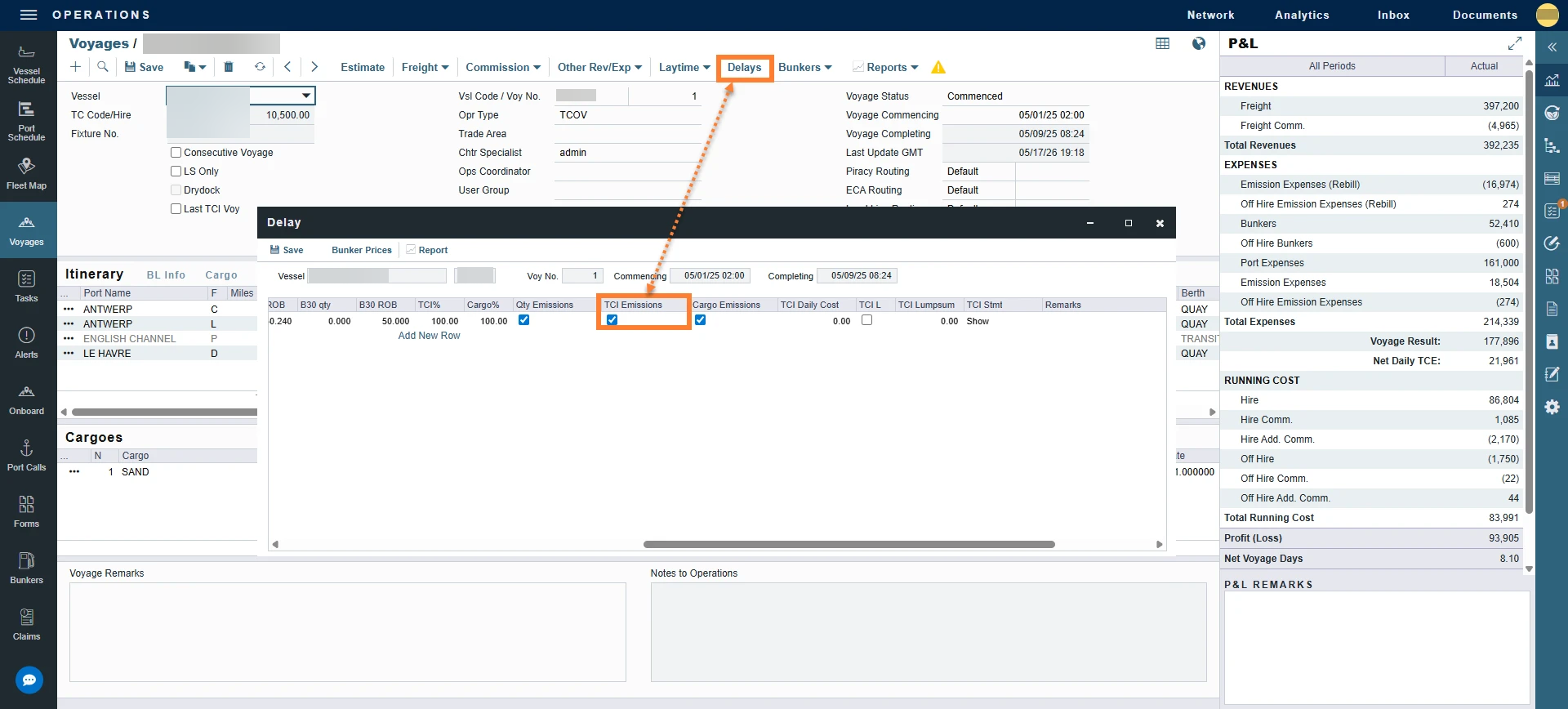
In Voyage Manager → Delays, add the delay row with Activity, Reason, From/To dates, and bunker quantities as usual.
-
-
Select the calculation mode.
-
Confirm the Qty Emissions check box state (defaulted via CFGDefaultQtyEmissionsOffhire) and select TCI Emissions, TCO Emissions, or Cargo Emissions as appropriate for the contract structure.
-
-
Click Save.
-
IMOS calculates the FuelEU and EU ETS emissions for the delay period.
-
-
Review the Carbon Calculator.
-
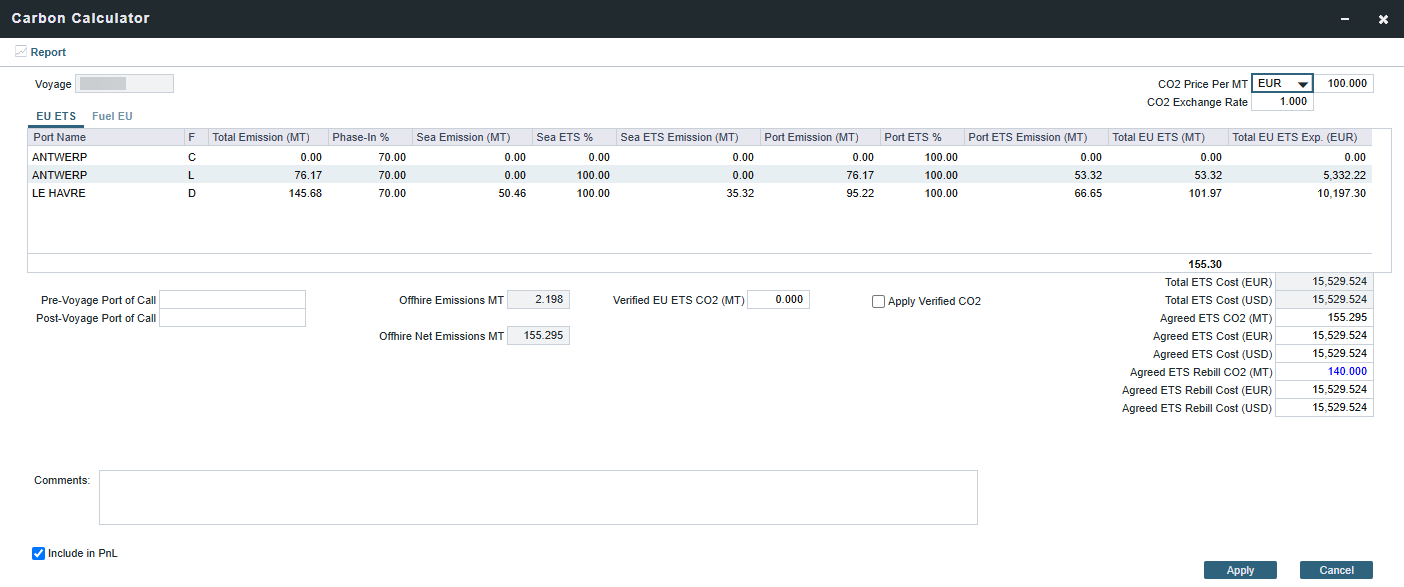
Open Voyage Manager → Sustainability and confirm the per-delay emission totals appear on the FuelEU and EU ETS tabs.
-
-
Confirm the Voyage P&L.
-
Open the Voyage P&L. The Offhire Emissions and Offhire Emissions Expenses (Rebill) section lists each delay with its period range and regulation breakdown. If a delay's Include in PnL check box is cleared in the Carbon Calculator, that delay's line is suppressed from the section.
-
-
Invoice (separate workflow).
-
With CFGEnableOffhireFuelEUPnl enabled, the FuelEU portion flows onto the TC and Cargo invoice (bill source VFEUE, subcode OHPENALTY). With CFGEnableOffhireEmissionsPnl enabled, the EU ETS portion can be invoiced through cash or allowance invoices on the related Time Charter or Cargo contract.
-
Viewing Results
Carbon Calculator
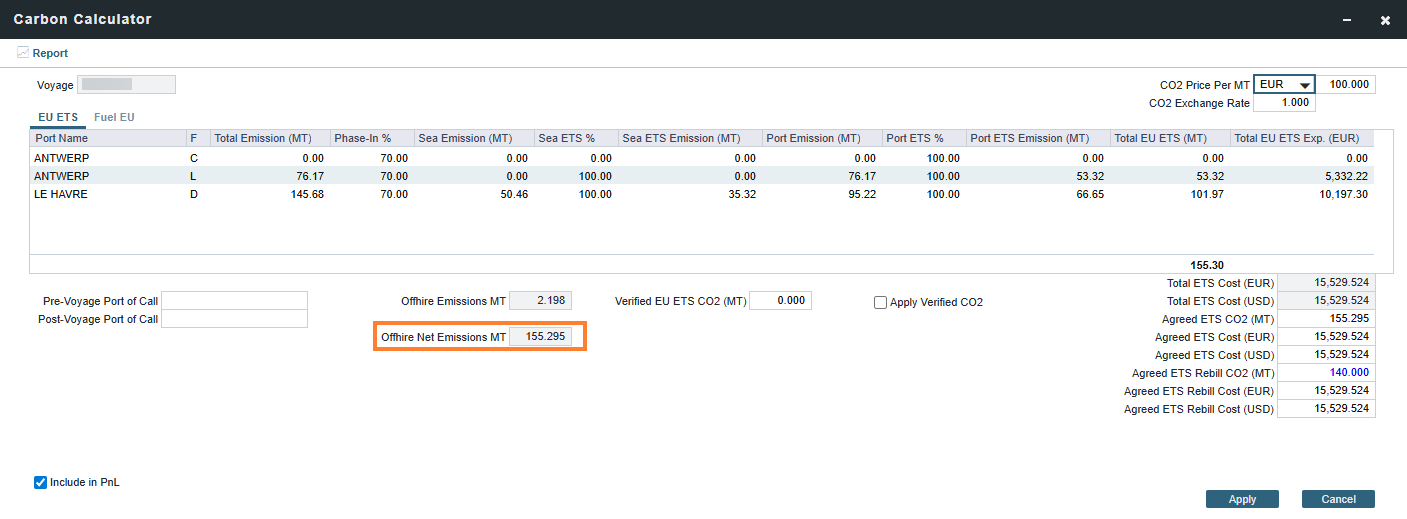
After offhire emissions are calculated, the following fields appear in the Carbon Calculator in the Voyage Manager:
-
EU ETS - Offhire Net Emissions MT: The net EU ETS emissions associated with offhire periods on the voyage.
-
FuelEU - Offhire Net Compliance Balance MT: The net FuelEU compliance balance impact associated with offhire periods on the voyage.
These fields let you see the impact of offhire on total voyage emissions without inspecting each delay individually.
Voyage P&L
When CFGEnableOffhireEmissionsPnl or CFGEnableOffhireFuelEUPnl is enabled, an Offhire Emissions section breaks down emissions per delay, per period, and per regulation. (EU ETS and FuelEU reported separately). Amounts are calculated as MT x Cost/MT / Exchange Rate. Where MT is pulled from the Carbon Calculator output for the matching delay. The corresponding bill codes are OHCARBON for the EU ETS portion and OHPENALTY for the FuelEU portion; both are routed via a dedicated business rule.
Note: The MT value in this formula is the net offhire emissions figure already output by the Carbon Calculator, which has phase-in percentage, ETS percentage, and TCI/TCO percentage applied. The formula reflects the financial conversion step only and is not the full emissions calculation chain.
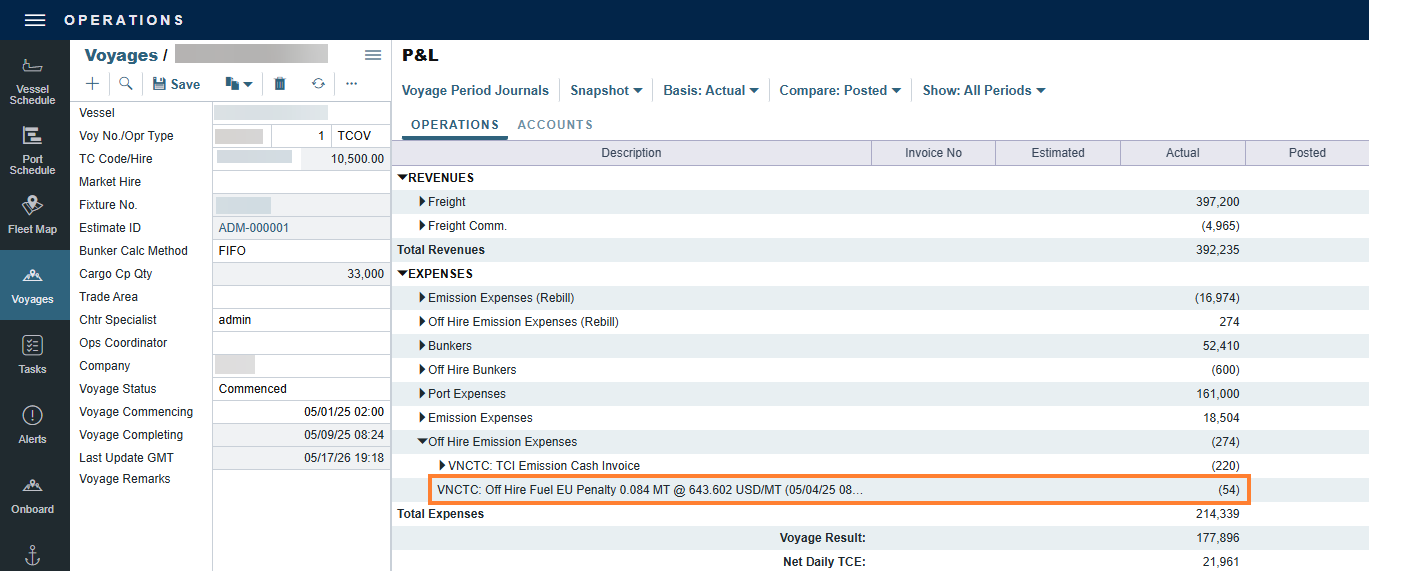
For more information on business rules for EU ETS and FuelEU, see https://vesonjira.atlassian.net/wiki/spaces/WIP/pages/edit-v2/4979261475?draftShareId=c0d25d60-5114-4d66-8d5e-9e41f011d35a.
Related Financial Workflows
Financial workflows that are impacted by offhire emissions:
-
Accruals: Enabling offhire emissions calculations triggers downstream accruals for EU ETS and FuelEU. Offhire invoices are period-based. Once an invoice has been generated for a specific offhire period, that period cannot be re-invoiced.
-
Posting & Payments: With business rules configured correctly, offhire emissions flow through the full financial workflow including posting and payments.
-
FuelEU Pooling Journals: offhire emissions applicable to FuelEU are included in pooling journals connected to the contracts.
-
Reporting: Offhire emissions costs are available in standard financial reports such as the Account Analysis report.
FAQ
Q1: I enabled CFGCalculateOffhireEmissions but I am not seeing emissions on my delay.
-
Confirm that TCI Emissions (or TCO Emissions) is selected on the delay row. The calculation is gated on that check box; the configuration flag is only the master enable.
Q2: My Voyage P&L does not show the offhire Emissions section.
-
Three things to verify:
-
CFGEnableOffhireEmissionsPnl is on.
-
Database schema is 52.5 or higher.
-
The Include in PnL check box is selected on the Carbon Calculator FuelEU/EU ETS tab(s).
-
Q3: If I duplicate an offhire row, do I see two P&L lines?
-
Yes. The Offhire Emissions section of the Voyage P&L distinguishes duplicate delays by the period range in the description, so each line is identifiable. This is by design for cases where the same delay window needs to be apportioned across multiple cost categories.
Q4: How is a delay that crosses 2025 to 2026 handled?
-
The proration splits the delay at the year boundary and applies each year's phase-in percentage (70% for 2025, 100% for 2026) and that year's emission factors to its respective segment. Both segments are summed and reported under the same delay in the Voyage P&L.
Q5: Does turning on CFGDefaultQtyEmissionsOffhire change existing delays?
-
No. The flag only changes the default state of the Qty Emissions check box for new offhire delay rows added after the flag is enabled.