
You can calculate AER (Annual Efficiency Ratio) and CII (Carbon Intensity Indicator) ratings for Voyage Estimates, located within the Carbon View screen in IMOS.
This feature requires setting up the CO2 factors, enabling the configuration flags CFGEnableCarbonView and CFGEnableCiiCalc, and a schema 391 or above.
What are AER and CII Ratings?
CII (Carbon Intensity Indicator) is a regulatory efficiency rating assigned to a vessel, expressed as a letter grade — A, B, C, D, or E — measuring how efficiently the vessel operates against a required annual reduction trajectory.
AER (Annual Efficiency Ratio) is the underlying numerical score used to determine the CII rating. It is calculated by dividing total CO2 emissions by deadweight tonnage (DWT) multiplied by distance traveled, using total distance regardless of laden or ballast status.
Regulatory basis: AER and CII fall under IMO MARPOL Annex VI, part of the International Maritime Organization's short-term GHG reduction measures, effective January 1, 2023. This is a global regulation — it applies to applicable vessels worldwide, regardless of trade route, flag state, or regional jurisdiction. This distinguishes it from regional carbon-pricing regimes such as EU ETS or UK ETS, which apply only to specific geographic scopes.
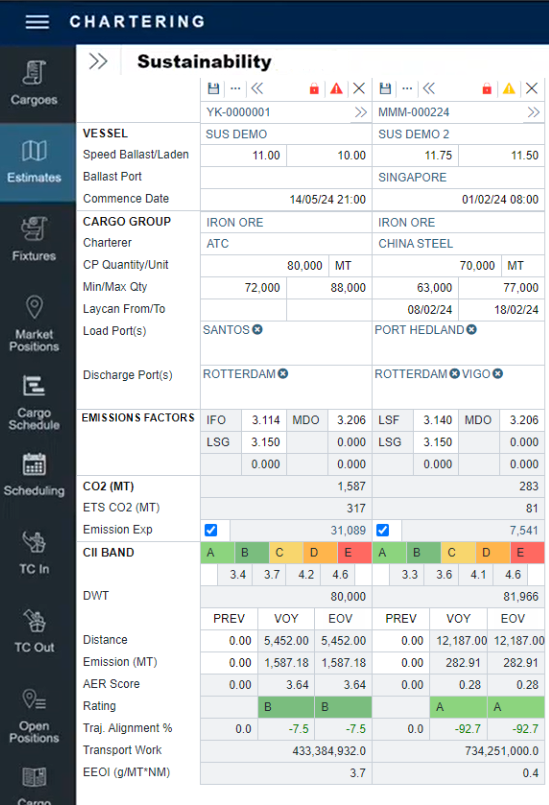
Key Fields - Calculating AER and CII Ratings
CII Band
The CII Band displays the current regulatory rating scale as a set of letter grades (A–E), along with the AER score thresholds required to achieve each grade.
Columns
-
PREV - This field can be manually entered or sourced via a Webhook. This is intended for the year-to-date or contractually relevant distance and emissions for use within a voyage estimate. Estimates automatically inherit previous distances and emissions from preceding voyages. The PREV values in the CII Band section populate based on the estimated EOY/V emissions of the last previous voyage for that vessel.
-
The CII fields support updates via webhook calls using the fields "prevDistance" and "prevEmissions.” For more information about webhooks, visit the IMOS - Webhooks article.
-
-
VOY - This is an IMOS-calculated field based on the emissions and distance of the particular Estimate itinerary
-
EOV - If PREV data has been entered, this will sum up the PREV and VOY data and project the EOV CII rating. If no PREV data has been entered, then the data and rating in this column will match the VOY data and rating.
Fields
A schema version of 45.4 or higher is required to view Emissions Factors.
-
Emissions Factors show the tons of CO2 emitted per ton of fuel consumed. These can be defined per estimate.
-
The Rating provides the CII rating compared to the reference CII (carbon intensity indicator).
Note: The CII Rating is based on the AER score without correction factors or exclusions.
-
The AER (Annual Efficiency Ratio) Score is calculated by dividing the total emissions by the DWT and distance values. The AER score takes the total distance regardless of laden or ballast legs.
-
The ETS (Emission Trading System) CO2 field shows the estimated CO2 consumption within the EU for a particular voyage estimate.
-
The Transport Work field calculates the cargo quantity multiplied by the laden nautical miles carried. Alt Qty can be utilized for Emissions metrics. When Transport Work Calculations and Cargo Emission allocation can not convert a lifting's BL quantity to MT, the calculation will attempt to convert the lifting's Alt Quantity to MT.
-
The EEOI (Energy Efficiency Operational Indicator) field divides the total CO2 emissions by the Transport Work value.
Combined Estimates
Combine Estimates allows you to combine all the Estimates in a Worksheet to get an overall rating score. You can use this feature for bulk estimates or to plan remaining voyages for a vessel in a given year to ensure a positive CII rating.
-
Click “…” near the save button.
-
Select Combine Estimates and choose the relevant estimates to combine.
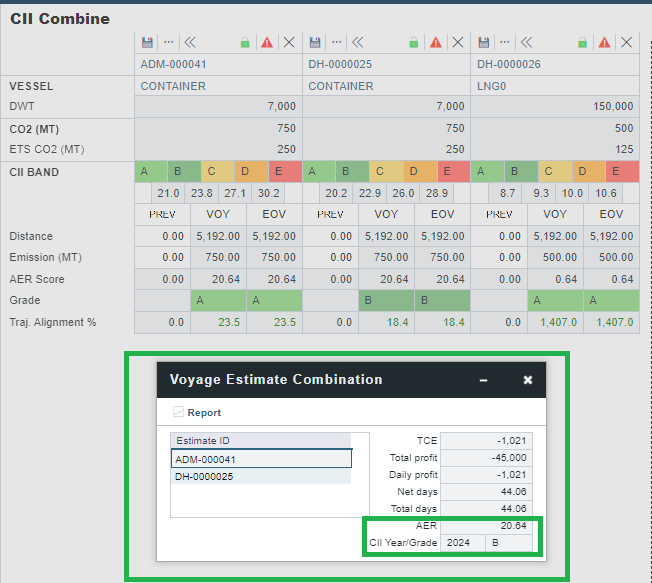
The CII fields account for the Distance and Emission across multiple estimates to determine the end AER grade. As grading is vessel-dependent, combined estimates only apply when the same vessel is selected. If attempting to combine different vessels, the CII Year/Grade will be “N/A.”
AER and CII in the Voyage Manager
AER and CII ratings are also available within the Sustainability Panel in the Voyage Manager. Review this wiki page to learn more.