
When you work with voyages that have many cargoes, you can increase the number of cargo rows that appear in the Laytime Calculation form before you need to scroll. This flag sets the number of rows.
Flag details
|
Field |
Value |
|---|---|
|
Name |
Laytime Add Cargo Grid Rows |
|
Flag |
CFGLaytimeAddCargoGridRows |
|
Description |
Specifies the number of cargo rows that appear in the cargo handling grid of the Laytime Calculation form before scrolling is required. The minimum is 4, and the maximum is 25. |
|
Data Type |
Integer |
|
Default Value |
4 |
|
Possible Values |
4 to 25 |
How the flag works
-
If the flag is not set, the cargo handing workspace allows for 4 cargo rows to show without scrolling.
-
Set a value from 4 to 25 to increase the size of the Cargo Handling workspace and show that many cargo rows, so you do not need to scroll to see multiple cargoes. A scroll bar appears only when the voyage has more cargoes than rows.
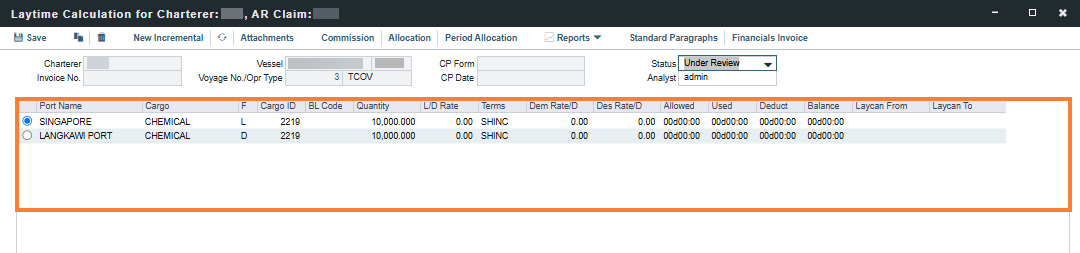
-
If you set a value lower than 4, the grid shows 4 rows. If you set a value higher than 25, the grid shows 25 rows.
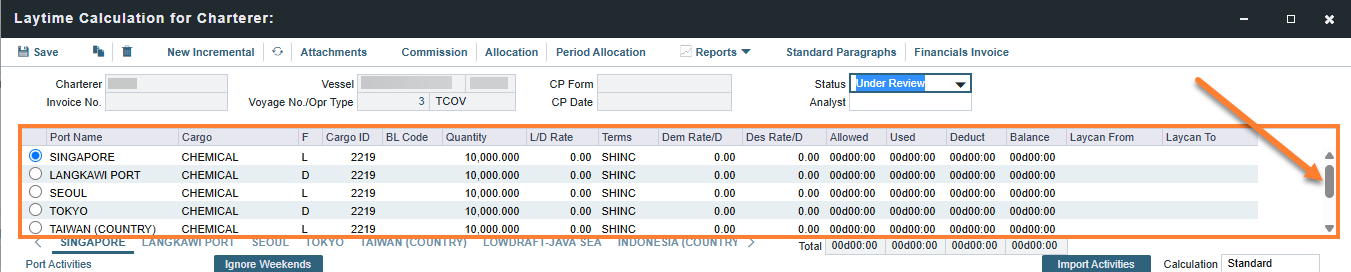
-
The setting applies to new and existing laytime calculations in both Deduction and Time Counting modes.
-
The Claim and Notes tabs include extra space at the bottom that matches the added rows.
-
The setting does not affect booking-based laytime calculations.
Related configuration flags
|
Name/Flag |
Description |
|---|---|
|
Laytime Deduction Table Height CFGLaytimeDeductionTableHeight |
Specifies the height of deduction table in laytime calculator |
|
Consolidate Laytime Tabs
|
When enabled, each portcall will have a single tab in the laytime calculator, where activities and deductions for all cargoes handled at that port will be listed. Cargo ID fields are available in the activities and deductions grids to indicate when a particular activity or deduction should only apply to some of the cargoes handled at that port. Leaving the Cargo ID field blank in these grids indicates that the activity or deduction applies to all cargoes handled at the port. |