
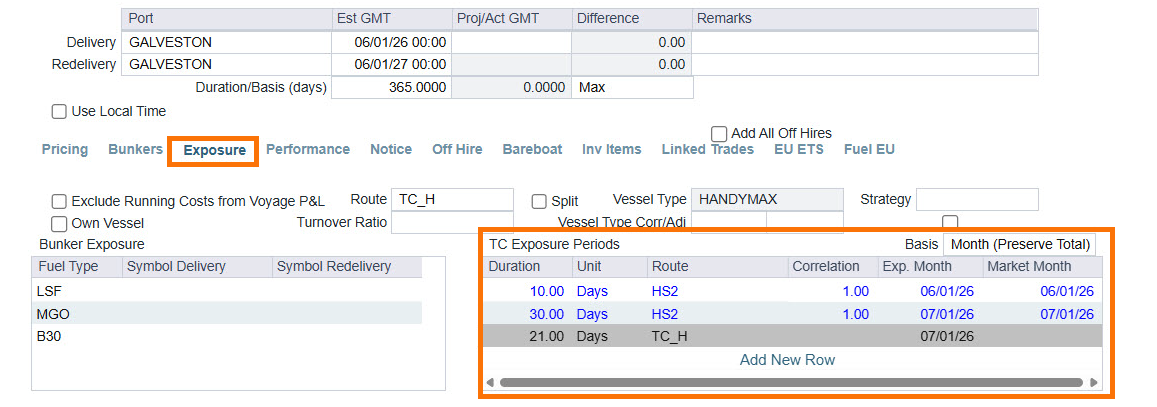
The TC Exposure Periods table is available within the Exposure tab of a Time Charter contract for Trading Module workflows. It's used to mark your Time Charter position to market against one or more routes over the life of the contract.
Default Route and Correlation Override
By default, the Route and Correlation used for Mark-to-Market comes from the Vessel Type — but this table lets you override that at a granular level, splitting a single contract into multiple periods and assigning a different route to each one.
The table gives Trading users the ability to mark different segments of the same contract against the routes that actually represent each period's exposure.
Exposure Period Basis:
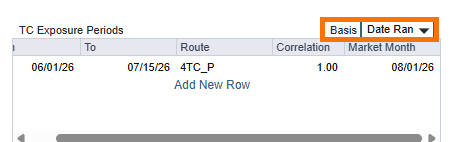
The basis field determines how a TC Exposure Period row's date range is established for Mark-to-Market purposes. The Basis selected controls which additional fields appear on that row and how the period's start and end dates are calculated.
Basis Options:
-
Delivery
-
Anchors the TC Exposure Period to the vessel's Delivery date, allocating the specified duration of exposure days forward from that date.
-
-
Open Date
-
Anchors the TC Exposure Period to the vessel's Open Date — the completion of the last scheduled voyage on the contract — running the specified duration forward from that point rather than from Delivery.
-
For example, the Completion Date of the Time Charter’s last voyage is 7/9/2026 23:59. We set the Open date to 60 days, so our exposure period will end on 9/10/2026 00:00
-
-
Date Range
-
Allows you to define a custom From/To date range for a TC Exposure Period, and price that range against a specific Route, Correlation, and Route Month for Mark-to-Market calculations — independent of the contract's actual exposure dates.
-
-
Month
-
Allows you to bucket a specified number of exposure days into a target month of your choice, rather than the month driven by the vessel's Delivery date. Days are entered manually and adjacent months are not adjusted automatically, so the contract's total day count can shift.
-
-
Month (Preserve Total)
-
Pushes exposure into a target month of your choice while automatically drawing days from adjacent months to preserve the total day count, preventing the inconsistent totals that could previously result from manual day entry. Currently the basis option used in the calculation is the time charter's Delivery Date.
-
Market Month:
Sets which month of the selected Route's forward curve is used to Mark-to-Market an exposure period, letting you value the period against a curve month other than the one the exposure days physically fall in. The days themselves stay in their physical month — only the pricing curve moves.