
Home > Data Center > Ports and Areas > Trade Areas
Trade Areas in IMOS are defined regions or voyage areas that help you organize, group, and analyze your company’s voyages, trades, and contracts by region. They are a key tool for managing your business geographically and streamlining reporting and analysis. Trade Areas are an Operations-wide field with direct impact on the Trading and Risk module as a useful reporting pivot. They're most often specific to the different business routes operated by your business
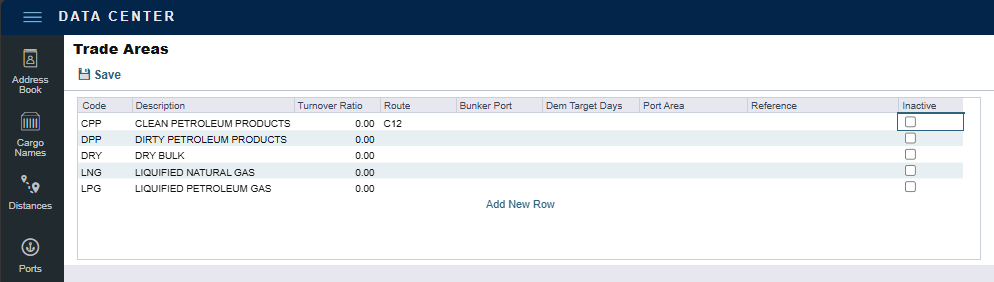
Trade Area Fields and Options
When setting up or editing a Trade Area, you can configure the following fields:
-
Code: Unique identifier for the Trade Area.
-
Description: Clear name for the Trade Area.
-
Turnover Ratio: Number of voyages typically completed in 30 days. (e.g., 1 = 30-day voyage, 0.5 = 60-day voyage)
-
Route: The route associated with the Trade Area, conditional on the selected Index.
-
Bunker Port: The main bunkering port for this Trade Area.
-
Dem Target Days: Number of days until the target date for completing a Demurrage Claim.
-
Port Areas: Associated port areas as defined in the Data Center.
-
Reference: Free-form text for cross-referencing with another system.
-
Inactive (checkbox): Mark the Trade Area as inactive to prevent new use (existing records remain unaffected).
How Trade Areas Are Used in IMOS
-
On Forms: Assign Trade Areas to voyages, trades, and contracts for accurate regional tracking.
-
In Reports: Use Trade Areas as filters in reports and dashboards for targeted analysis.
-
In Operations and Trading: Align physical operations and trading strategies by region. They are also useful for balancing paper trading against physical positions