
This topic is not related to the Pooling module in IMOS.
This page reviews a suggested process to organize FuelEU Pools in IMOS and how to create FuelEU Pool-related reports.
FuelEU pooling refers to how companies organize their vessels and companies for the FuelEU regulation. These pools are created and submitted to the European Union, and are set up on the compliance level.
Organizing pools by Vessel Fleet
We suggest setting up the different FuelEU Pools in the Vessel Fleet field. If your company already uses the fleet field for other business purposes, it is possible to set up multiple fleets for each vessel.
Step 1 - Add FuelEU pools to the Vessel Fleets table
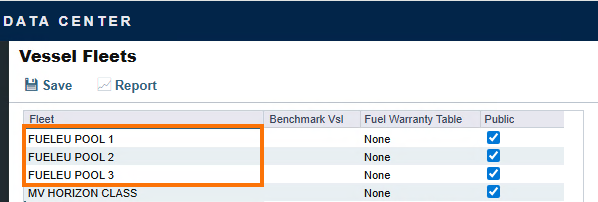
In IMOS - Vessel Fleets in the Data Center, add each fleet in the Fleet column as a new row. Enable the Public column checkbox for the pools as well. This action allows users to add the new fleets to a vessel.
Exhibit 1: In this example, we set up three pools.
Step 2 - Add the new fleets to vessels
One fleet per vessel
Navigation: Data Center > Vessel
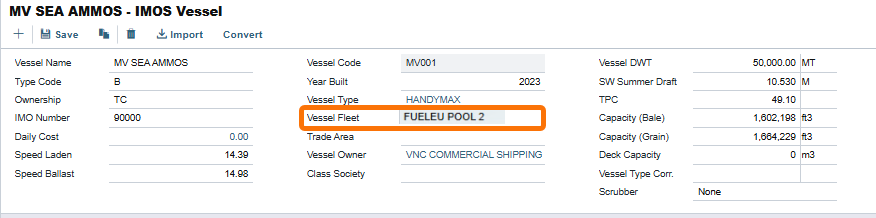
The Vessel Fleet field is available in the Vessel screen for each vessel. If this field is missing, your company most likely uses multiple fleets (See next sub-section).
Exhibit 2: In this example, we added the Fleet FuelEU Pool 2 to the Vessel MV Sea AMMOS.
Multiple fleets per vessel
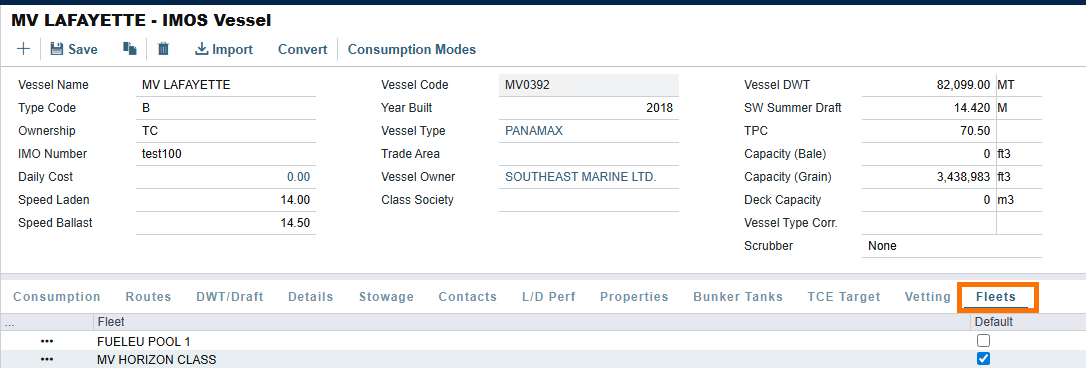
Companies can add a new tab to the vessel to manage multiple fleets. Learn more about this option by reviewing IMOS - Fleet Tab - Vessel.
Exhibit 3: In this example, we added the Fleet FuelEU Pool 1 to the Vessel MV LAFAYETTE in the Fleets tab.
Creating compliance balance reports for FuelEU pools by voyage
After completing the steps above, it is now possible to create compliance balance reports with this setup. We will review two report options based on your company’s fleet setup.
Review IMOS - Exporting & Importing a Report Definition if you are not familiar with importing report definitions in IMOS.
Option one - Single fleet per vessel
This report assumes each vessel has one FuelEU pool set up in the Fleet field. There are no other Fleets associated with each vessel.
About
The rows in this report display FuelEU-related compliance and penalty fields for each voyage. The Voyages are then grouped by the FuelEU pool. The report displays the FuelEU compliance balance totals for each pool as well. Positive compliance balances display in green font, and negative compliances display in red font.

Report Definition
FuelEU Compliance Balance - Single Fleet.form
Report option 1 design logic
We started with the Voyage table and added FuelEU compliance-related fields. We then created a one-to-one join by selecting the paperclip icon next to the Vessel Code field in the Voyage Table. In the Vessel table, we added the Fleet field. The Fleet field was then used as a grouping. We also set a sum aggregation for the Fuel EU Compliance Balance column.
Option two - Multiple fleets per vessel
For this option, companies will need to set up a filter in the report so that only Fleets related to FuelEU Pools display. Check out IMOS - Adding Filters if you are not familiar with filters in the Report Designer.
This setup assumes one FuelEU Pool per vessel, and other Fleets serve other business purposes.
About
The rows in this report display FuelEU-related compliance and penalty fields for each voyage. The Voyages are then grouped by the FuelEU pool. The report displays the FuelEU compliance balance totals for each pool as well. Positive compliance balances display in green font, and negative compliances display in red font. The different FuelEU Pools are selected in the Fleet filter in the report.

Report Definition
FuelEU Compliance Balance - Multiple Fleets.form
Report option 2 design logic
We started with the Voyage table and added FuelEU compliance-related fields. We then created a one-to-one join by selecting the paperclip icon next to the Vessel Code field in the Voyage Table. In the Vessel table, we added a one-to-many join to the Vessel Fleet Member table. In this table, we added the Fleet Name field. The Fleet Name field was then used as a grouping. We also set a sum aggregation for the Fuel EU Compliance Balance column.
Q&A
1. Do these reports prorate compliance balances by calendar year?
The reports outlined in this document focus on agreed compliance balances for each voyage assigned to a FuelEU Pool. The current design of the two reports do not support the ability to report on FuelEU pool balances for a given calendar year by prorated values.
Proration could be necessary for reporting on compliance balances by year because technically a voyage could commence and complete between two calendar years.