
Release notes schedule
This page captures curated release notes posted every Friday. Explore a tailored list of features and fixes, including images and documentation, to better understand which changes apply to your workflow.
Want to see daily updates?
To view all changes made to IMOS, visit the changelog.
Update new feature Security
October
23 October 2026
Operations
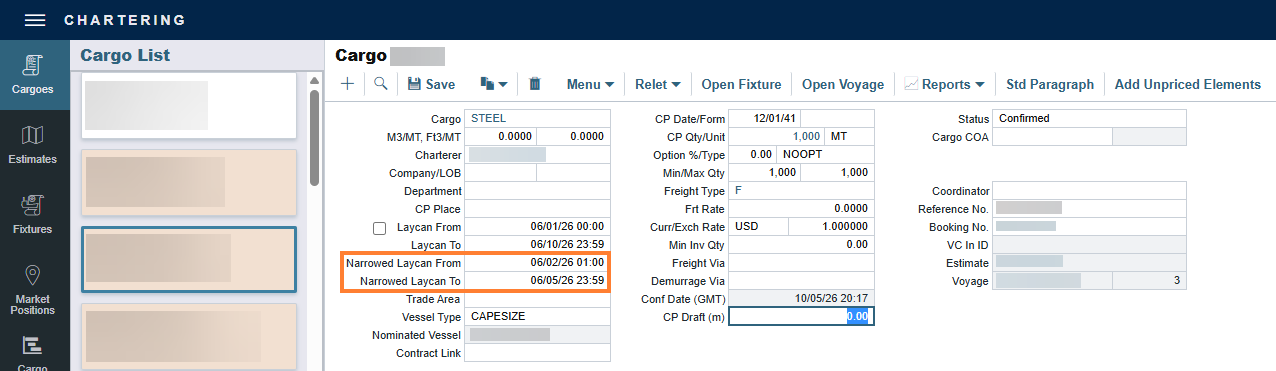
Narrowed Laycan From and Narrowed Laycan To fields Update
This feature requires the configuration flag CFGEnableCargoNarrowedLaycans to be enabled and a minimum schema version 61.2. With Automatic Schema Upgrades enabled, it will be available in your environment by 24 October 2026. To enable this feature sooner, or if Automatic Schema Upgrades are not enabled in your environment, contact Veson Support.
You can now record narrowed laycan dates alongside the original laycan and view them directly in Voyage Manager. The new Narrowed Laycan From and Narrowed Laycan To fields appear on the Cargo form, the VC In form, and the Voyage Manager CP Terms grid. You can edit them from either the cargo or the voyage, and the dates stay in sync. The fields are locked for users with read-only access and are copied when you copy a cargo with its original laycan preserved or copy a voyage that has a cargo. You can also report on both dates in Report Designer.
Voyage P&L
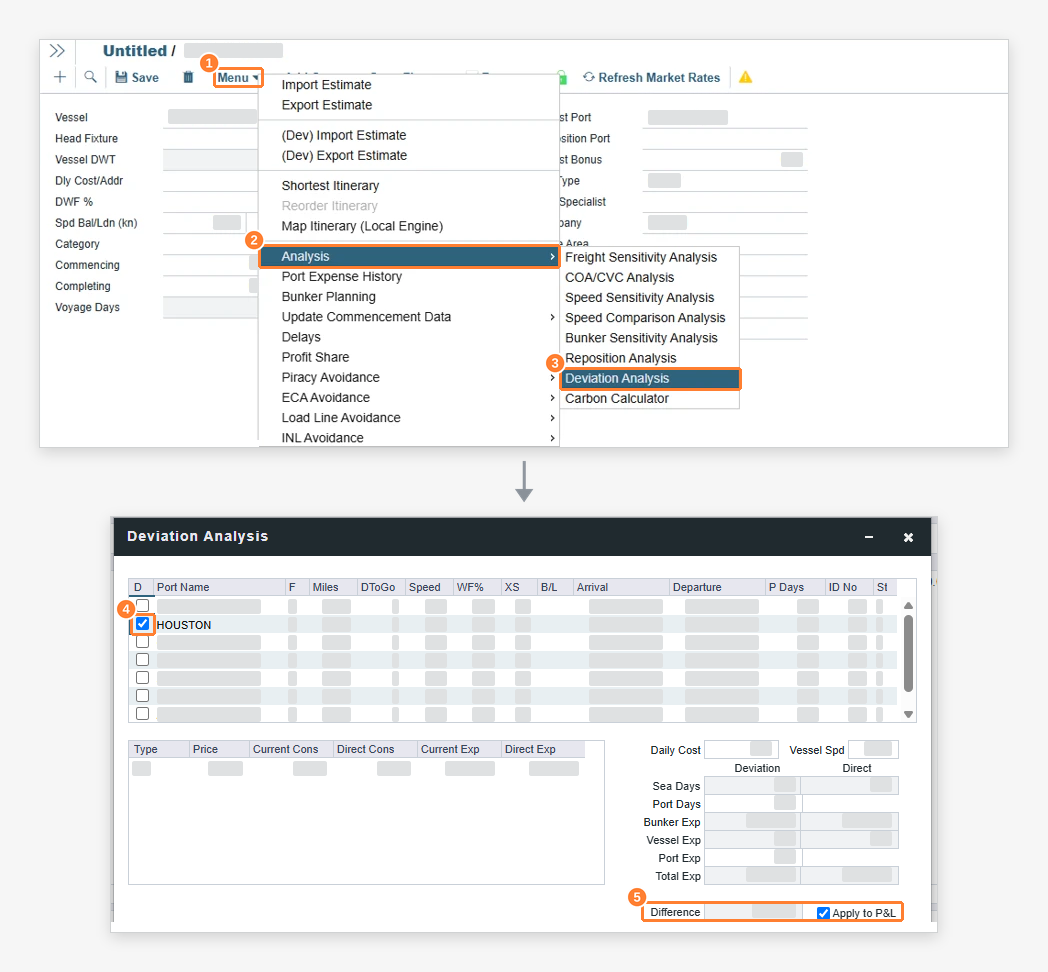
Deviation analysis in the Estimate P&L Update
This feature requires the configuration flag CFGEnableEstimatePnlDeviationAnalysis to be enabled.
When the configuration flag CFGEnableEstimatePnlDeviationAnalysis is enabled, the Deviation Analysis form is available in Estimates. Applying the analysis saves it on the estimate’s deviation port and shows the resulting Deviation TCE in the Estimate P&L. This helps you compare the Net Daily TCE with the result of excluding a port call from the itinerary.
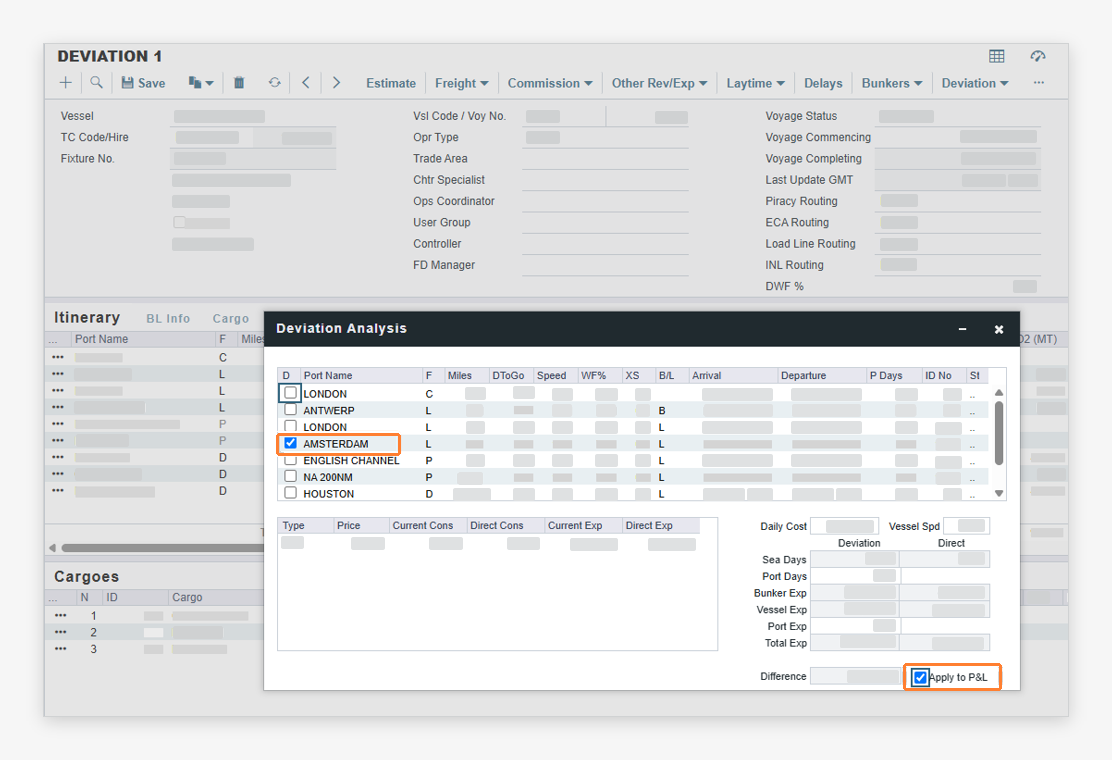
Compare voyage TCE with a port deviation in the Voyage P&L Update
This feature requires the configuration flag CFGEnableVoyagePnlDeviationAnalysis to be enabled. This feature requires a minimum schema version 60.9. With Automatic Schema Upgrades enabled, it will be available in your environment by 24 October 2026. To enable this feature sooner, or if Automatic Schema Upgrades are not enabled in your environment, contact Veson Support.
You can now apply a deviation analysis to the Voyage P&L. When the CFGEnableVoyagePnlDeviationAnalysis flag is enabled, an Apply to P&L checkbox is available on the Voyage Deviation Analysis form. Applying saves the deviation analysis on the voyage’s deviation port and shows the resulting Deviation Analysis TCE in the Voyage P&L, so you can compare it with the Net Daily TCE. This helps you compare voyage performance with and without a port call in the same view.
Trading
Delete linked intercompany paper trades together and control who can unlink them
This feature requires the configuration flag CFGLockIntercompanyPaperTradeLinks to be enabled.
When the configuration flag CFGLockIntercompanyPaperTradeLinks is enabled, deleting an intercompany paper trade from the Paper Trade screen also deletes its linked mirror trade after you confirm. The warning names the mirror trade that will be deleted, and the delete is blocked if the mirror trade is settled. Unlinking intercompany paper trades is restricted to users who have the Unlink Intercompany Paper Trades permission, which you manage under Trading > Actions. This helps you keep intercompany positions consistent and reduces the risk of unintended changes to linked trades.
16 October 2026
Invoicing & Payments
Include offhire UK ETS emissions in invoices and settlement forms Update
This feature requires the configuration flags CFGEnableOffhireUkEtsPnl, CFGCalculateOffhireEmissions, and CFGEnableUkEts to be enabled. To add offhire line items to UK ETS invoices, CFGEnableUKETSAllocation must also be enabled.
This feature requires a minimum schema version 54.0. With Automatic Schema Upgrades enabled, it will be available in your environment by 24 October 2026. To enable this feature sooner, or if Automatic Schema Upgrades are not enabled in your environment, contact Veson Support.
Offhire emissions are now supported under UK ETS. Delays on a voyage that have the Time Charter In or Time Charter Out Emissions checkbox selected are used to calculate the UK ETS emissions for the offhire period. Those quantities appear in the Carbon Calculator, the Voyage P&L, and the UK ETS invoices. UK ETS cash invoices can now be included in Time Charter Payments, Time Charter Bills, and freight invoices, and the Hire Statement, Statement of Accounts (SOA), and SOA Recap reports now support UK ETS. This helps you account for the emissions cost of offhire periods under UK ETS in your invoicing and settlements.
Transfer UK Allowances on contracts and see them reflected in Voyage P&L Update
This feature requires the configuration flags CFGEnableUkEts and CFGEnableUKETSAllocation, plus CFGEnableTCEmissionsAllocation for Time Charter In contracts or CFGEnableCargoEmissionsAllocation for Cargo and VC In contracts. It also requires the Trading Module license.
This feature requires a minimum schema version 61.0. With Automatic Schema Upgrades enabled, it will be available in your environment by 24 October 2026. To enable this feature sooner, or if Automatic Schema Upgrades are not enabled in your environment, contact Veson Support.
UK ETS allowance transfers are now available on Time Charter In, Cargo, and VC In contracts. When UK ETS Settlement is set to Allowances or Hybrid, a UK Allowance Transfer grid is shown. It lists only UK Allowances and respects the configured Match Type. A Transfer Price Method field supports purchase price and weighted average price calculations on Time Charter In and VC In contracts. UK Allowance transfers post as journals, with price difference and exchange rate difference lines where applicable, and are reflected in Voyage P&L and monthly accruals. EU ETS transfers are unchanged. This helps you manage UK ETS allowance transfers with the same workflow you use for EU ETS and keep transfer costs visible in your voyage results.
Distances
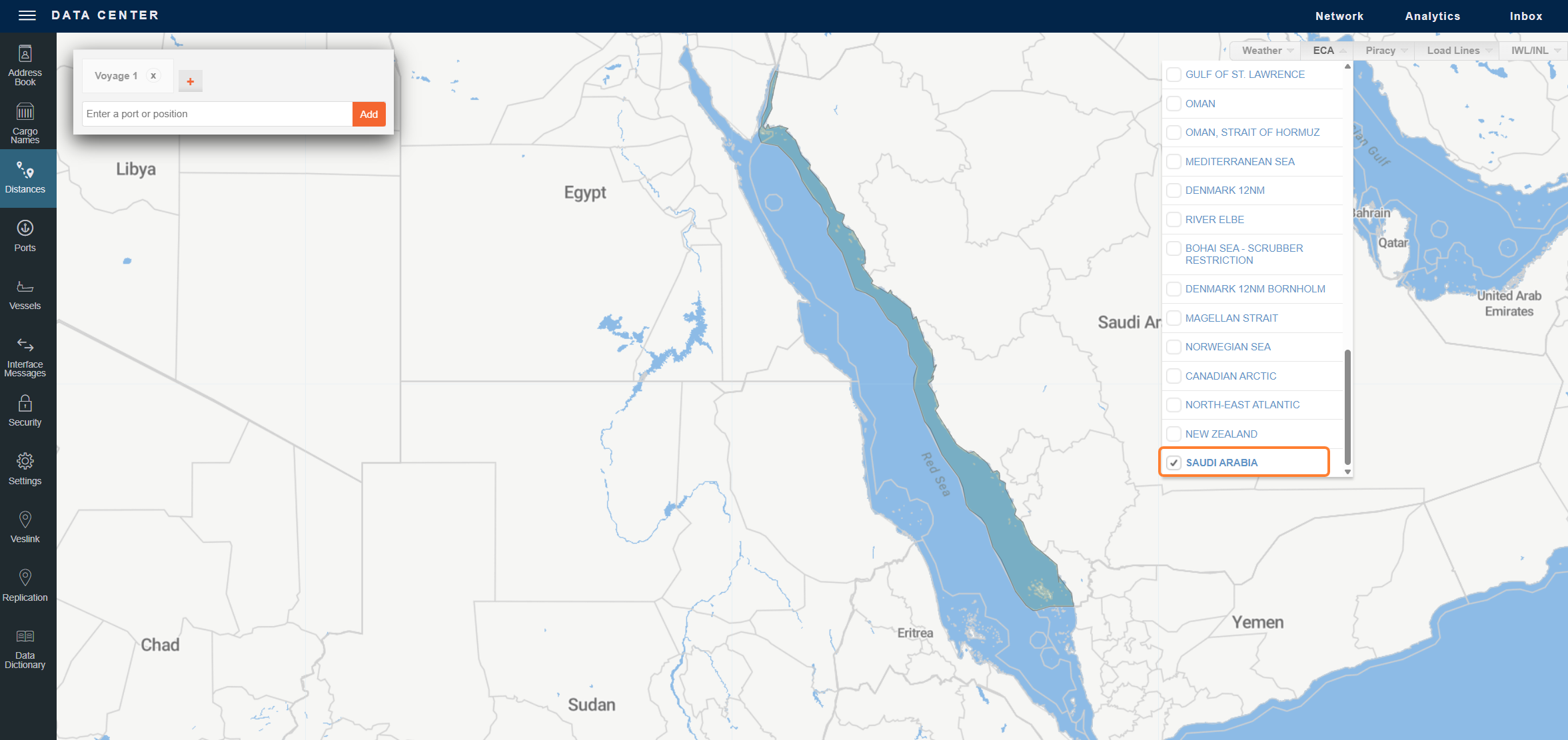
New ECA - SAUDI ARABIA Fuel Zone Update
A new fuel zone, ECA - SAUDI ARABIA, covers Saudi Arabia’s ports and 12 nm territorial sea on the Red Sea and Arabian Gulf coasts. It reflects Saudi Ports Authority Circular 55-2020, which bans open-loop scrubber washwater discharge. Open-loop scrubber vessels switch to the non-scrubber fuel configuration in the zone, and closed-loop vessels do not.
New ECA - NEW ZEALAND Fuel Zone Update
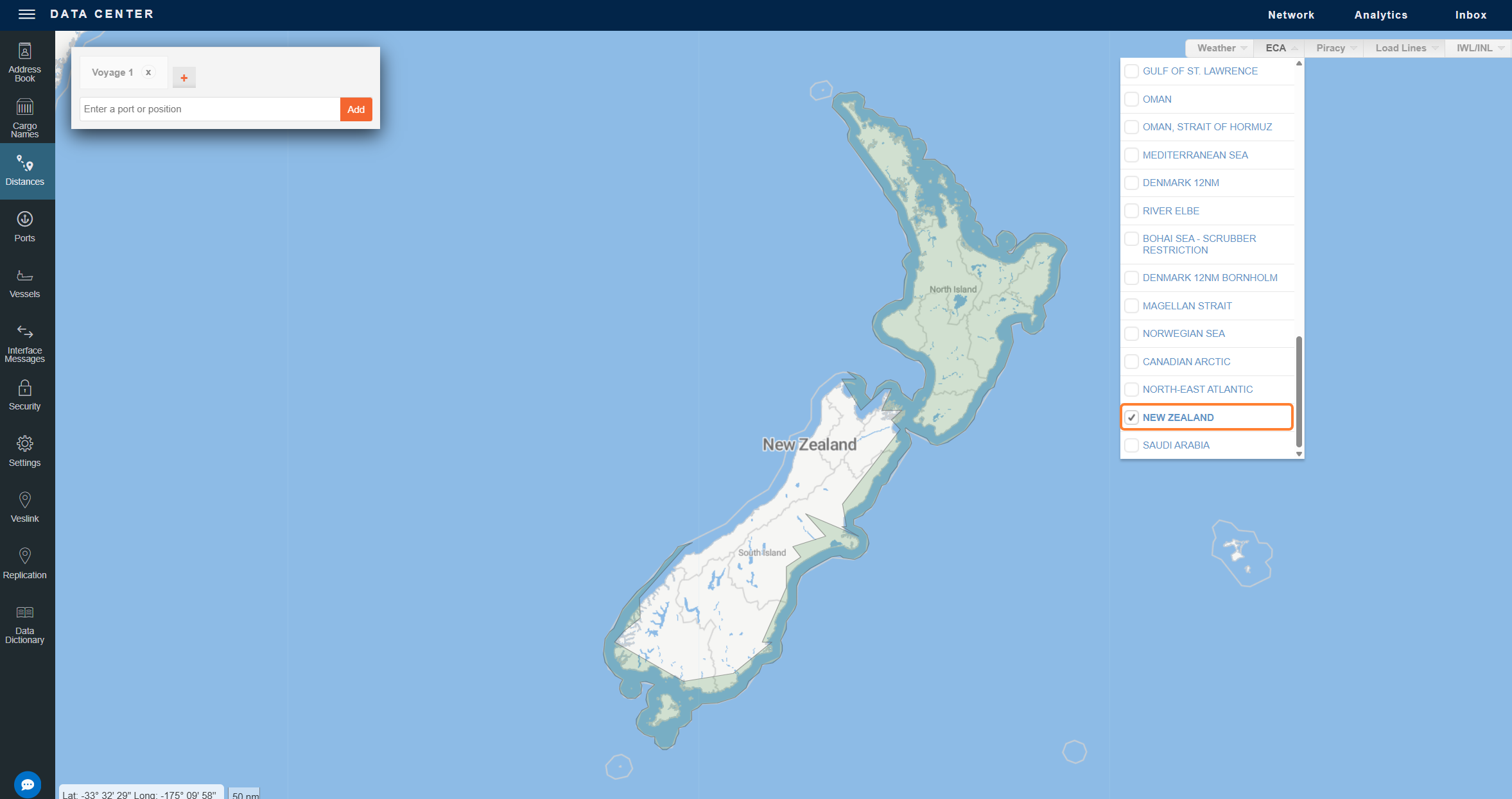
A new fuel zone, ECA - NEW ZEALAND, is now available. It covers New Zealand’s 12 nm territorial sea around the North, South, and Stewart Islands. It is for clients who follow the New Zealand Ministry for the Environment guidance on scrubbers, which advises avoiding washwater discharge and switching to compliant fuel within 12 nm.
New JWLA-035 Black Sea Piracy Zone Update
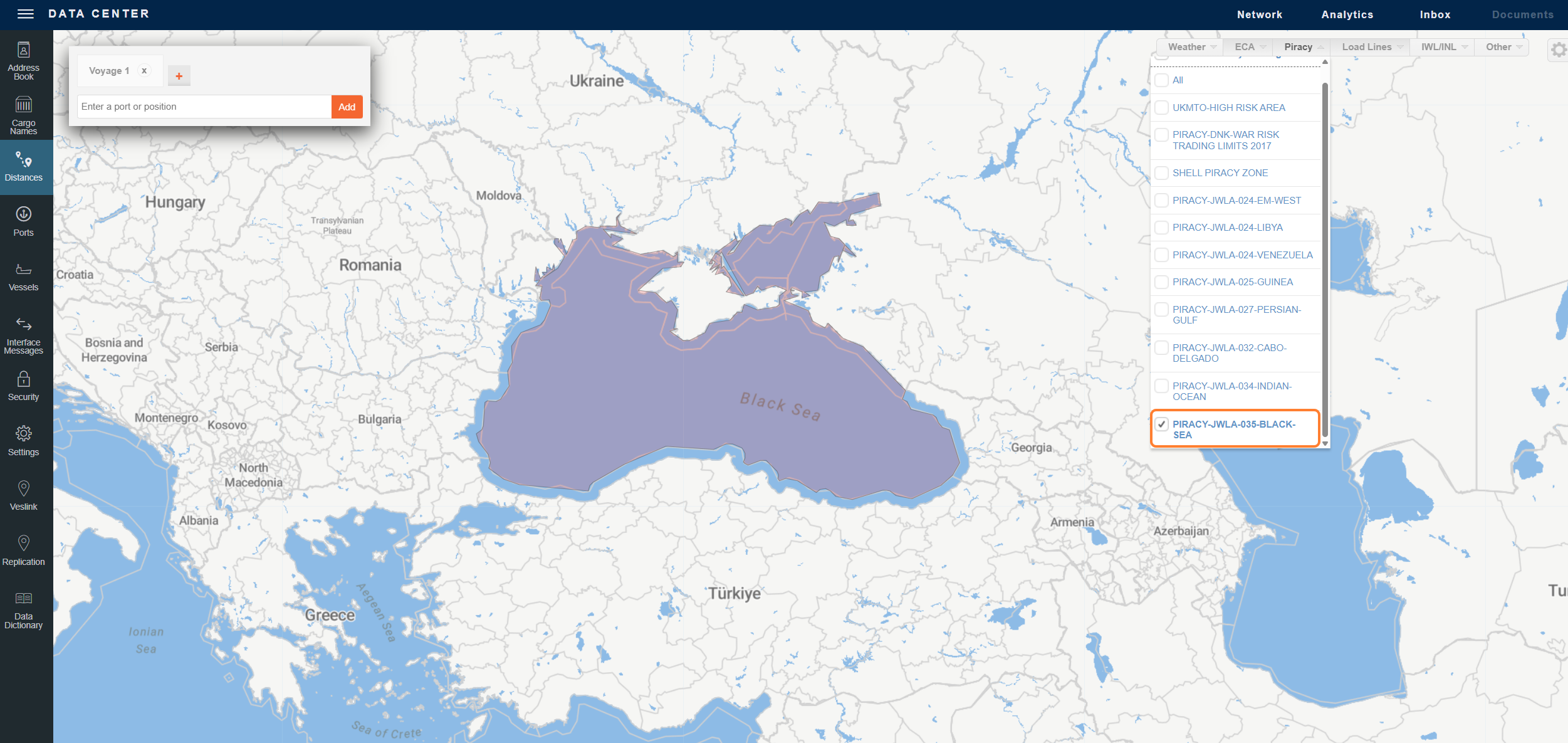
A new piracy zone, PIRACY-JWLA-035-BLACK-SEA, reflects Joint War Committee (JWC) circular JWLA-035 (16 September 2026). The zone covers the Black Sea, excluding the territorial waters of adjoining countries other than Russia and Ukraine, together with the Sea of Azov and the Ukrainian, Russian (Don/Donets), and Belarus inland waters. The PIRACY-JWLA-029-UKRAINE-AND-RUSSIAN-WATERS zone is now inactive and is replaced by this zone.
Trading
Retain Ballast Days at Original Trade Price for Time Charter Contracts Update
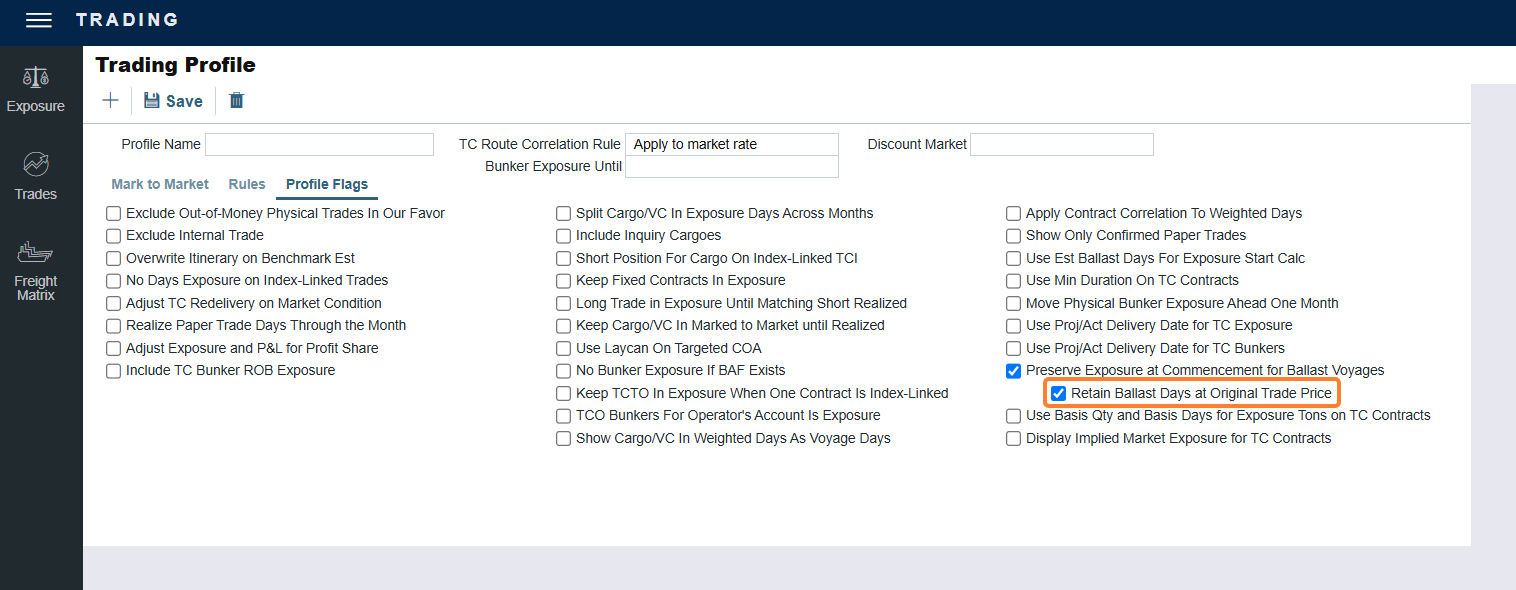
This feature requires the Retain Ballast Days at Original Trade Price trading profile flag to be enabled. It is available as a sub-profile flag when Preserve Exposure at Commencement for Ballast Voyages is selected.
A new trading profile flag, Retain Ballast Days at Original Trade Price, is available beneath Preserve Exposure at Commencement for Ballast Voyages. When it is enabled, unrealized ballast days on a Time Charter contract are viewable in Trading and valued at the hire rate of the pricing period in which they originated, rather than at the current period’s rate. Each rolled-in period is itemized separately, so users can see the rate that applies to each group of days.
9 October 2026
Bunker Management
Bunker Procurement Status Locking and Permissions Update
This feature requires the configuration flag CFGEnableBunkerProcurementStatusLocking to be enabled. After you enable the flag, go to Security List → Access Rights and enable the Set PO Approval Status right under the Operations module.
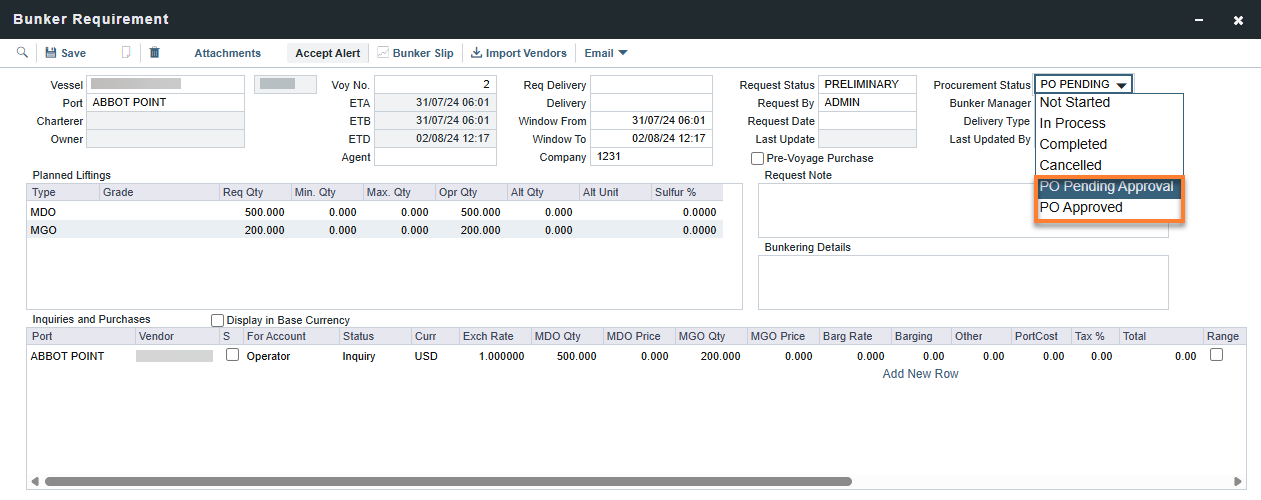
You can lock Ordered inquiry and purchase lines on a Bunker Requirement while it goes through purchase order (PO) approval, which helps keep IMOS consistent with your external procurement system, such as SAP. The Procurement Status field on the Bunker Requirement form includes two new statuses, PO Pending Approval and PO Approved, and PO Approved can be set only from PO Pending Approval. The new PO Approval status permission controls who can change the status to or from PO Approved, and new statuses are available in the Bunker Requirement Export, Import, and Update XML.
Distances
Three new ECA zones added: Canadian Arctic, Norwegian Sea and North-East Atlantic Update
Three new ECA zones are now available in the distances maps and the Fuel Zones table: ECA - NORWEGIAN SEA, ECA - CANADIAN ARCTIC and ECA - NORTH-EAST ATLANTIC. To apply your Worldwide configuration to the new zones, configure them or save the Fuel Zones table. New routing points have also been added in open water just outside these zones, so routes that minimize ECA distance can stay outside the zones longer and enter them later.
Where the new zones overlap existing zones, the following priority applies:
-
ECA - ICELAND 12NM and ECA - IRISH SEA take priority over ECA - NORTH-EAST ATLANTIC.
-
SECA - NORTH SEA takes priority over ECA - NORTH-EAST ATLANTIC and ECA - NORWEGIAN SEA.
-
The North American ECA takes priority over ECA - CANADIAN ARCTIC where they meet at 60°N.
-
For in-port consumption, all three new zones take priority over ECA - EURO PORTS.
-
For in-port consumption at Irish Sea ports, ECA - IRISH SEA now also takes priority over ECA - EURO PORTS.
-
ECA - NORTH-EAST ATLANTIC now takes priority over ECA - ICELAND, which covers the same waters. You can mark ECA - ICELAND inactive in your Fuel Zones because it no longer applies.
The zones apply as soon as this release is deployed. Under MARPOL Annex VI the 0.10% sulphur limit applies from 1 March 2027 in the Norwegian Sea and Canadian Arctic ECAs; the North-East Atlantic ECA enters into force on 1 September 2027, with its 0.10% sulphur limit applying from 1 September 2028. Please adjust your fuel zones accordingly for planning upcoming voyages versus voyages that will take place before these take effect.
Analytics
UK ETS Reporting in Report Designer and Analytics Update
You can now report on UK ETS data in Report Designer and Analytics. UK ETS fields, including cost, agreed, rebill, and offhire emissions, are available on Voyage and Voyage Estimate. New UK ETS joins on Voyage Itinerary Carbons provide itinerary-level sea and port emissions. This matches the existing EU ETS and FuelEU reporting, so you can track UK ETS allowances and penalties in the same way.
2 October 2026
Nothing new to share.
September
25 September 2026
Chartering
Fuel Type Expansion: Vessels Can Now Capture Up to 10 Fuel Types Update
Requires a minimum schema version of 60.0 or higher. The CFGEnableFuelExpansion configuration flag is now enabled by default and it can be disabled if needed. With Automatic Schema Upgrades enabled, it will be available in your environment by 24 October 2026. To enable this feature sooner, or if Automatic Schema Upgrades are not enabled in your environment, contact Veson Support.
Previously, vessels were limited to six fuel types, so users operating vessels that burn a wider variety of fuels had no way to record them all on a single vessel record. Vessels now support up to 10 fuel types, so every fuel type used on a vessel is captured accurately in one place.

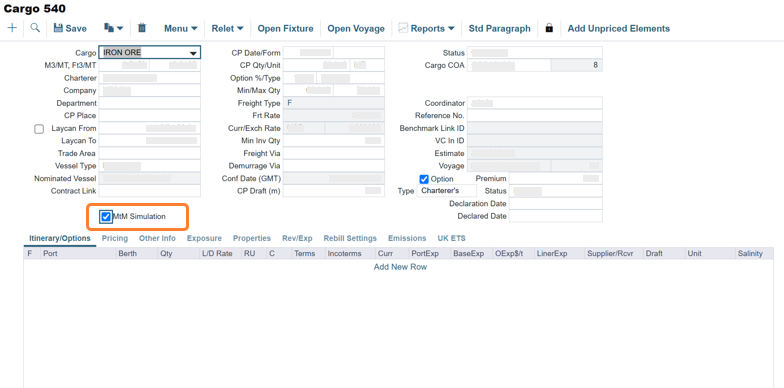
MtM Simulation Checkbox Added to Cargo/TC Contracts
This feature requires the configuration flag CFGEnableMtmSimulationContracts to be enabled.
A new MtM Simulation checkbox is available on the Cargo, VC In, TC In, and TC Out contract forms. The checkbox identifies contracts used for mark-to-market simulations in downstream systems, giving users a clear way to flag simulation activity without affecting official mark-to-market results or relying on custom properties.
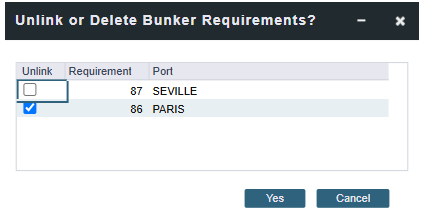
Choose to Keep or Delete Bunker Requirements When Deleting a Voyage
This feature requires the CFGPreserveBunkerRequirementsOnVoyageDelete configuration flag to be enabled.
Previously, all bunker requirements on a deleted voyage were automatically unlinked and kept. Now, when you delete a voyage, the Unlink or Delete Bunker Requirements message lists each bunker requirement with its port so you can choose, for each one, whether to keep and unlink it from the voyage or delete it along with the voyage. This feature gives you more control over bunker requirements when deleting a voyage, so you can reassign an individual requirement to a different vessel or voyage instead of having every requirement on the voyage unlinked automatically.
Bunker Management
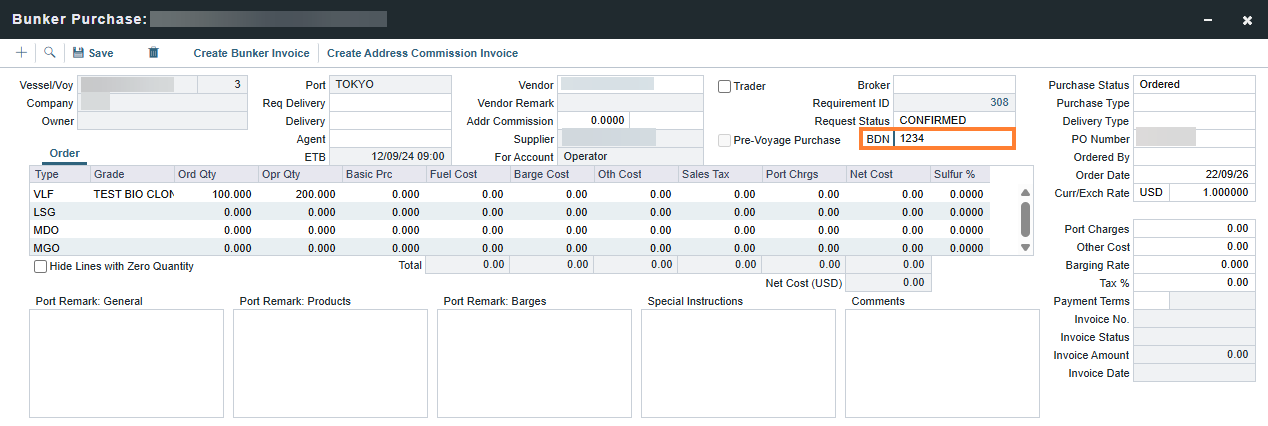
Bunker Delivery Note Field Added to Bunker Purchase Update
This feature requires a minimum schema version 60.5.
The Bunker Delivery Note (BDN) field is added to the Bunker Purchase form, letting users record the BDN reference number for a bunker purchase.
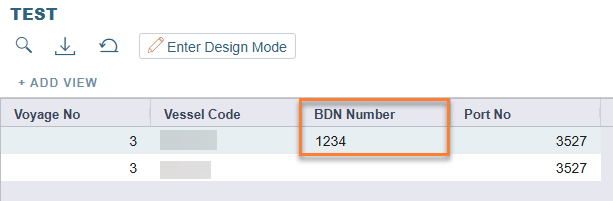
This is also available in the Bunker Lifting report table for Report Designer, supporting OVD reporting and bunker lifting reports.
18 September 2026
Invoicing & Payments
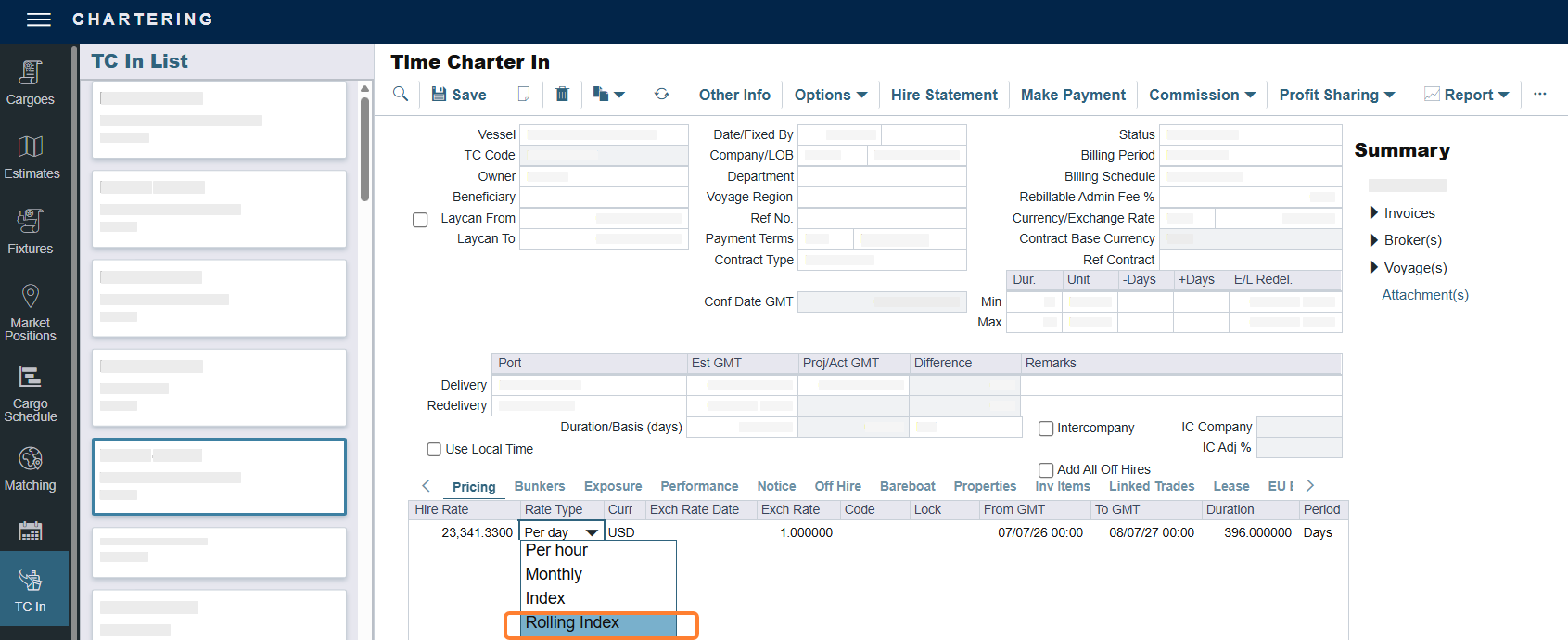
Rolling Index Rate Type Added to Time Charter Contracts
A new hire rate type, Rolling Index, is available. This allows you to invoice a provisional hire rate in advance based on the preceding hire period specified in the unpriced component, and generates a final hire invoice adjusted for the period once pricing is realized. This feature removes the need for manual calculation when setting up hire clauses priced against a preceding index period.
11 September 2026
Operations
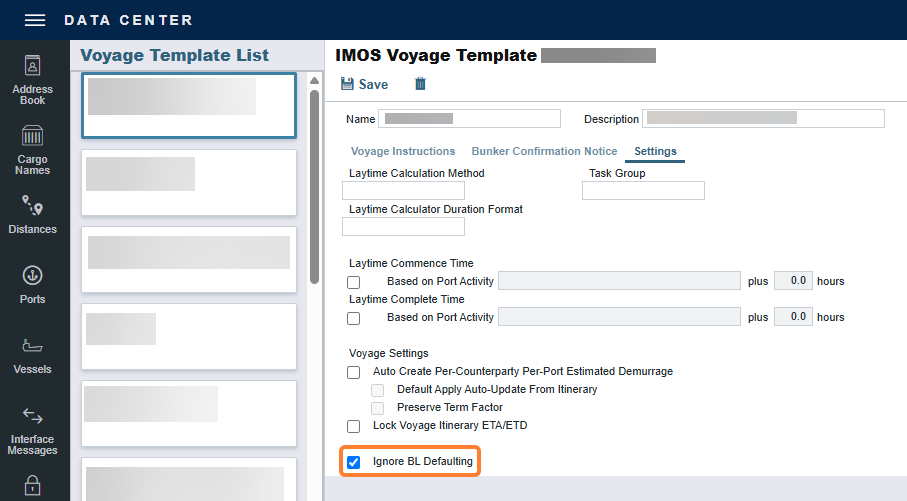
Ignore BL Defaulting Checkbox Added to Voyage Templates Update
This checkbox applies to clients who are using the configuration flag CFGDefaultDischargeBLInfo.BL to default load port BL details to discharge ports.
On the Voyage Template form, the Settings tab now includes an Ignore BL Defaulting check box. When you select it, voyages created from the template no longer copy the following information from the load port to the discharge port: BL Date, BL Qty, CP Unit, Ship Qty, Ship Unit
This is useful for voyages where the discharged quantity does not usually match what was loaded, such as LNG voyages.
Operations
Fuel Grade Added to Bunker Requirement Inquiries and Purchases Update
This feature requires the configuration flag CFGEnableBunkerInvMultigrade to be enabled and a minimum schema version 60.3.
You can now set a fuel grade per fuel type on the Bunker Requirement Inquiries and Purchases table, allowing multiple line items of the same fuel type at different grades or prices. The grade syncs with the linked Bunker Purchase form and is included in the requirement export and import XML. It also defaults onto new bunker invoices and is used in bunker inventory and emissions factor calculations to more accurately match invoiced lines to bunker lots.
Operations
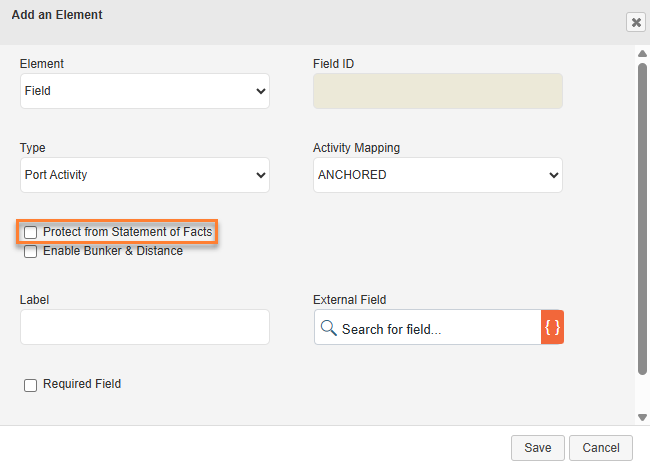
Port Activity Entries are No Longer Overwritten by Statement of Facts Update
Form Designer Port Activity controls now include an option to Protect from Statement of Facts. When you enable this setting on a Port Activity entry created or updated through an individual VVR form submission, that entry is locked. A later Statement of Facts submission that matches the same event time does not overwrite that entry. This preserves the ROB and distance values submitted through the individual VVR form, even if the Statement of Facts arrives after.
4 September 2026
Trading & Risk
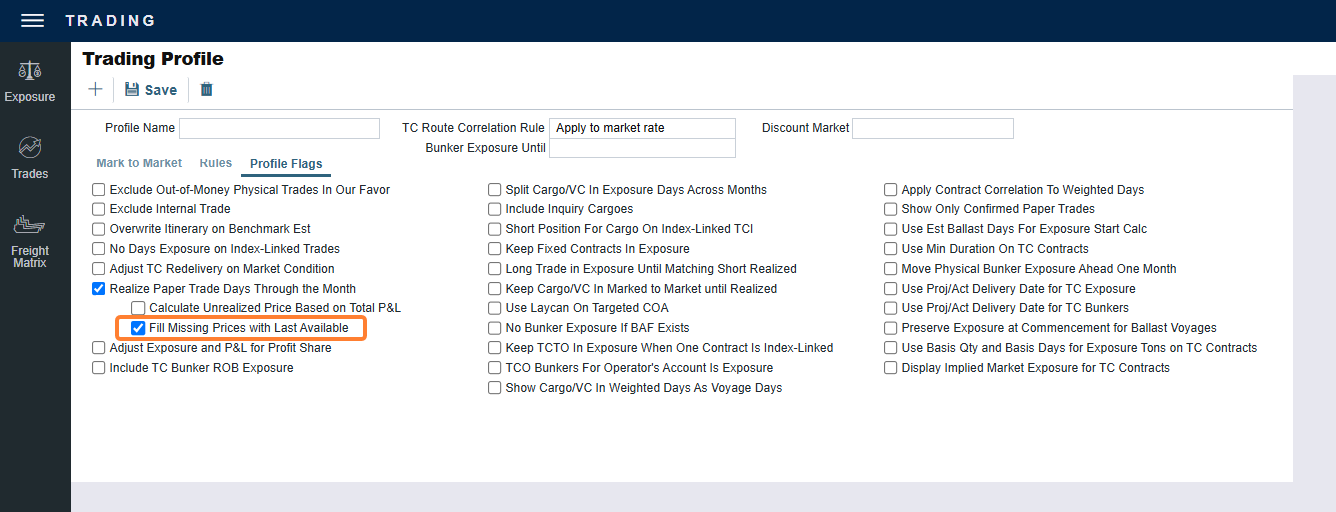
Fill Missing Price Days Option for Accurate Realized Position Valuation Update
This feature is available when you select the Fill Missing Prices with Last Available option in the Profile Flags tab of the Trading Profile.
Trading now includes a Fill Missing Prices with Last Available option in the Trading Profile. When you enable this option, IMOS uses the last available spot price to fill gaps in daily settlement data, so your realized position and P&L valuation remain accurate even when upstream pricing feeds are incomplete. This removes the need to manually track and adjust for missing market data, giving you a more reliable, up-to-date view of your exposure and P&L without extra manual work.
August
28 August 2026
Demurrage & Claims
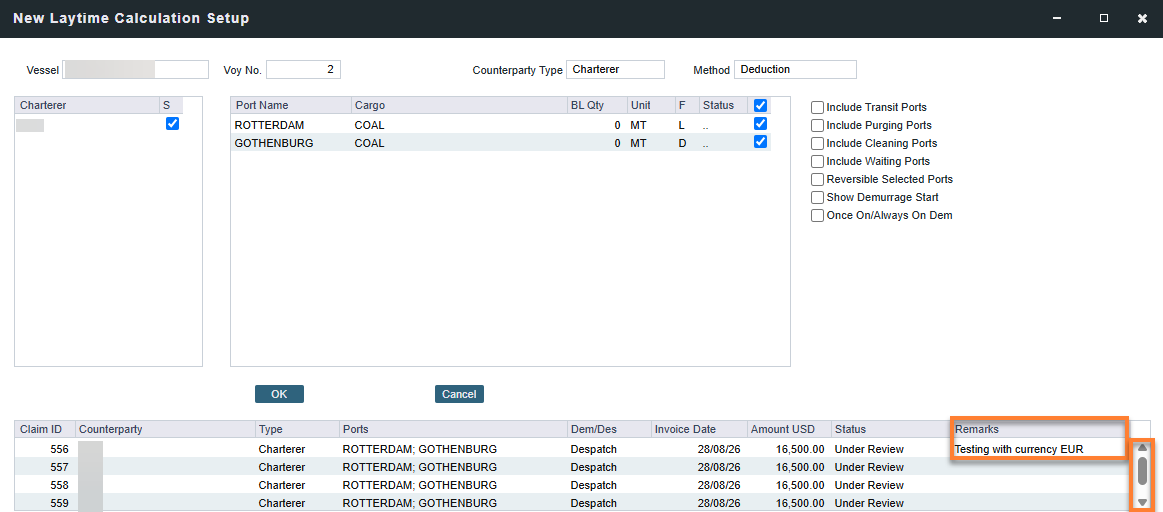
Resizable Claim List with Remarks in Laytime Calculation Setup Update
The claims list on the Laytime Calculation Setup form can now be resized, giving you more control over how much of each column you see at once. The list also includes a new Remarks column, so you can review notes alongside the other claim details without needing to open each calculation individually. Together, these changes make it easier to compare multiple calculations side by side.
Invoicing & Payments
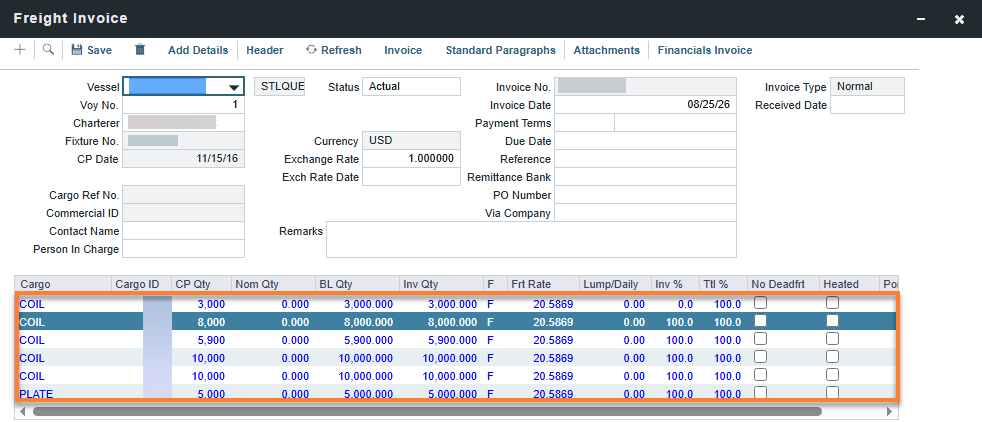
Freight Invoice: Expanded Cargo Grid Update
This feature requires the configuration flag CFGFrtInvAddCargoGridRows to be enabled.
The cargo grid on the Freight Invoice form now supports more visible rows, letting you increase the display up to a maximum of 25 cargo rows at once. This gives you a fuller view of an invoice's cargo details without needing to scroll through multiple pages, which is especially helpful when working with invoices that cover several cargoes.
Trading & Risk
New Contract-Level Override for Cargo Exposure Days Update
This feature requires the configuration flag CFGCargoExposureContractDays to be enabled and a minimum schema version 54.2. With Automatic Schema Upgrades enabled, it will be available in your environment by 19 September 2026. To enable this feature sooner, or if Automatic Schema Upgrades are not enabled in your environment, contact Veson Support.
Individual contracts can now override the trading profile’s Split Cargo/VC In Exposure Days Across Months flag. A new drop-down menu on the Exposure tab of Cargo, VC In, and CCOA contracts offers:
-
Set Exposure Days to Laycan Month – nominates exposure to the laycan month.
-
Split Exposure Days Across Months – splits exposure as a strip of days across months.
-
Blank – follows the trading profile flag.
A cargo linked to a COA inherits its selection from the COA after it is saved.
Invoicing & Payments
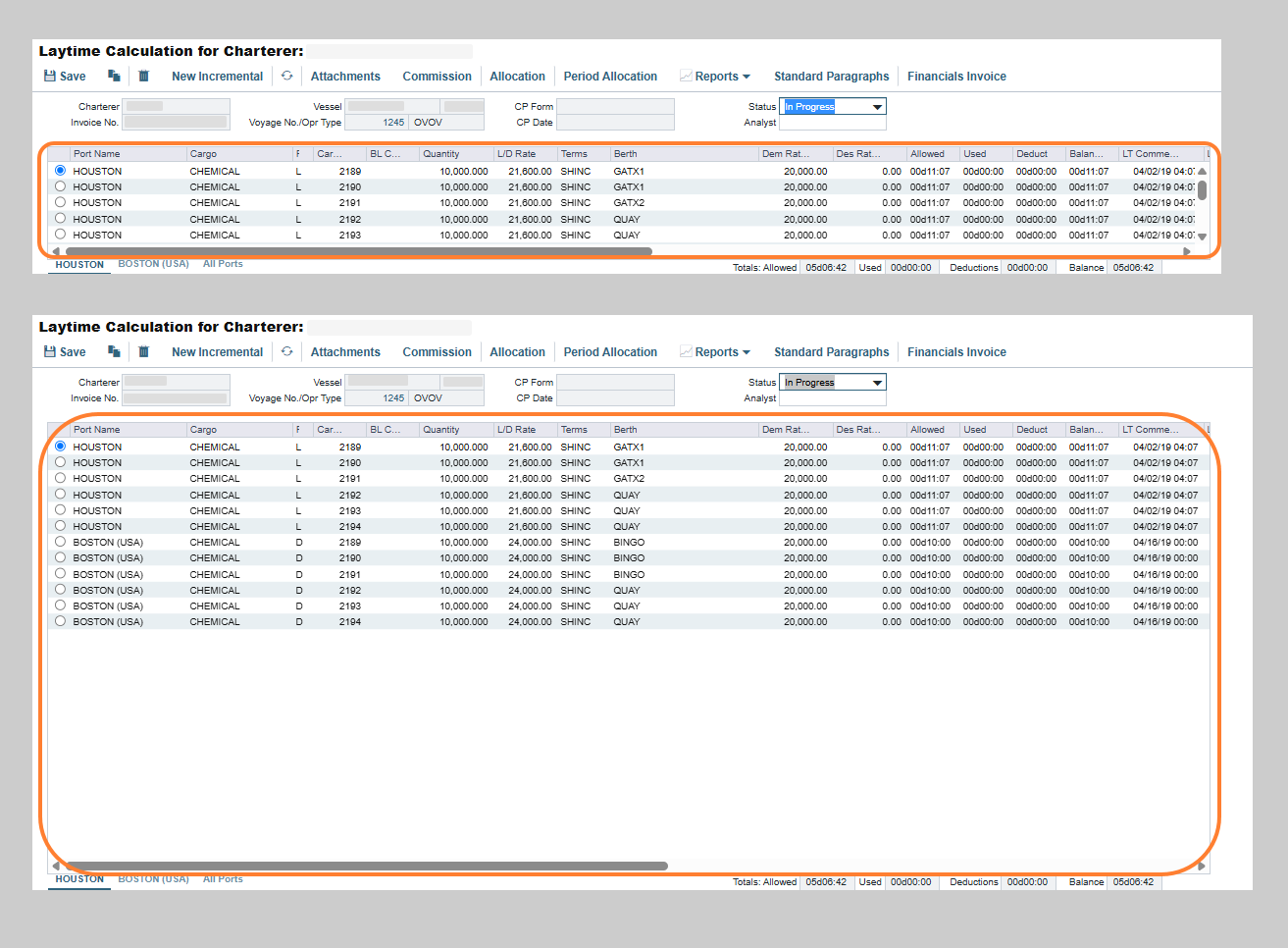
Laytime Calculator: Expand Cargo Grid Size Update
This feature requires the configuration flag CFGLaytimeAddCargoGridRows to be enabled.
The Laytime Calculator grid now supports a configurable number of visible cargo rows, from 4 to 25. This lets you adjust the grid to fit voyages with many cargoes, reducing the amount of scrolling needed to review them all.
Operations
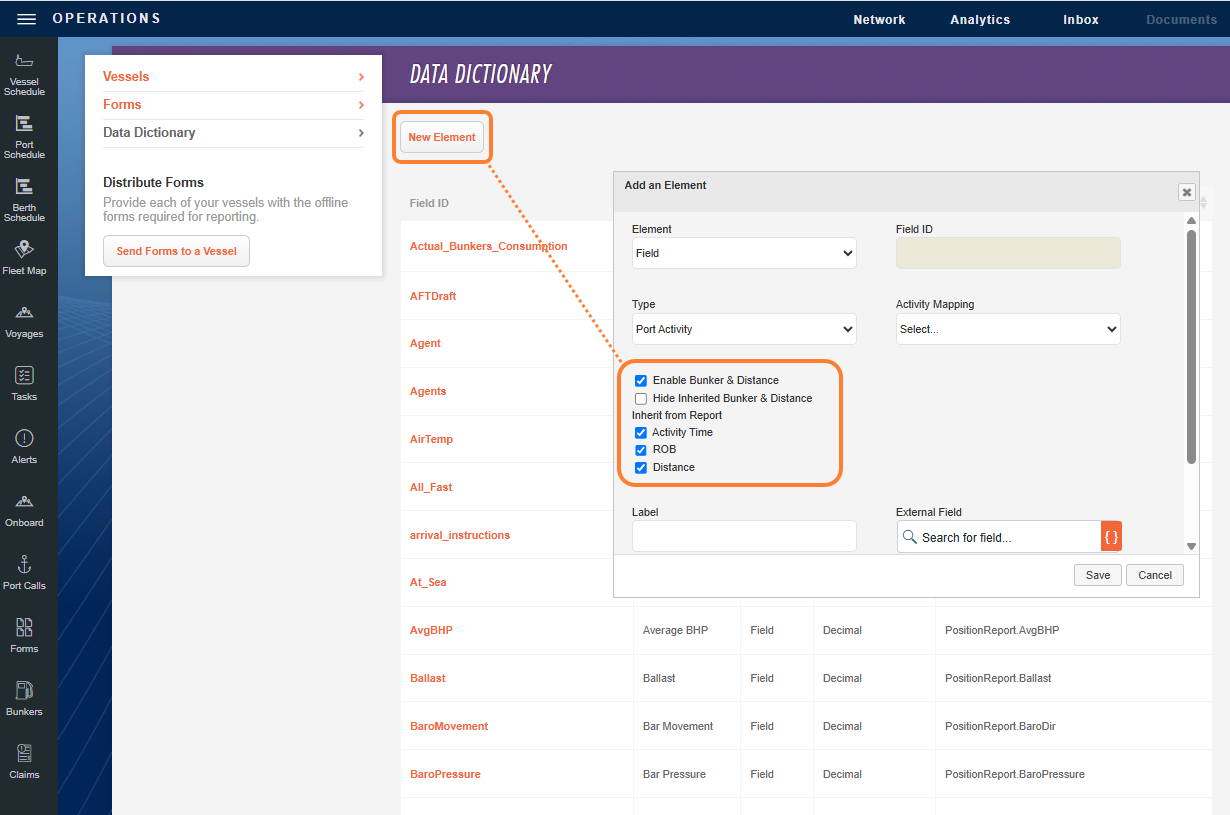
Record and Inherit Bunker and Distance on Port Activity Veslink Form Elements Update
You can now record bunker and distance values through the Port Activity form control in Veslink Forms. You can also configure the control to inherit these values from base-level fields, such as the shared bunker table, instead of entering them manually. These settings are configured on the data dictionary element for the Port Activity field, found in Operations→ Setup → Define & Send Forms.
21 August 2026
Nothing new to share.
14 August 2026
Distances
New Magellan Strait ECA Zone Update
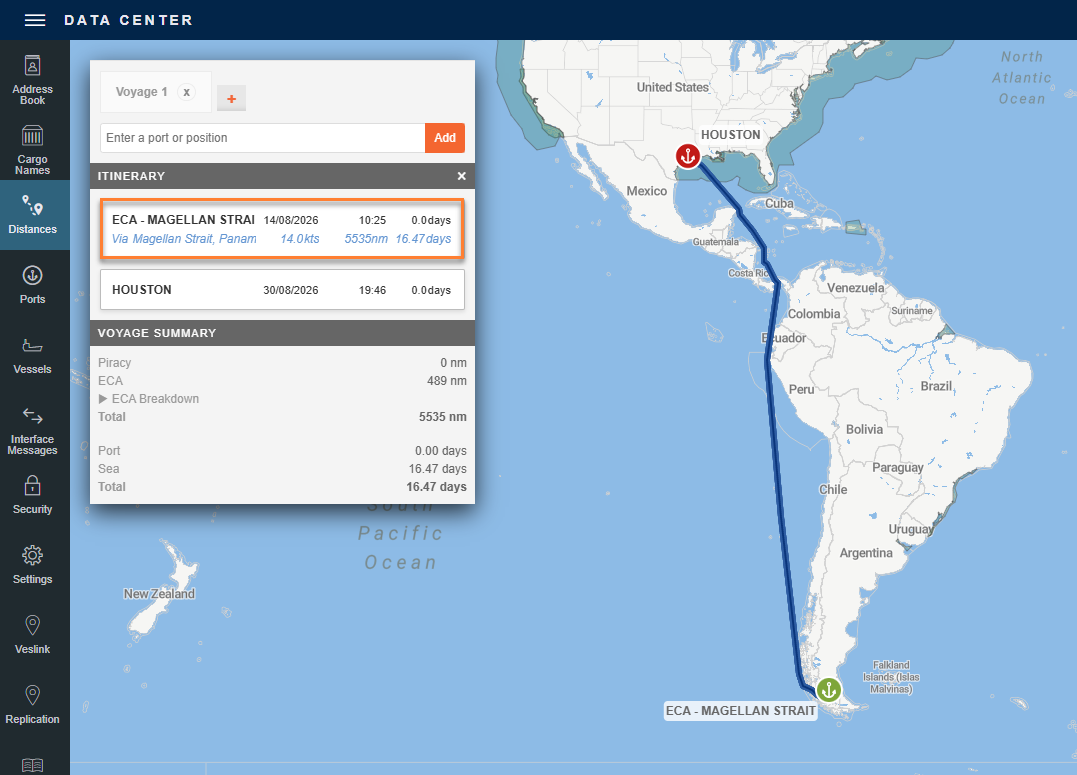
A new ECA zone, ECA - Magellan Strait, is now available to configure in Fuel Zones, with a scrubbers allowed value of Closed Loop. When configured, this zone takes priority over other overlapping ECA regions. The addition of this ECA zone helps ensure voyage estimates stay accurate as environmental discharge requirements evolve, keeping cost calculations aligned with current regulatory standards.
Invoicing and Payments
Automatic FX Date Default for Imported PDA/FDA Invoices Update
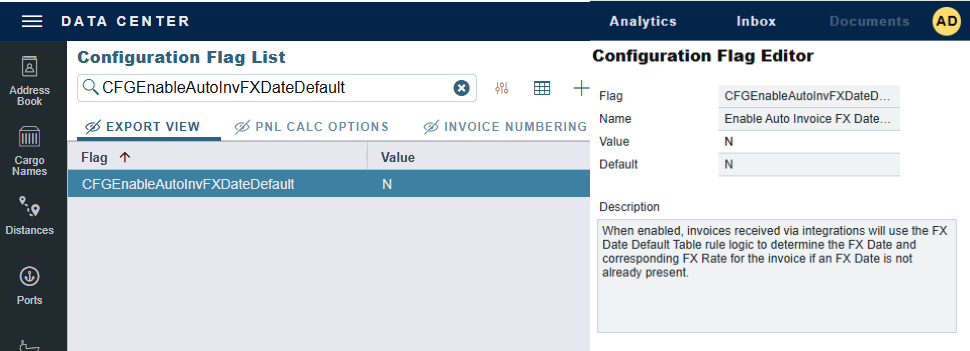
This feature requires the configuration flag CFGEnableAutoInvFXDateDefault to be enabled.
With the new Enable Automatic FX Date Default for Imported Invoices flag enabled, imported PDA and FDA invoices missing an exchange rate date now get one automatically from the Invoice FX Date Default Rules, along with the corresponding rate. This reduces the need for manual FX rate corrections on automated invoice imports and helps ensure accurate profit and loss reporting.
7 August 2026
Chartering
CargoSaleExport XML Now Includes Broker/Address Commission Payment Details Update
Previously, you were unable to see the broker/address-commission payment method (freight invoice, demurrage, claim, partial commission, and bill-via settings) in the cargoSaleExport XML, even though these were configurable in the IMOS UI. These settings are now included as freightInvoiceSetting, demurrageSetting, claimSetting, partialCommissionSetting, and billViaSetting elements on each broker line in the export.
Invoicing & Payments
Port Disbursements & Advancements FX Date Rule Additional Options Update
Two additional options are available in the Date Default field on the Invoice FX Date Default Rules form when the Invoice Type is Port Disbursements and Advancements: Port Arrival Date GMT and Port Departure Date (Local Time). When one of these options is selected, Port Disbursements and Advancements invoices created on the Port Advance/DA form receive an exchange rate date taken from the port call on the voyage itinerary, rather than from the invoice date. This change reduces the need for manual exchange rate corrections and improves the accuracy of downstream financial reconciliation.
July
31 July 2026
Financials
Freight Invoices Support a New FX Date Rule Based on Last Loading Port Update
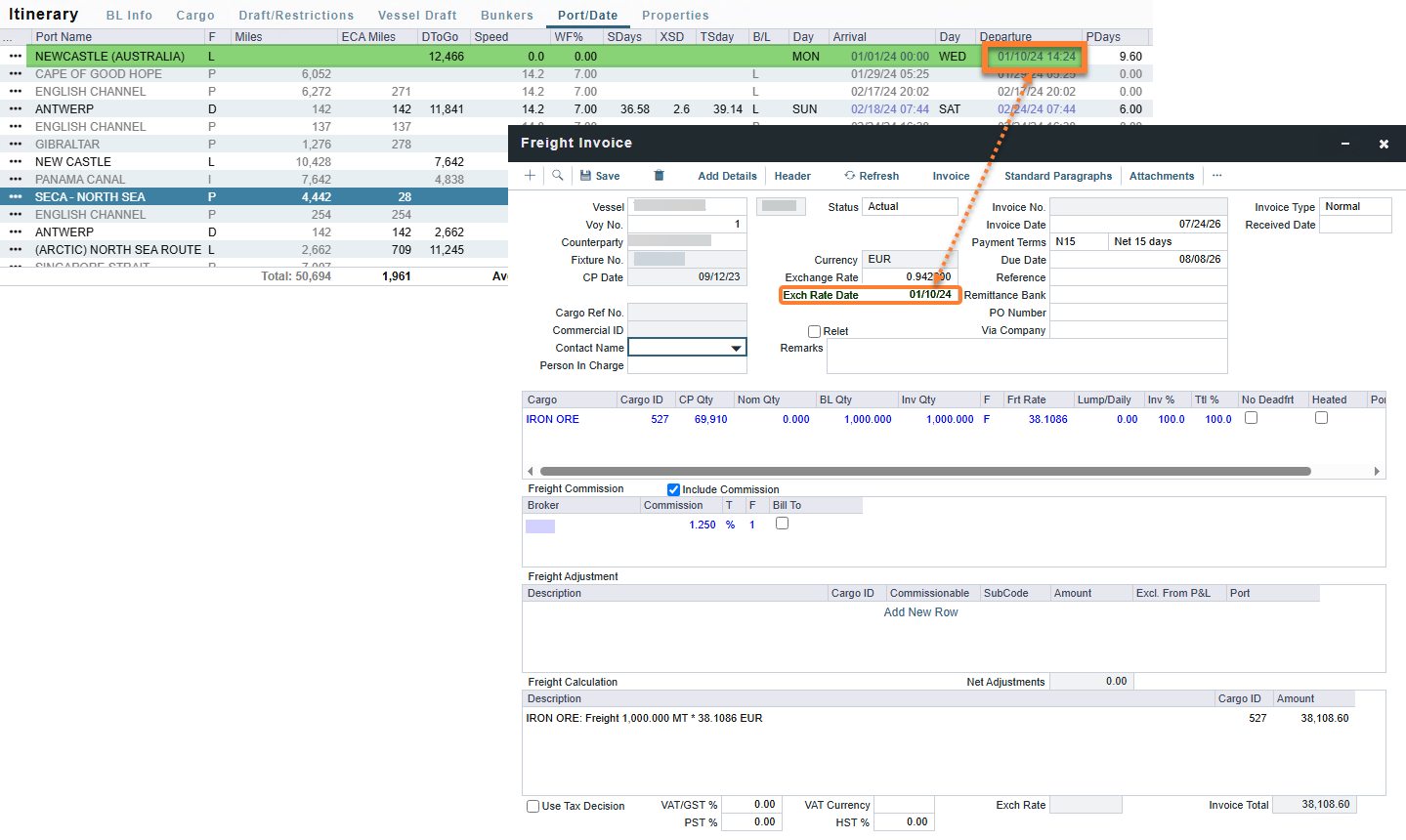
For Freight Invoices (FINV, RINV, TINV), a new FX Date rule option, Last Loading Port Departure Date, is available. When selected, IMOS sets the exchange rate date to the GMT departure date of the last loading port on the cargo — using the latest date across cargoes when an invoice includes more than one.
Trading & Risk
Risk Days, Risk Tons, and Risk Bunker Tons Populated for All Contracts Update
This feature requires a minimum schema version 53.6. With Automatic Schema Upgrades enabled, it will be available in your environment by 22 August 2026. To enable this feature sooner, or if Automatic Schema Upgrades are not enabled in your environment, contact Veson Support.
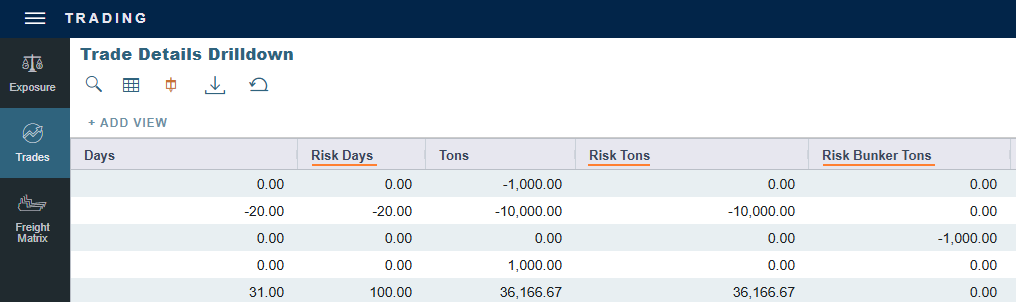
The Risk Days, Risk Tons, and Risk Bunker Tons fields are now populated for all contracts, not just those with an overridden mark-to-market month. This gives you a single, unified set of fields for tracking your risk exposure, even when the mark-to-market month differs from a contract's physical period.
24 July 2026
Operations
UK ETS Applies Northern Ireland Deduction Update
This feature is visible only where the UK ETS Carbon Calculator is already enabled with configuration flag CFGEnableUkEts and minimum schema version 53.0.
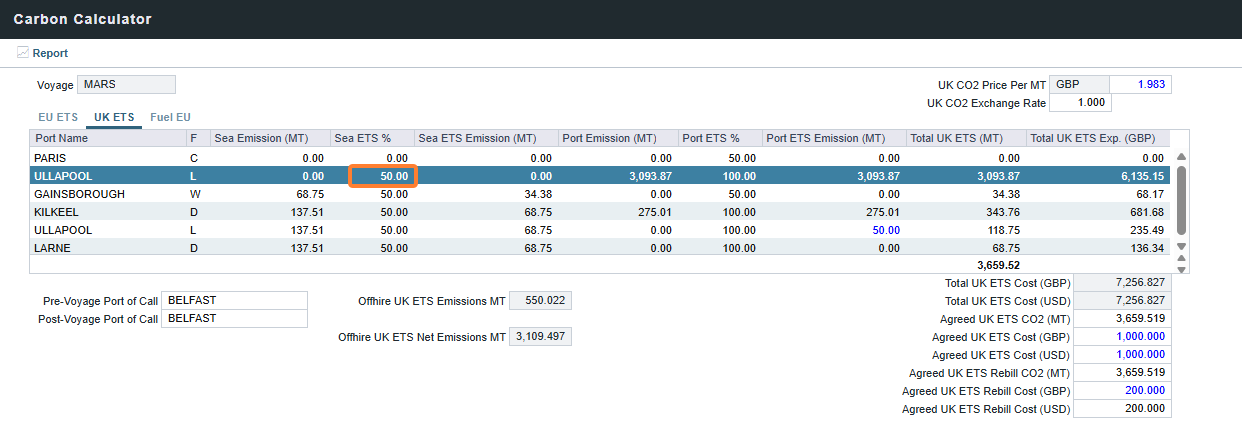
The UK ETS Carbon Calculator now applies a 50% emissions deduction for sea legs between Northern Ireland and Great Britain, per the UK ETS Northern Ireland carve-out. This keeps your UK ETS reporting aligned with the regulatory deduction for Northern Ireland routes.
Analytics
Offhire Emissions and Compliance Balance in Report Designer Update
This feature requires a minimum schema version 53.6. With Automatic Schema Upgrades enabled, it will be available in your environment by 25 July 2026. To enable this feature sooner, or if Automatic Schema Upgrades are not enabled in your environment, contact Veson Support.
Offhire emissions and compliance balance amounts for EU ETS and FuelEU are now available in Report Designer under the voyage table. You can include the Offhire ETS CO2, Offhire Rebill ETS CO2, Offhire Net Emissions, Offhire Compliance Balance, Offhire Rebill Compliance Balance, and Offhire Net Compliance Balance fields, allowing you to consolidate your voyage reports.
Chartering
Vessel Former Name in Estimates Main View + Filters Update
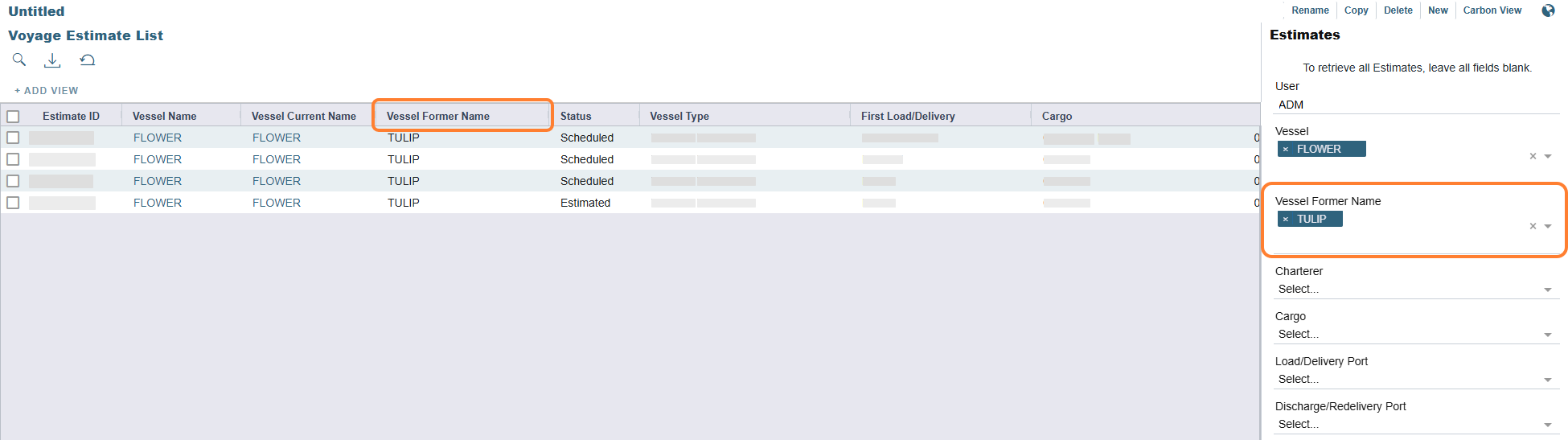
Vessel Former Name is now available as a column in the Voyage Estimate List, and replaces Vessel Current Name as a field available in the list's search panel.
17 July 2026
Trading & Risk
Mirrored Trade IDs Now Visible on Trade List Screens Update
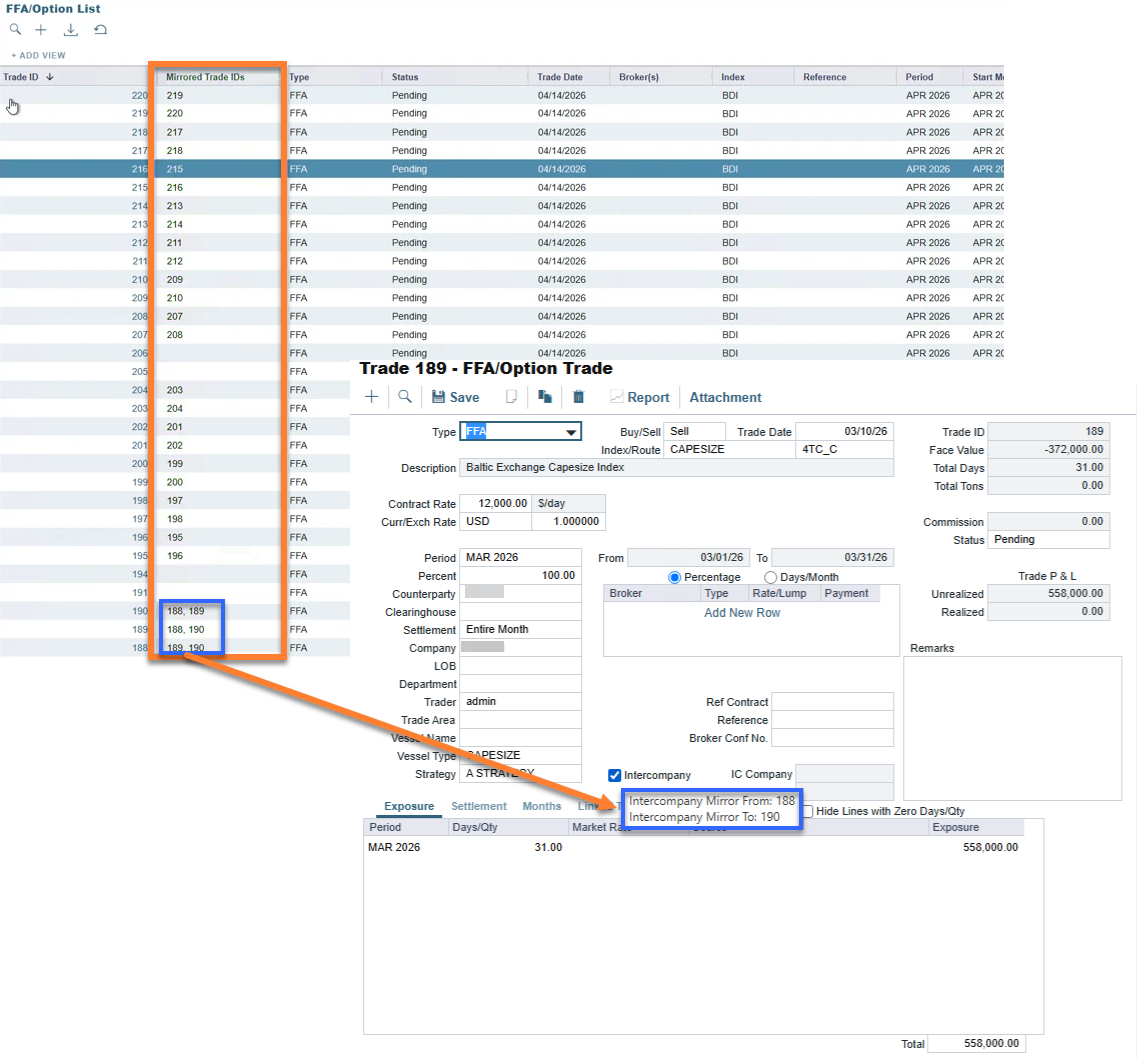
Previously, the only way to see which trades were linked as mirrored intercompany trades was to hover over the Intercompany check box on the trade form. A new Mirrored Trade IDs column is now available on the FFA/Option and Bunker Swap/Option lists, displaying a comma-separated list of linked trade IDs, including multi-trade chains, so mirrored trades are visible directly from the list view.
Trading & Risk
Period Average Settlement Now Available for FFA Options Update
Previously, FFA Options could only settle using the Entire Month, 7 Day, or 10 Day methods, even though Period Average appeared as an option in the Settlement Method drop-down menu. You can now select Period Average, and the settlement price is calculated as the average of the underlying market data prices over the period.
Trading & Risk
Override the Mark-to-Market Month for Bunker Exposure Update
You can now override the Mark-to-Market month used to value bunker exposure on TC and Cargo contracts. New M2M Delivery Month and M2M Redelivery Month fields are available on the TC Exposure grid, and a new M2M Month field is available on the Bunker Exposure table on Cargo contracts. By default, exposure values against the redelivery (TC) or nomination (Cargo) date; selecting an override values it against that month's curve instead. A new Risk Bunker Tons field shows the bunker tons at risk in the applicable month, matching Bunker Tons when no override is selected.
Chartering
UK ETS Costs Now in Voyage P&L Update
Requires schema version 53.4 or higher and must be enabled via the CFGEnableUkEts configuration flag. With Automatic Schema Upgrades enabled, it will be available in your environment by 25 July 2026. To enable this feature sooner, or if Automatic Schema Upgrades are not enabled in your environment, contact Veson Support.
UK ETS emission costs can now flow into the Voyage P&L, in addition to the Estimate P&L. A new Include in P&L check box on the UK ETS tab of the Carbon Calculator controls this, and a dedicated UK ETS tab with a Cash/N/A Settlement Type drop-down menu is available on TC and Cargo contract forms.
You can select the Cash settlement type on the UK ETS tab of a Cargo, VC In, Time Charter, or Head Fixture contract added to the Estimate or Voyage Manager. This setting allocates UK ETS expenses to a specific contract and enables cash invoices for voyages linked to that contract.
Financials
New Price Calc Methods for Carbon Allowance Period Transfers Update
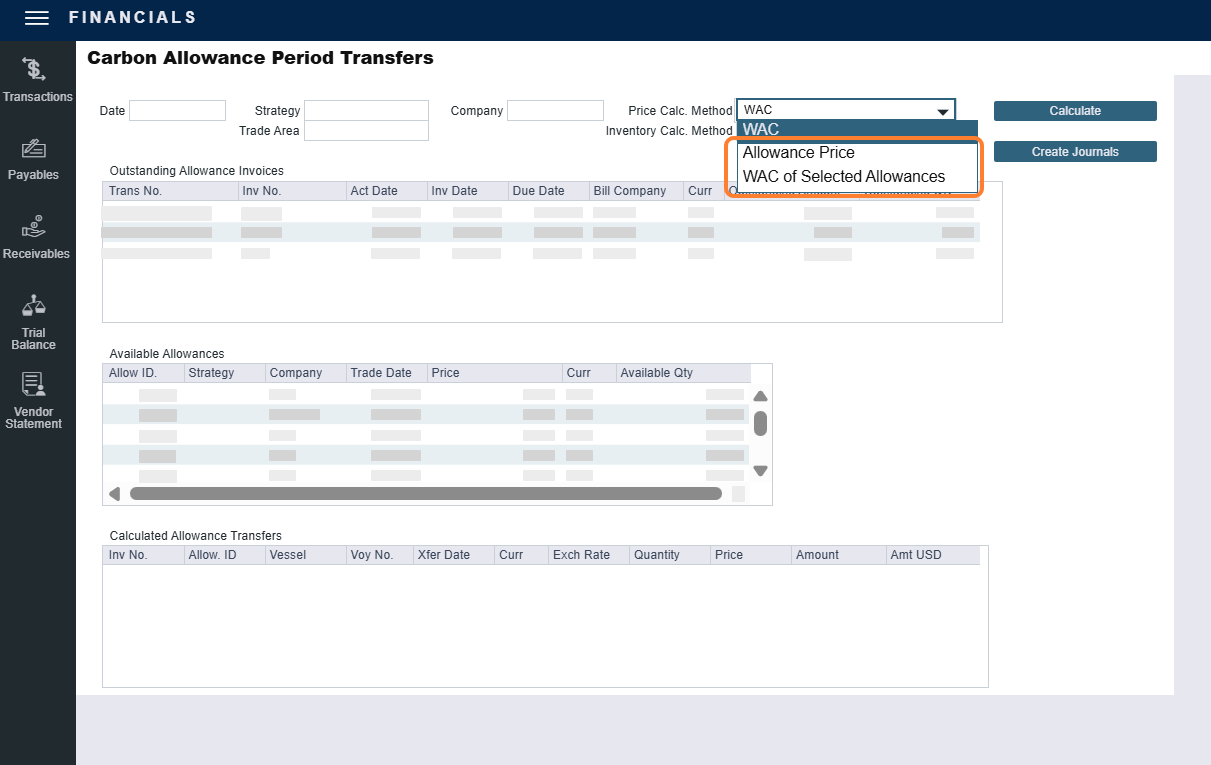
Two new options are now available for the Price Calc. Method field in the Carbon Allowance Period Transfers workflow: Allowance Price, which prices each transfer at the price of the specific allowance used from inventory, and WAC of Selected Allowances, which prices each transfer at the weighted average price of only the allowances used in the calculated transfers. Previously, this workflow only supported the Weighted Average Cost (WAC) method.
10 July 2026
Nothing new to share.
3 July 2026
Operations
Itemized Bunker Breakdown for Supplement to Delivery and Paid by TCI Owner Update
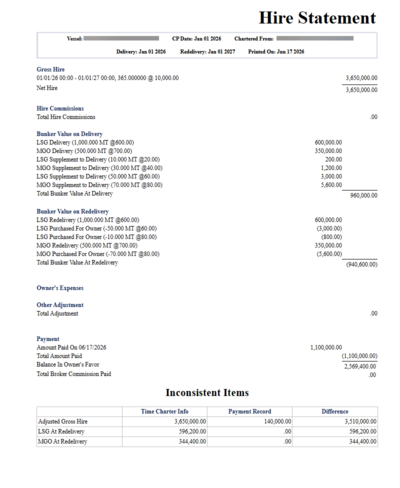
New Bunker Breakdown grids for Supplement to Delivery and Paid by TCI Owner are now available in the TC Contract Bunker Breakdown form (TCI only). You can enter itemized quantities and prices for each lifting to control how amounts are calculated in TC invoices. Previously, Paid by TCI Owner bunkers were deducted at a weighted average price with no per-lifting pricing, and Supplement to Delivery quantities did not appear in Bunker Breakdown at all. When breakdown entries are provided, TC invoices, Hire Statements, SOA, and SOA Recap use the itemized data; rows with a breakdown are locked in the bunkers grid to prevent unintended edits.
Chartering
UK ETS Costs Now in Voyage Estimate P&L Update
Requires schema version of at least 53.4 and must be enabled via CFGEnableUkEts. With Automatic Schema Upgrades enabled, it will be available in your environment by 25 July 2026. To enable this feature sooner, or if Automatic Schema Upgrades are not enabled in your environment, contact Veson Support.
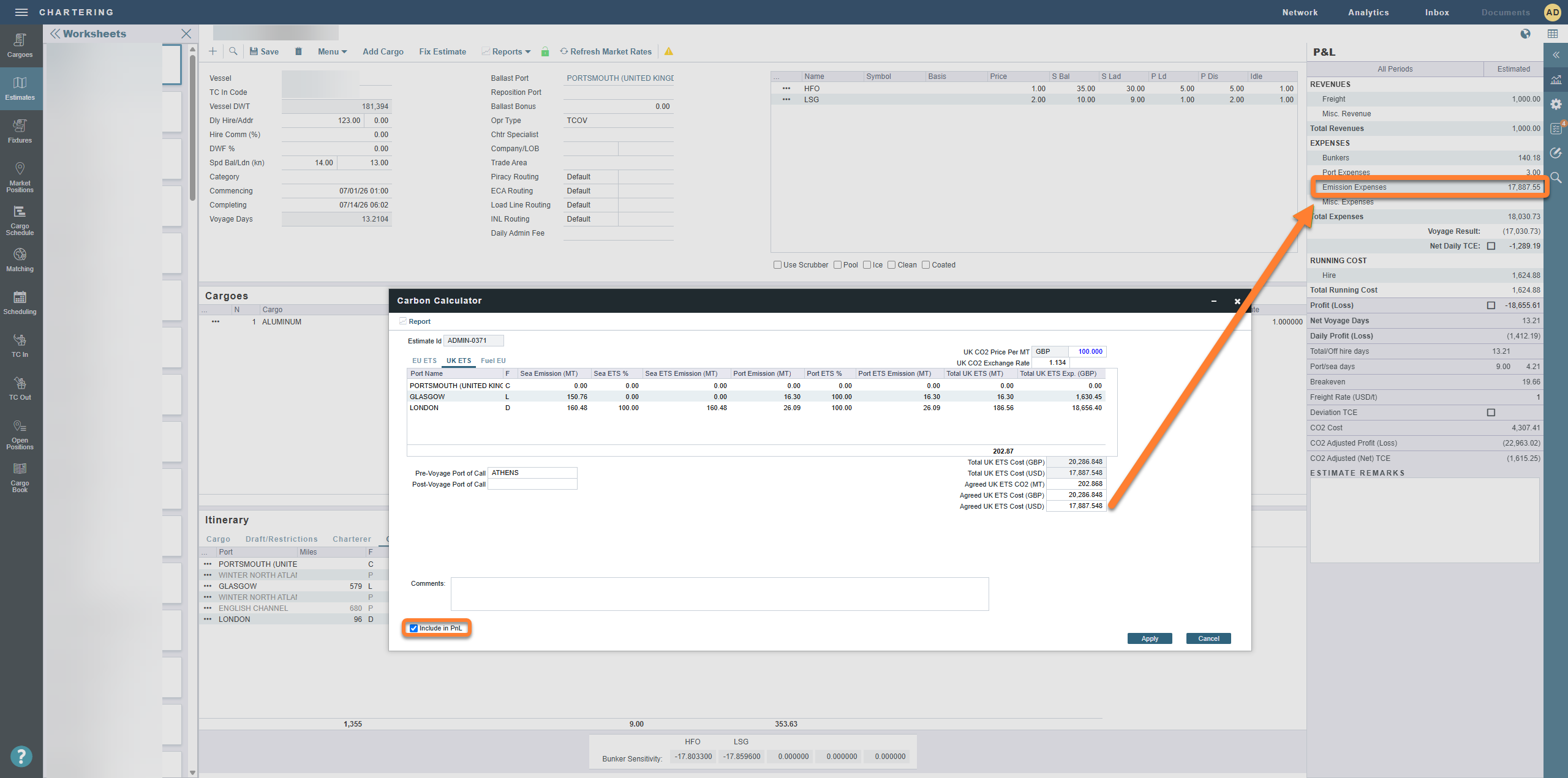
UK ETS emission costs can now flow into the Voyage Estimate P&L for a complete view of emissions trading impact. A new Include in P&L check box on the UK ETS tab of the Carbon Calculator controls this, and a dedicated UK ETS tab with a Cash/N/A Settlement Type drop-down menu is available on TC and CP Terms Details forms. The Estimate Carbon View adds a UK ETS CO2 (MT) field, and Net Emissions Expense now includes UK ETS alongside EU ETS and Fuel EU.
The following new configuration flags control default pricing, P&L inclusion, and settlement types:
-
CFGUKETSDefaultPrice - defaults UK ETS settlement type on TC Outs and Cargoes
-
CFGDefaultIncludeUKETSExpInPnl - defaults UK ETS settlement type on TC Ins and VC Ins
-
CFGDefaultTCOutCargoUKETSSettlementType - defaults UK ETS price in new estimates
-
CFGDefaultTCInVCInUKETSSettlementTypecontrol - defaults UK ETS Include in PnL setting to checked for new estimates and copied estimates.
June
26 June 2026
Chartering
Enable UK ETS Calculator new feature
This feature requires the configuration flag CFGEnableUkEts to be enabled.
This feature also requires a minimum schema version of 50.2. With Automatic Schema Upgrades enabled, the feature is already available. If Automatic Schema Upgrades are not enabled in your environment, contact Veson Support.
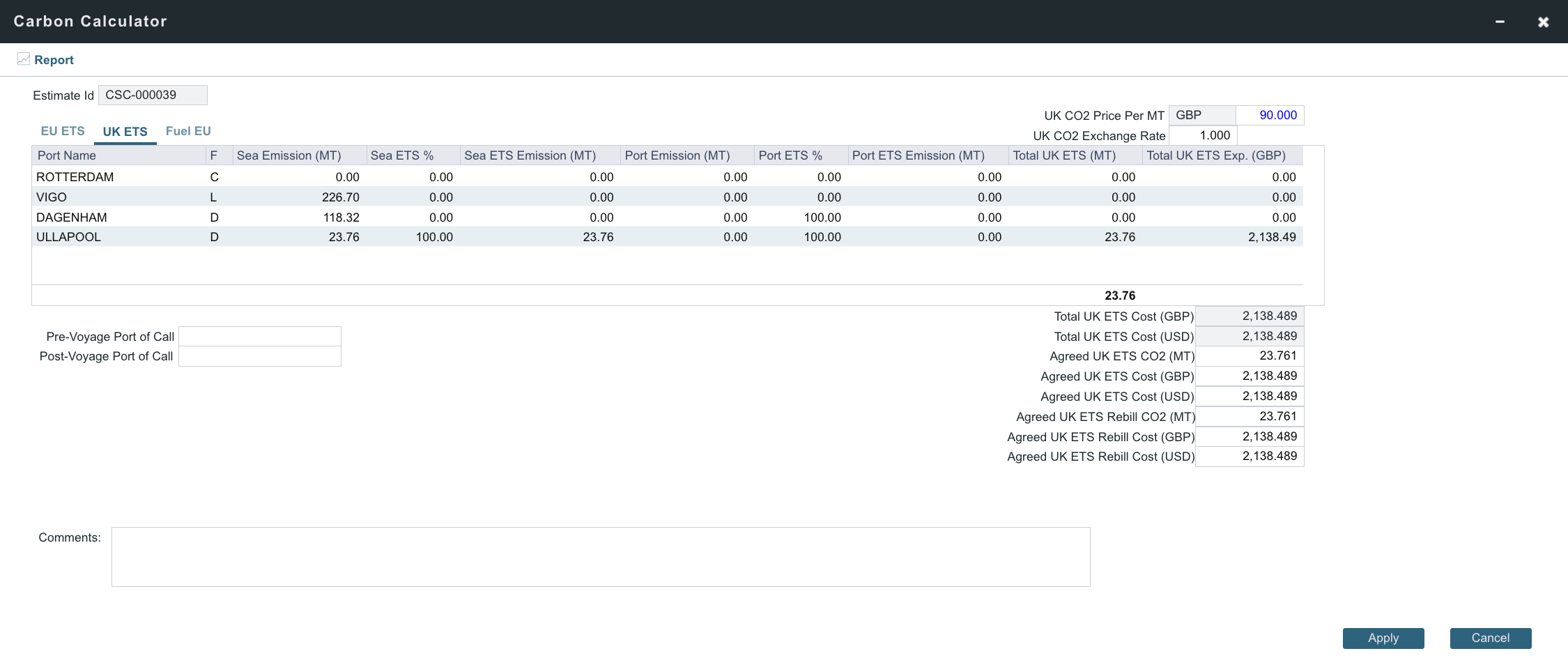
With the UK Emissions Trading Scheme extending to maritime, IMOS now provides a dedicated UK ETS commercial calculation. Operators can value UK ETS exposure on estimates and voyages under the new regulation, and manage the resulting cost alongside existing EU ETS and FuelEU in the Carbon Calculator.
19 June 2026
Nothing new to share.
12 June 2026
Nothing new to share.
5 June 2026
Trading & Risk
Select start month and route for TC exposure Update
This feature requires a minimum schema version of 53.3. With Automatic Schema Upgrades enabled, it will be available in your environment by 6 June 2026. To enable this feature sooner, or if Automatic Schema Upgrades are not enabled in your environment, contact Veson Support.
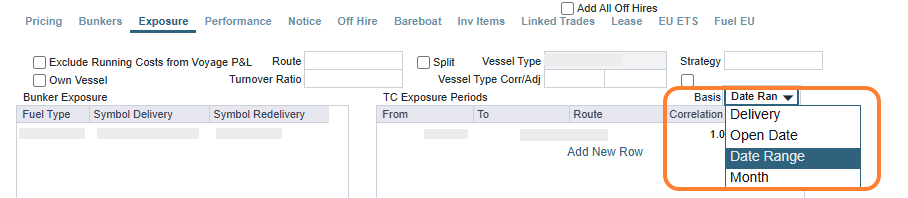
A new basis called Date Range is now available in the TC Exposure Period table of Time Charter Contracts. Using this basis, you can input a date range with From and To dates and select the Route, Correlation, and Route Month used for Mark-to-Market calculations in Trading & Risk.
Route Month is a new concept available for all TC Exposure Period basis types, enabling you to price against a risk month on the route curve that may differ from the exposure month. To capture the selection of the risk month in Trading views, a new field called Risk Days appears in the Trade Details and Trading Summary views. Risk Days include all contract days marked to market against a curve price in that month.
May
29 May 2026
Chartering
TC Exposure Period Bucketing Now Conserves Total Exposure Days Update
TC Exposure period bucketing now automatically distributes exposure days across months based on contract duration and your inputs, while preserving the total day count. A new exposure basis, Month (Preserve Total), is now available in the TC Exposure Periods grid. This basis allows you to push exposure into a month of your choice while preserving the total exposure duration on the Time Charter Contract. You can designate a target month, and the system draws days from adjacent months as needed, ensuring no days are gained or lost. Previously, days could be entered arbitrarily without rebalancing, causing inconsistent totals. This eliminates manual intervention and keeps exposure calculations aligned with delivery and redelivery dates.
Operations
Enable FuelEU Prioritization Calc Checkbox by Default Update
This feature requires the configuration flag CFGDefaultPrioritizedFuelEUCalc to be enabled.
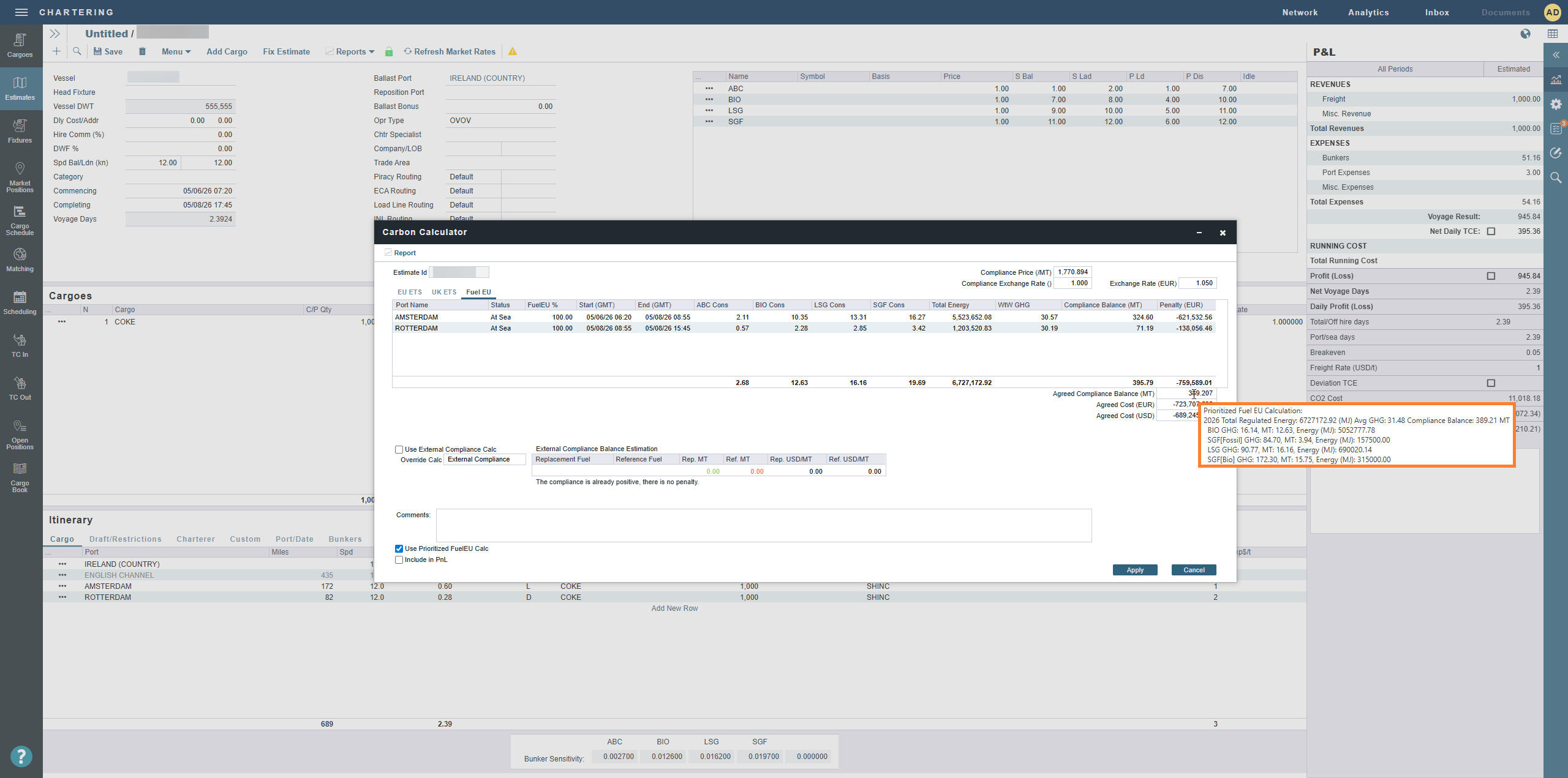
The new CFGDefaultPrioritizedFuelEUCalc configuration flag has been added to automatically enable the FuelEU Prioritization Calc checkbox by default in voyages. This flag eliminates the need for repeated manual selection, improving efficiency and reducing the risk of oversight.
29 May 2026
Chartering
Vessel Current Name Field Added to Estimates Update
This feature requires a minimum schema version 53.2. With Automatic Schema Upgrades enabled, it will be available in your environment by 6 June 2026. To enable this feature sooner, or if Automatic Schema Upgrades are not enabled in your environment, contact Veson Support.
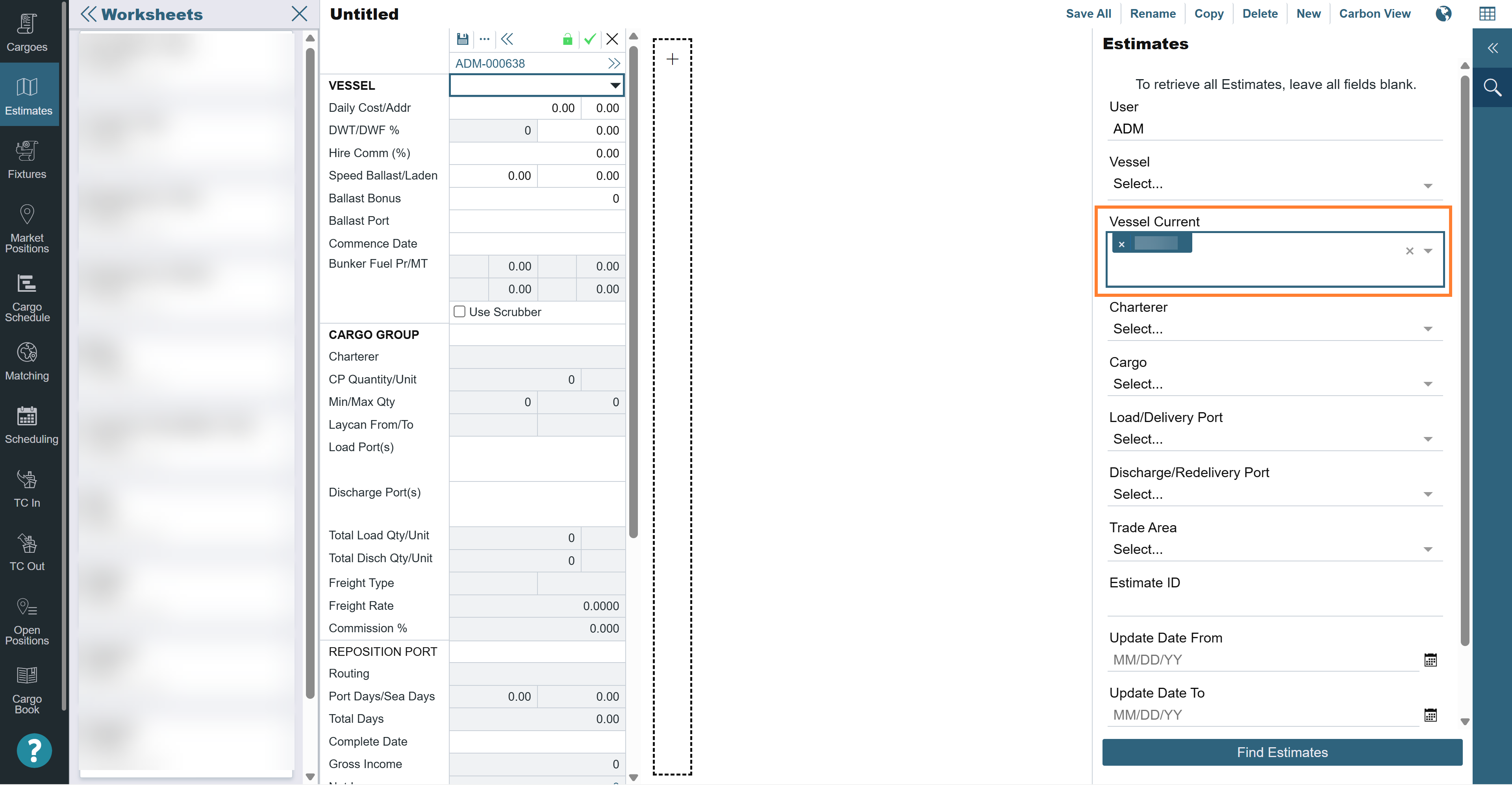
A new Vessel Current Name field has been added to the Estimates list view, reflecting the vessel’s most recent name after any rename. Available as a selectable column, a filter option in the Estimates filter panel, and is annotated for use in Report Designer. The existing Vessel Name field continues to display the name assigned at estimate creation. Charterers can now cross-reference vessels by current name without leaving Estimates, reducing friction in vessel renaming workflows.
22 May 2026
Operations
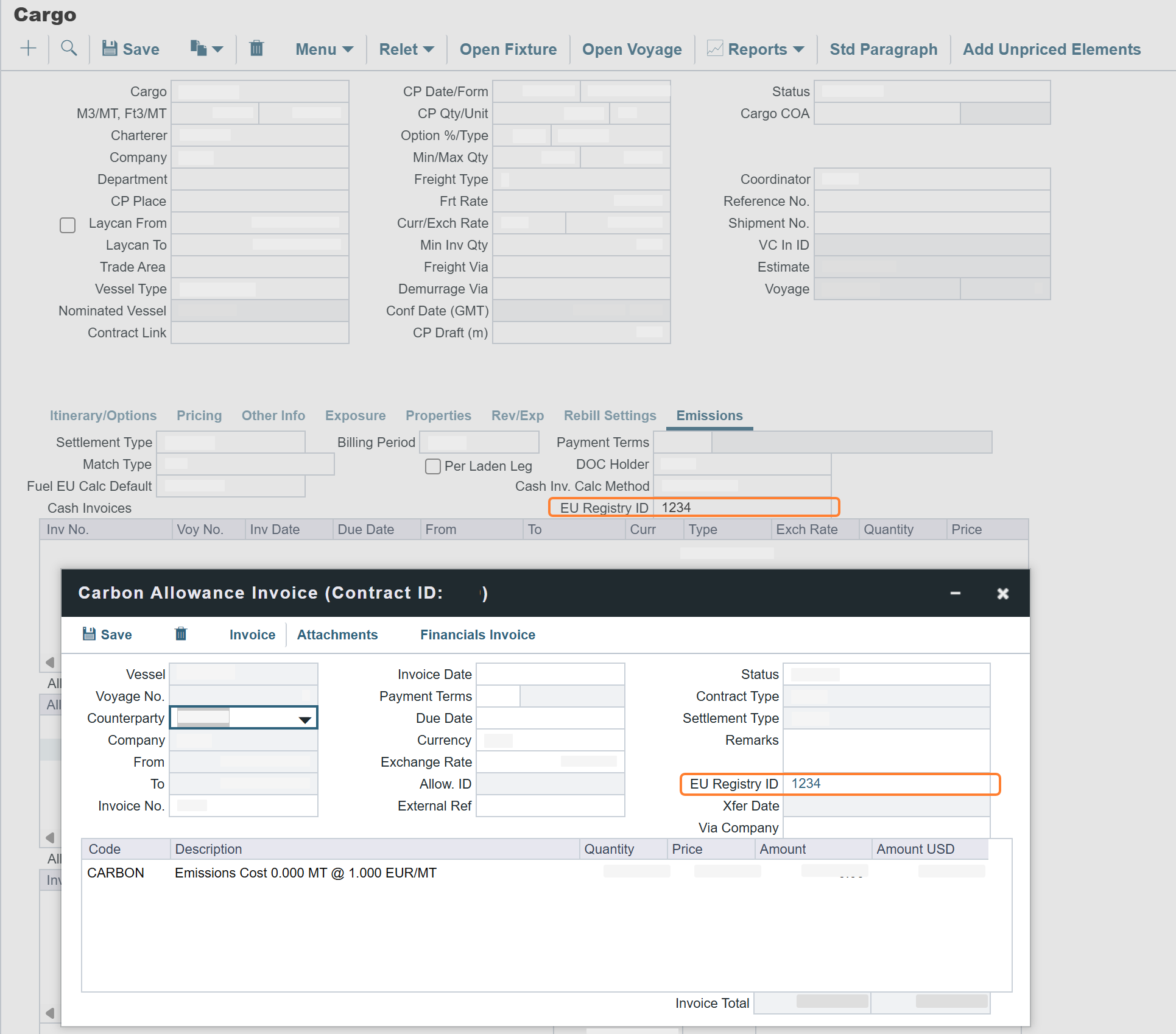
EU Registry ID Added to Contract Emissions Tabs with Carbon Allowance Invoice Defaulting Update
This feature requires a minimum schema version 52.8. With Automatic Schema Upgrades enabled, it will be available in your environment by 6 June 2026. To enable this feature sooner, or if Automatic Schema Upgrades are not enabled in your environment, contact Veson Support.
An EU Registry ID field has been added to the Emissions and EU ETS tabs on TC, Cargo, and VC IN contracts. The field is available when a DOC Holder is selected and is filtered to the registry accounts applicable to that company. When you create an Allowance Invoice, the EU Registry ID is automatically copied from the contract. For TC IN and VC IN contracts, this occurs when the contract's DOC Holder matches the invoice's Counterparty; for TCO and Cargo contracts, this occurs when the contract's DOC Holder matches the invoice's Company. For TCI cash emission invoices, when a DOC Holder is set on the TCI contract, the DOC Holder now defaults as the Counterparty on the invoice. This ensures accurate counterparty assignment on emission-related invoices, supporting compliance with EU ETS reporting requirements.
15 May 2026
Trading & Risk
Implied Market Exposure for Index-Linked TC Contracts Update
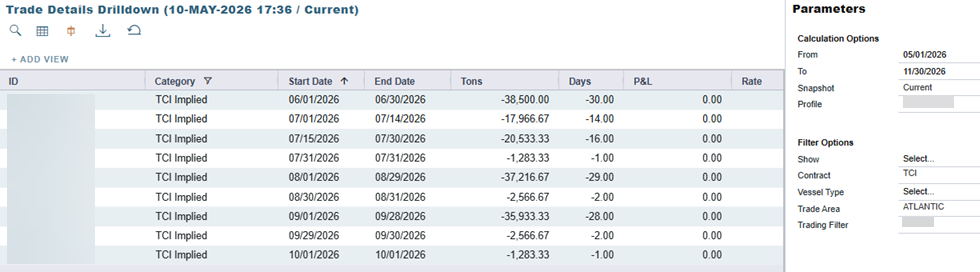
IMOS Trading now displays implied market exposure for Time Charter contracts with index-linked floating rates. Two new exposure categories appear in the Trading & Risk Exposure view: TCI Implied and TCO Implied. Both show calculated Days and MT values for only the unpriced portion of each index-linked contract period. For example, when a contract's floating rate is based on a monthly average and 10 days have already been priced, the implied exposure reflects only the remaining unpriced days. This feature is disabled by default. To enable it, navigate to the Trading module → select Trading Profile → Profile Flags → select Display Implied Market Exposure for TC Contracts → Save.
Financials
Period-Based FuelEU Pool Journals Now Supported Update
This feature requires the configuration flag CFGEnablePeriodBasedFuelEUJournals to be enabled.
The new CFGEnablePeriodBasedFuelEUJournals flag enables period-based FuelEU Pool Journals. When enabled, you can specify a date range when journaling Compliance MT on a TC’s FuelEU tab, splitting total Compliance MT across reporting periods (e.g., across two calendar years). The actual P&L reflects the full FuelEU penalty, while the posted amount reflects only MT journaled to date, preserving accrual accuracy until remaining MT is journaled in a subsequent period.
8 May 2026
Chartering
Fixed Estimate Locking Update
This feature requires the configuration flag CFGEnableFixedEstimateLocking to be enabled.
A new configuration flag, CFGEnableFixedEstimateLocking, has been added to automatically lock fixed estimates and preserve saved bunker ROB values from being recalculated. When enabled, a red lock indicator appears on the estimate, and saving is blocked until the Lock Fixed Estimate setting is unchecked, which restores bunker recalculations.
Vessel Card Consumption Warning Update
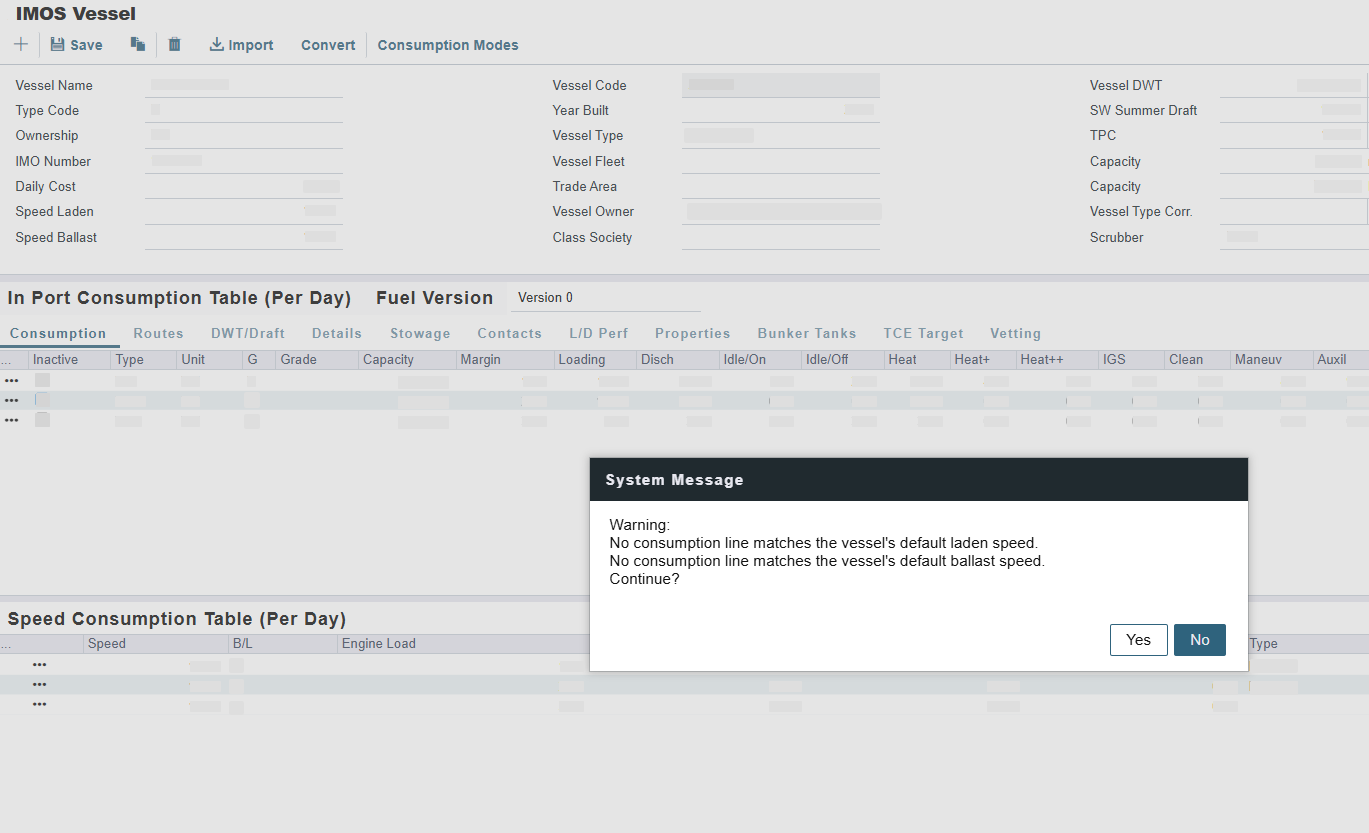
The Vessel form now displays a warning for all ownership types when a vessel's default ballast or laden speed has no matching entry in the speed consumption table.
Voyage Estimator Speed/Consumption Validation Update
A new validation option has been added to the configuration flag CFGVoyestCriteriaForZeroProfit – SpeedNotInConsTable. When configured, SpeedNotInConsTable raises a validation error on an estimate if the default ballast or laden speed does not match an existing entry in the vessel's speed consumption table, and the P&L results are cleared to indicate the error condition.
Invoicing & Payments
Remove the invoices from the Allowance Transfer dropdown list once the outstanding balance is zero Update
Allowance invoices that have been fully transferred no longer appear in the dropdown list on the Carbon Allowance Transfer form, making it easier to find invoices with remaining quantity available to transfer.
1 May 2026
Nothing new to share.
April
28 April 2026
Operations
Shared Comments Section Added to the Carbon Calculator Update
The Carbon Calculator now features a shared Comments section available across both FuelEU and EU ETS tabs on the Estimate and Voyage. Comments are retained when the calculator is closed and are automatically carried forward when an Estimate is fixed to a Voyage, ensuring all carbon-related notes remain in one place throughout the workflow.
24 April 2026
Nothing new to share.
16 April 2026
Financials
Off-Hire FuelEU and EU ETS charges now flow through to Voyage P&L, TC Invoices, and Pooling Journals Update
Requires schema version 51.8 or higher. Enabled CFGEnableOffhireFuelEUPnl to surface FuelEU off-hire charges in the Voyage P&L and on TC invoices, and CFGEnableOffhireEmissionsPnl to do the same for EU ETS off-hire emission expenses. The two flags operate independently – enable each one as needed for the regulations that apply to your operations.
Off-hire periods generate emission obligations under both EU ETS and FuelEU Maritime. With this release, those costs will flow into the Voyage P&L, TC invoices, and FuelEU pooling journals – giving you a complete financial picture of your off-hire emissions exposure.
-
Voyage P&L visibility: Off-hire emission expenses calculated from the Delays form are now reflected in the Voyage P&L when the relevant flag is enabled. (CFGEnableOffhireFuelEUPnl For FuelEU; CFGEnableOffhireEmissionsPnl for EU ETS).
-
FuelEU Pooling journals: Off-hire FuelEU charges are correctly accounted for in pooling journal entries.
-
Incremental invoicing and multi-currency are fully supported across TCI, TCI Head Fixture, TCO, and freight invoice workflows.
10 April 2026
Operations
CTMS Data Capture for LNG Cargo Handling new feature
A schema update to version 52.4 is required to use this feature.
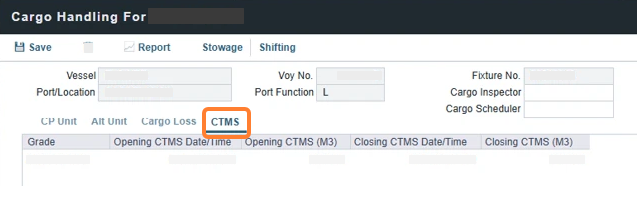
A new CTMS tab with Opening/Closing CTMS Date/Time and Volume (M3) fields is now available on the Cargo Handling form for LNG carrier vessels. These fields allow you to capture CTMS data for more precise BOG calculations and improved cargo operational accuracy.
Chartering
FuelEU External Compliance Cost Calculator Update
This feature requires the configuration flag CFGEnableFuelEUAltComplianceCostCalc to be enabled. A schema update to version 52.4 is required to use this feature.
You can now use the External Compliance Calculator, available on the FuelEU tab of the Carbon Calculator, to determine the cost of zeroing out a vessel’s FuelEU compliance balance. The calculator computes replacement and reference fuel quantities and prices, and can drive the Agreed Cost (USD) and Emissions Expenses P&L values.
Automated Pre-Voyage Port of Call in Estimates Update
The Pre-Voyage Port of Call field in the Estimate form now updates automatically when commencement data is updated. The automation reduces manual data entry, improves data consistency between estimates and voyages, and ensures more accurate P&L forecasting from the estimate stage.
ECA Miles Column Now Available on the Voyage Estimator Port/Date Group Tab Update
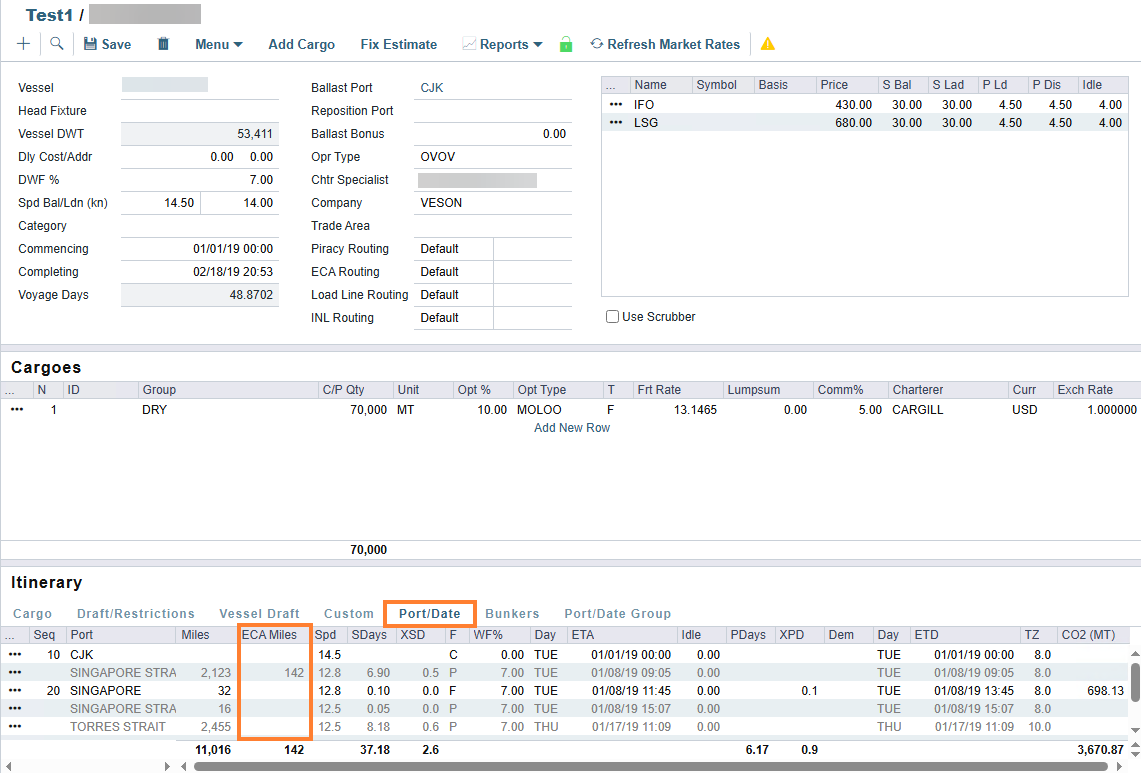
This feature requires the configuration flag CFGDisplayECAMilesInItinerary to be enabled.
Now the ECA Miles column appears directly on the Port/Date Group tab in read-only mode. This improvement reduces unnecessary navigation and makes ECA distance data more accessible during voyage estimation.
Total Discharge Quantity added to Estimator Column View Update
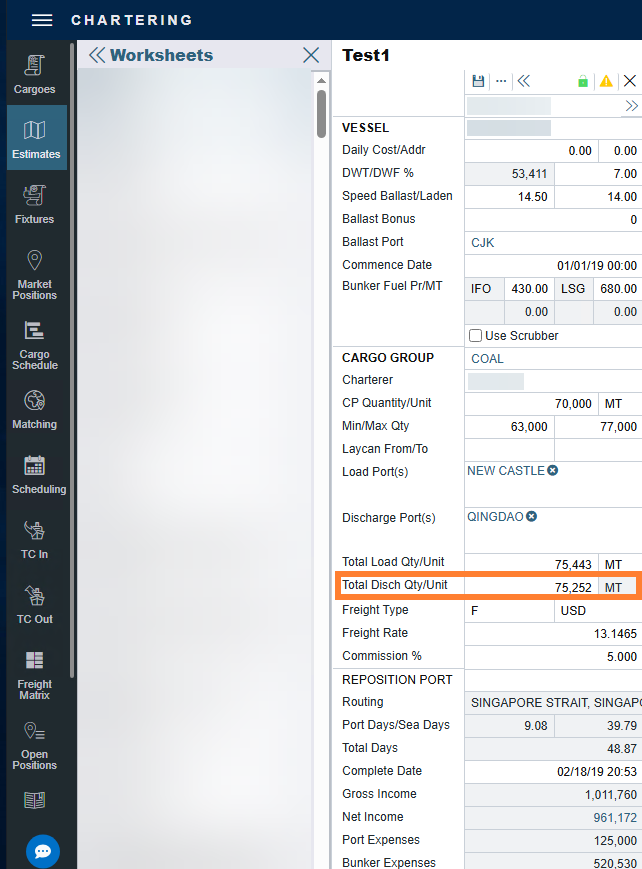
This feature requires the configuration flag CFGShowDischQuantityInEstColumn to be enabled.
A new Total Disch Qty/Unit field is now available directly in the column view, mirroring the existing Total Load Qty/Unit functionality. When multiple discharge ports exist, the value reflects the sum across all ports.
Access Rate Tables for Scale Table Freight in Cargoes and COAs Update
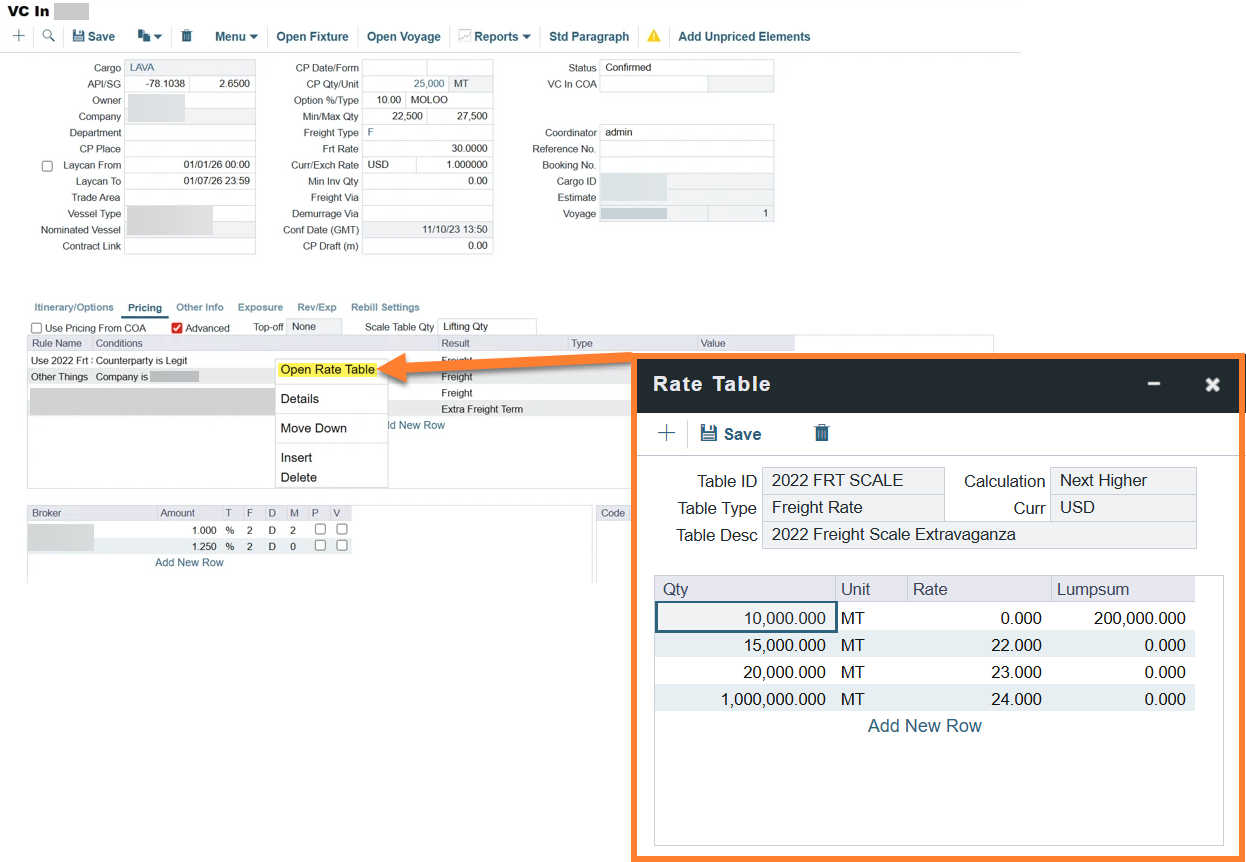
On the Pricing tab of Cargoes and COAs, you can right-click a pricing line in the Advanced Pricing Rules grid to open the Rate Table associated with a Scale Table-type Freight results. The Rate Table opens in read-only mode, so you can view rate structures without requiring direct read access to Rate tables. This context menu option appears only on lines where a Scale Table Rate Table is applicable.
Analytics
FuelEU Itinerary-Level Fields for Voyages and Estimates Update
A schema update to version 52.2 is required to use this feature.
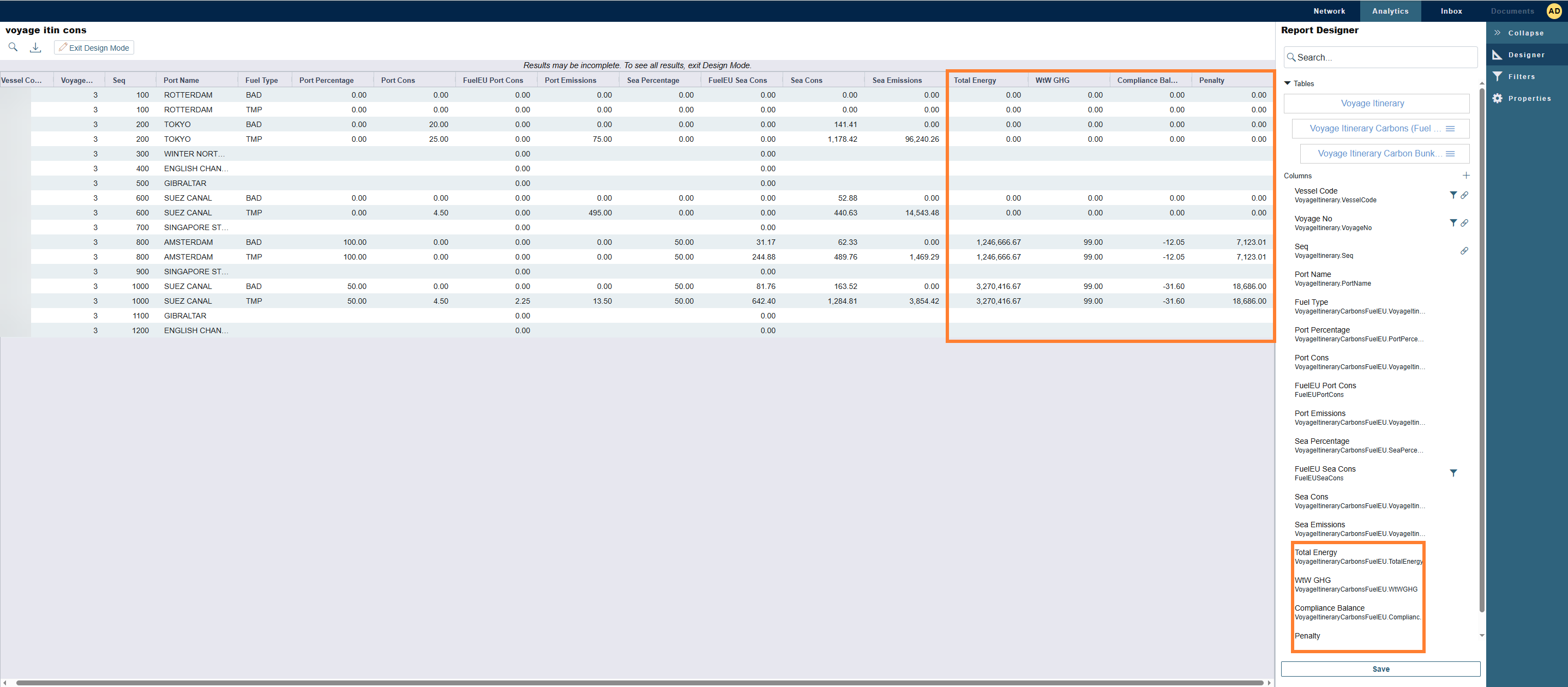
Four FuelEU emissions fields have been added to the EstimateItineraryCarbon and VoyageItineraryCarbon tables in Report Designer: Total Energy, WtW GHG, Compliance Balance, and Penalty. These fields enable FuelEU compliance monitoring at the itinerary line level for voyages and estimates. These fields apply to FuelEU records only and remain empty for EU ETS entries. To populate the data, you must resave all historical voyages.
3 April 2026
Nothing new to share.
March
27 March 2026
Chartering
Enhanced FuelEU Calculation Type Configuration Update
This feature requires the configuration flag CFGDefaultFuelEUCalcType to be enabled.
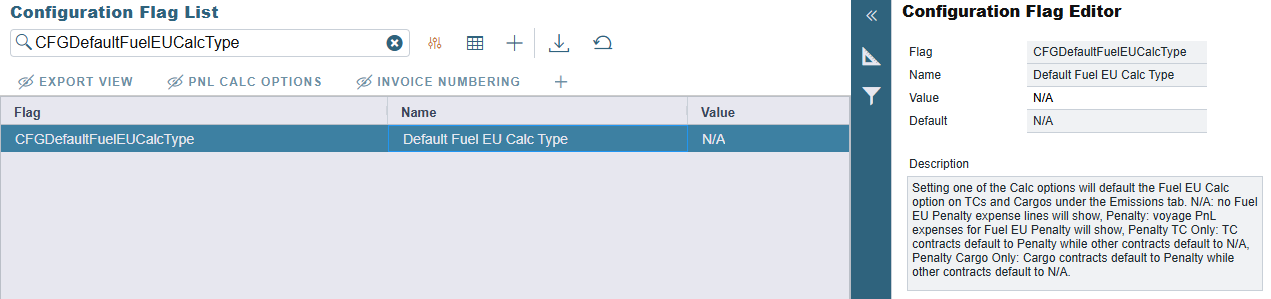
There are now two new options for the CFGDefaultFuelEUCalcType configuration flag: Penalty TC Only, which applies the Penalty default only to Time Charter contracts, and Penalty Cargo Only, which applies the Penalty default only to Cargo contracts, allowing you to set different FuelEU calculation defaults based on contract type. This enhancement improves user experience, reduces manual data entry, and prevents PnL reporting inconsistencies. The existing N/A and Penalty options remain unchanged and continue to apply to all contract types. Contracts created before the configuration flag is set will not be updated, as this functionality only affects new contracts.
20 March 2026
Nothing new to share.
13 March 2026
Invoicing & Payments
Multi-Currency Support for Special TC Invoices Update
This feature requires the configuration flag CFGEnableSpecialInvoiceCcySelection to be enabled.
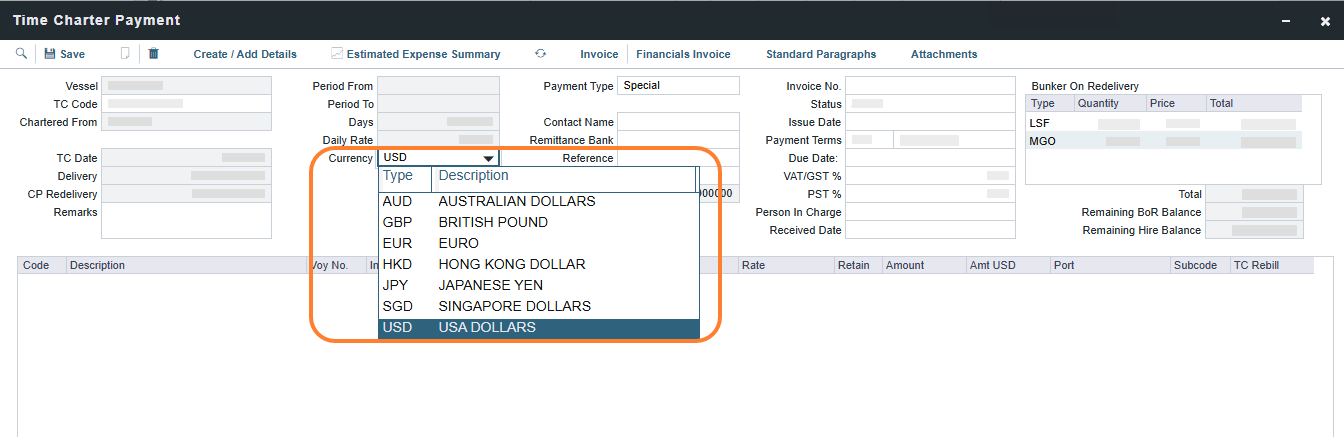
You can now select a different currency for Special type invoices on Time Charter (TC) contracts that differ from the contract currency. This enhancement allows you to pay vessel owners in the expected currency (e.g., EUR) for FuelEU penalties while maintaining standard invoices in the contract currency (e.g., USD) for improved operational and regulatory compliance. This functionality is controlled by the new configuration flag CFGEnableSpecialInvoiceCcySelection.
6 March 2026
Distances
New ECA Fuel Zone Added - Denmark 12NM Bornholm ECA Update
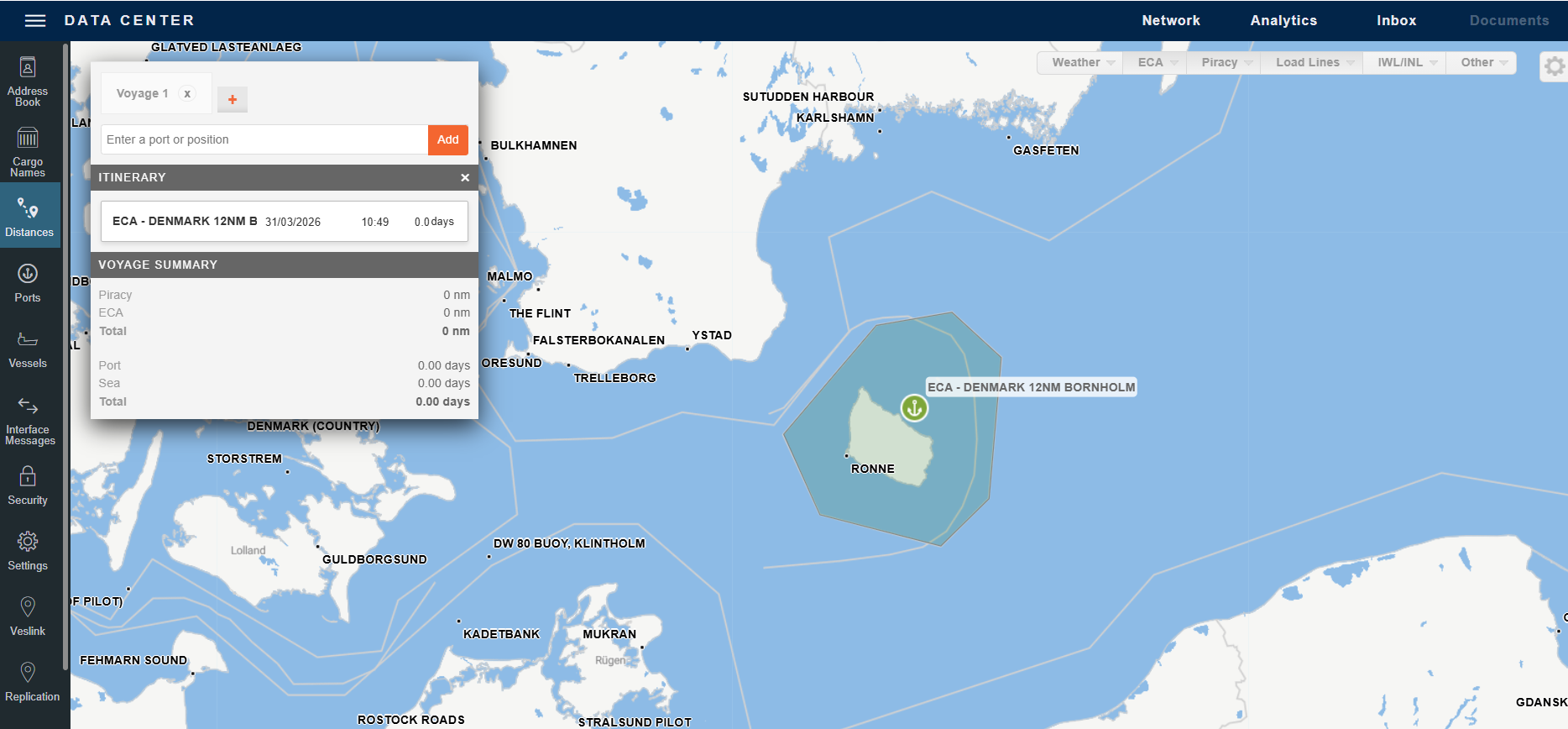
The new ECA zone: DENMARK 12NM BORNHOLM now covers Rønne and Greenland, ensuring accurate fuel consumption, ROB, and P&L calculations for voyages passing through these areas. This zone will only apply if the ECA - Baltic Sea zone is not enabled in your Fuel Zone setup. When enabled, it takes precedence over the North Sea SECA in overlapping areas.
Analytics
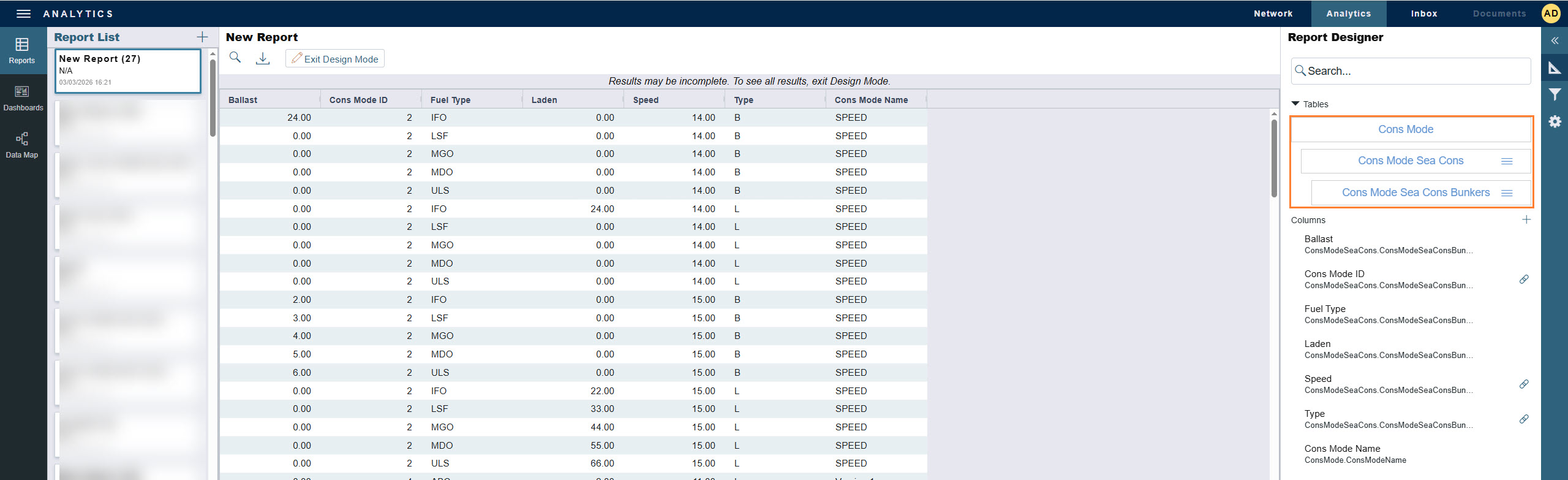
New in Report Designer: Daily Sea & Port Consumption fields available in the Cons Mode table Update
You can now report on Daily Sea and Port Consumption values by fuel mode or fuel type using the Cons Mode Sea Cons Bunkers table.
Operations
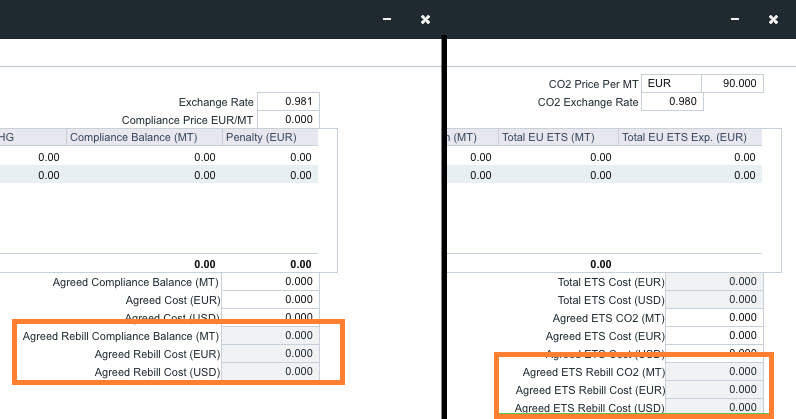
New in Sustainability: Carbon Calculator - Agreed Rebill Fields for FuelEU and EU ETS Update
This feature requires the configuration flag CFGEnableCarbonCalcAgreedRebill to be enabled.
A new setting adds the Agreed Rebill Cost and Emission fields under the FuelEU and EU ETS tabs in the Carbon Calculator. These agreed amounts override the Rebill Emissions Exp in the PnL and flow into invoicing.
Distances
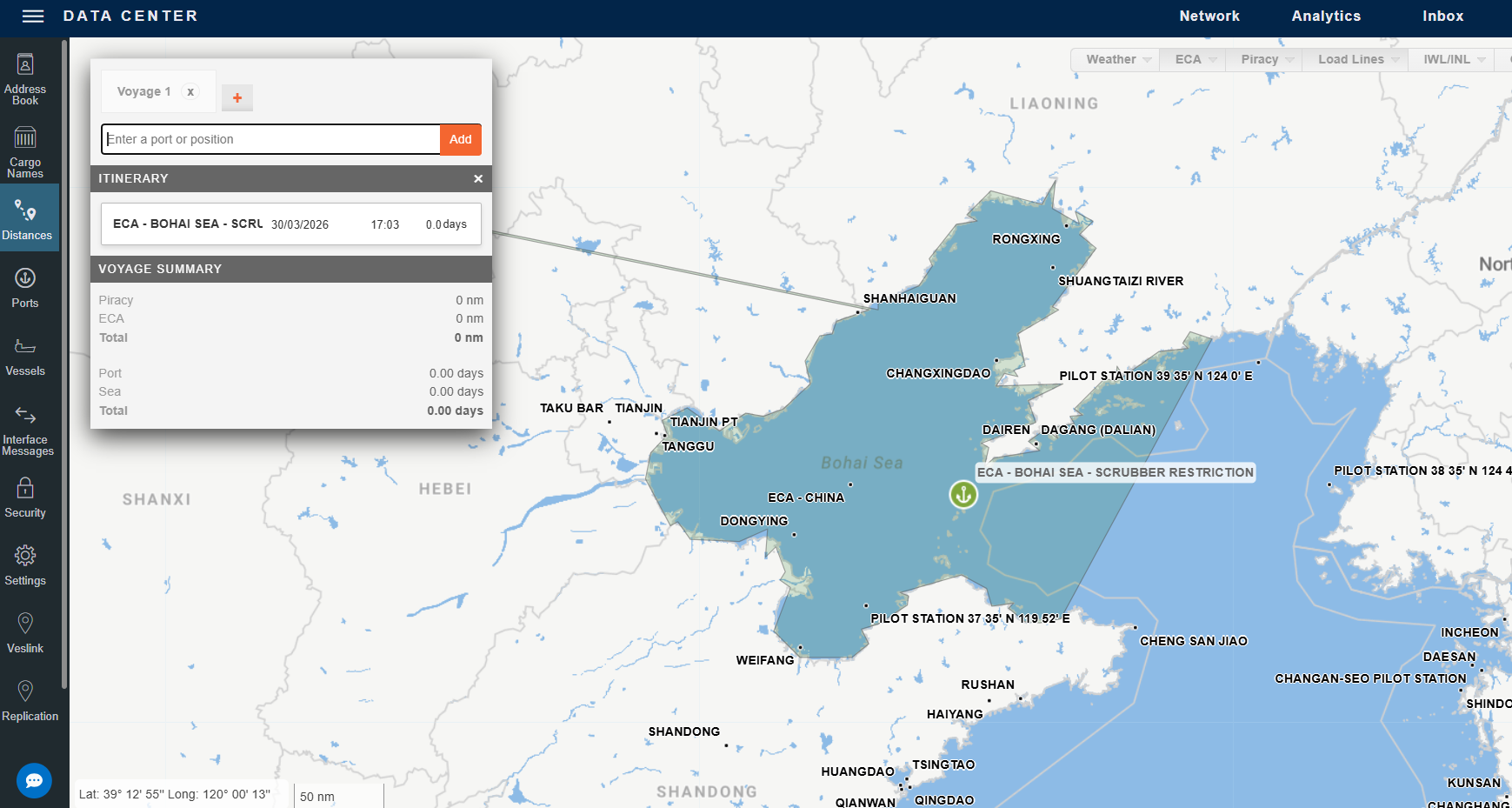
New ECA Zone: Bohai Sea with Scrubber Restriction Update
A new ECA zone has been added: ECA - BOHAI SEA - SCRUBBER RESTRICTION. This ECA zone has a scrubbers allowed value of Closed Loop and is now available to configure in Fuel Zones. When configured, this ECA zone prioritizes scrubber settings over overlapping zones, notably ECA - China and ECA - Bohai Sea, enabling the use of more restrictive scrubber requirements in this region. If you are enabling this zone in your Fuel Zone setup, you can now mark the old ECA - Bohai Sea fuel zone inactive, as it will never apply. If you have auto-distance updates enabled, this will appear in your Ports List and Fuel Zones page after the auto-update runs on Friday.
Chartering
TCO Bunker Adjustment in Estimate P&L Update
This feature requires the configuration flag CFGEstimateTCOBnkrAdj to be enabled and a schema update to version 51.9.
TCO Estimates now contain grids to enter estimated delivery and estimated redelivery bunker information, improving forecast accuracy for voyage profitability at the estimate stage. These values are carried from TCO estimates to TCO contracts on fixing. The values are used to calculate a TCO bunker adjustment line in the Estimate P&L based on delivery and redelivery port ROBs. The configuration flag CFGTCOBunkerAdj enables the TCO bunker adjustment. The configuration flag CFGAlwaysShowTCOBunkerAdj enables the redelivery component.
Distances
New Piracy Zone: JWLA-033 Indian Ocean Update
New piracy zone added: PIRACY-JWLA-033-INDIAN-OCEAN. This zone is now available to use in avoidance settings and routing preferences. This updated zone is meant to replace the zones PIRACY-JWLA-032-INDIAN-OCEAN and PIRACY-JWLA-027-PERSIAN-GULF. We will deactivate these zones in the coming weeks and will announce when we have done so.
February
27 February 2026
Nothing new to share.
20 February 2026
Analytics
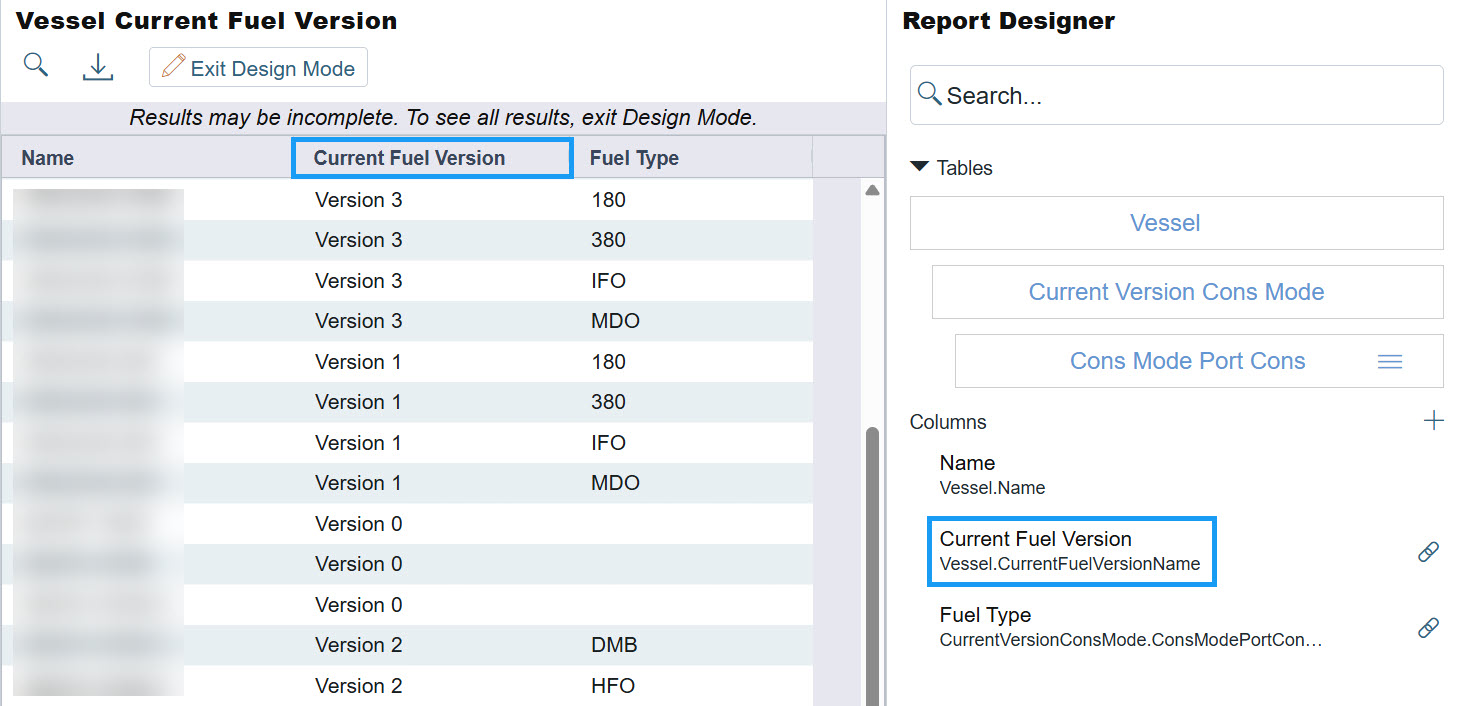
New in Report Designer: Current Fuel Version Update
A Current Fuel Version column has been added to the Vessel table in Report Designer, reflecting the newest Fuel Version used by a vessel.
13 February 2026
Operations
New in Sustainability: Off-Hire Emissions Calculation Update
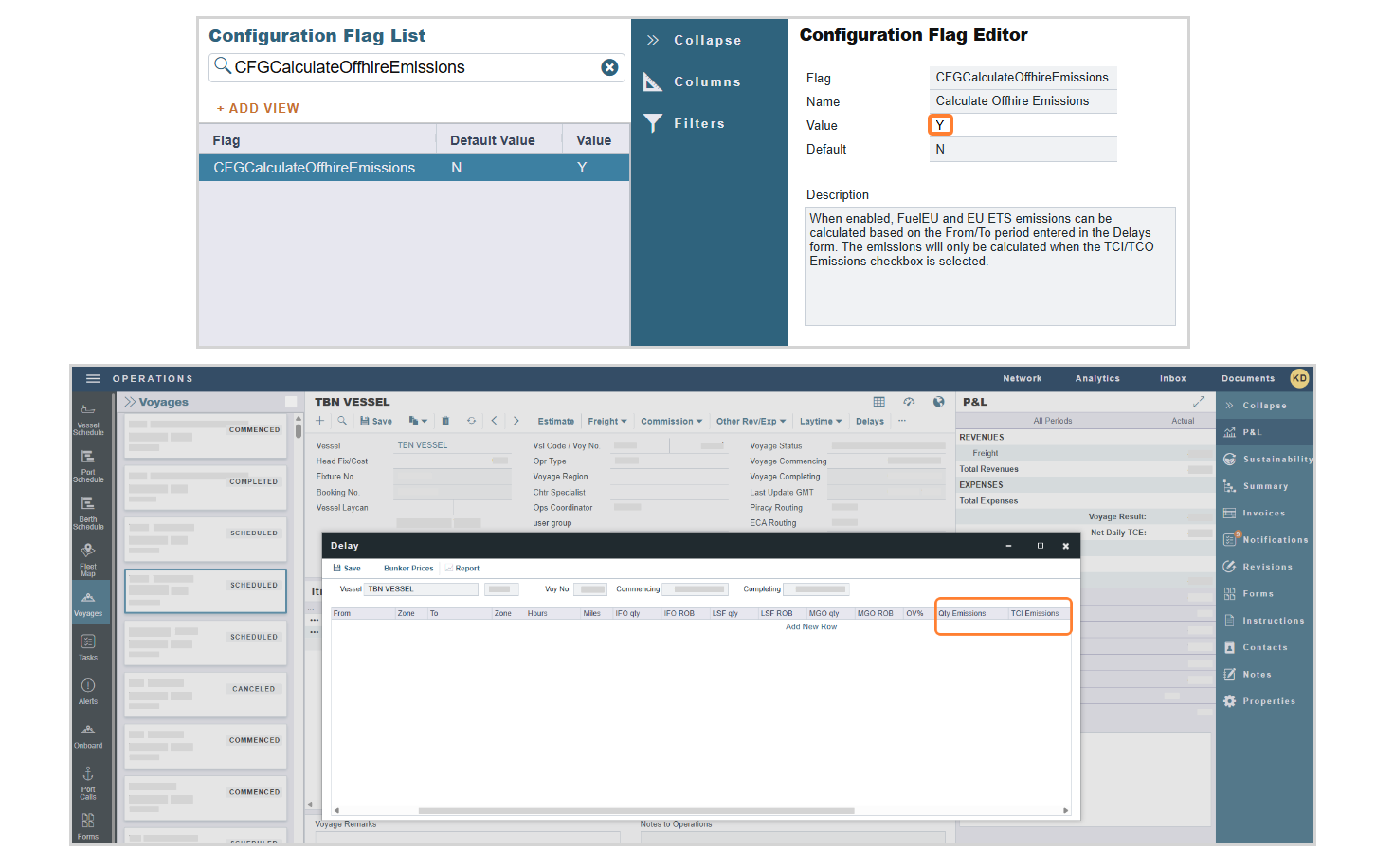
This feature requires the configuration flag CFGCalculateOffhireEmissions to be enabled.
You can now enable the configuration flag CFGCalculateOffhireEmissions to calculate FuelEU and EU ETS emissions based on the From/To period entered in the Delay form, enhancing the emissions management workflow. Emissions only calculate when the TCI/TCO Emissions checkbox is selected.
Default the Qty Emissions Method for the Offhire Emission Calculation Update
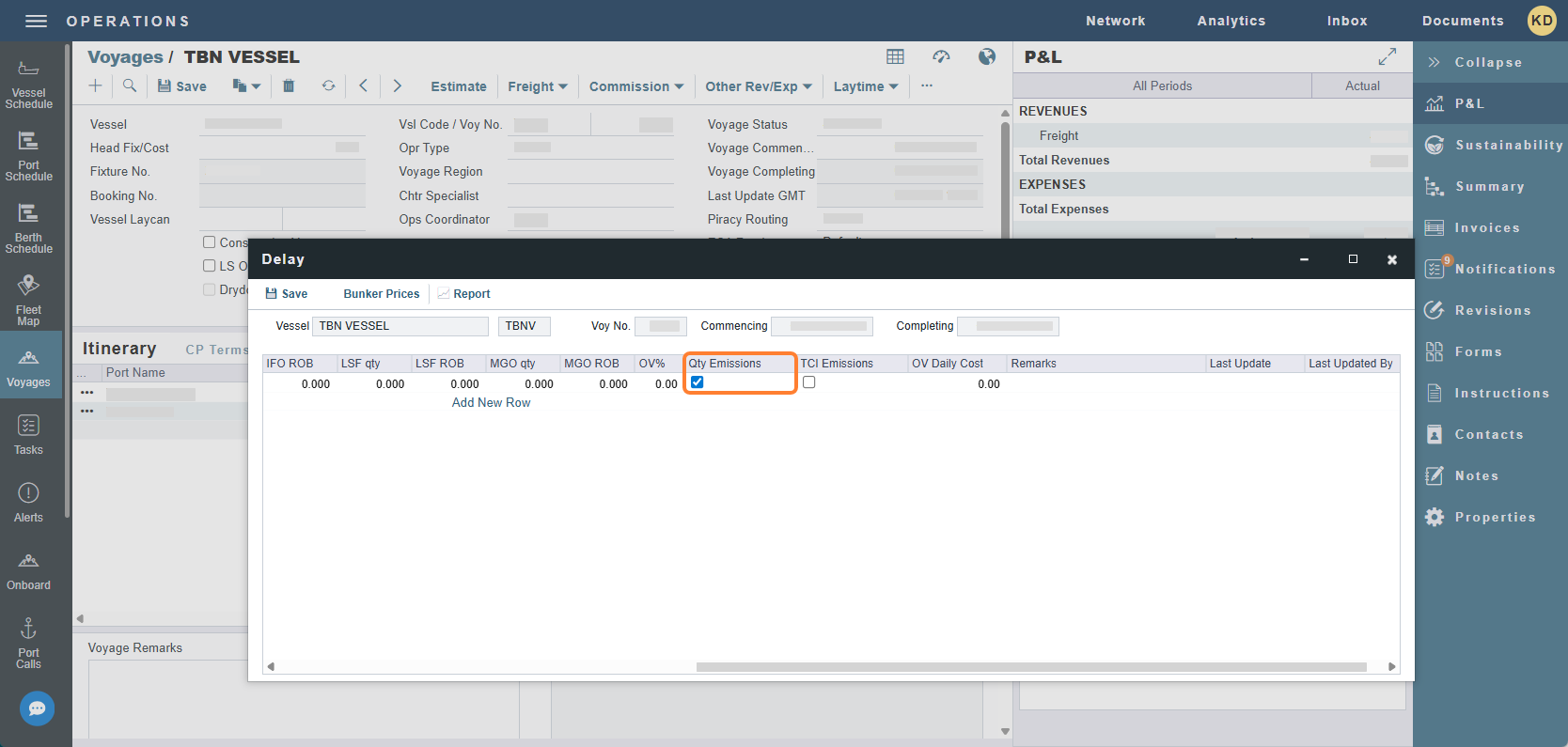
This feature requires the configuration flag CFGDefaultQtyEmissionsOffhire to be enabled.
To improve operational efficiency and ensure accurate emissions allocation, you can now select the Qty Emissions checkbox on the Delay form by default for new off-hire delays when the configuration flag CFGDefaultQtyEmissionsOffhire is enabled.
6 February 2026
Chartering
Fuel Modes for Webhooks/Tasks & Alerts Update
To allow for better consumption management and improved accuracy on the Voyage P&L, Port Mode and Sea Mode are now available in the UpdateEstimate API (fields estimateItineraries.portMode and estimateItineraries.seaMode) and in the Voyage Itinerary and Voyage Estimate Itinerary Tasks & Alerts tables.
January
30 January 2026
Nothing new to share.
23 January 2026
Nothing new to share.
16 January 2026
Financials
UDFs added for Task and Alerts Update
You can now set Tasks and Alerts on UDFs to invoice data from IMOS to your accounting systems. Financials Invoice UDFs can now be referenced in Financials Invoice Tasks & Alerts rules.
9 January 2026
Nothing new to share.
2 January 2026
Nothing new to share.