
Home > Chartering > Pricing Rule Result Types & Variables
|
Pricing Rule Result |
Types |
Values |
|---|---|---|
|
Allowed Laytime |
- |
Right-click the line to open the Allowed Laytime form. 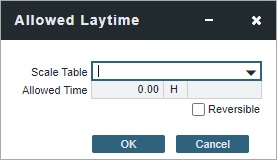
Select a Laytime Hours Scale Table. If you set Allowed Laytime as Reversible, enter the Allowed Time in Days or Hours and select Laytime Terms. |
|
BAF
|
Complete the BAF Type form and then click OK. |
Enter a number. |
|
Bill By |
- |
Select BL Qty, CP Qty, Invoice Qty, or Outturn Qty. |
|
Bunker Surcharge
|
Cap/Collar |
Complete the Bunker Cap/Collar Table form and then click OK. |
|
Select a table. |
|
|
|
Counterparty Option Tolerance |
Enter a number. |
|
|
Demurrage/Despatch |
Per Day or
|
Complete the Demurrage/Despatch form and then click OK. |
|
Extra Freight Term |
Enter a number. |
|
|
Freight |
Flat Rate or
|
Enter a number. |
|
Complete the Scale Table form and then click OK. |
|
|
|
Complete the Worldscale form and then click OK. |
|
|
|
VAT |
Enter a tax code. |
Enter a number. |