
Introduction
What is the TCO Bunker Adjustment?
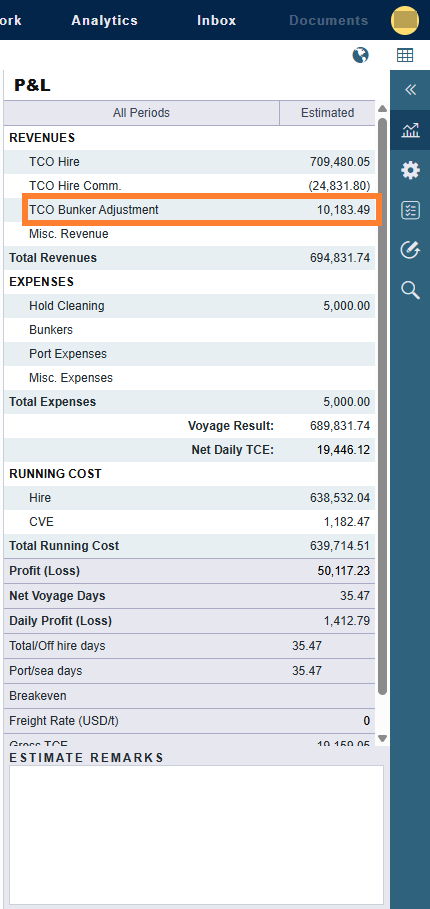
When a vessel is chartered out on a Time Charter Out (TCO) contract, a bunker adjustment captures the difference between the contractual value of bunkers transferred to the charterer at delivery and redelivery and the actual FIFO inventory value of those bunkers at the time of transfer. The adjustment appears as a revenue line item in the Voyage P&L.
What’s New
Previously, the bunker adjustment could only be calculated at the voyage level, after a TCO contract was fixed. With the TCO Bunker Adjustment in Estimates feature, you can now enter estimated delivery and redelivery bunker quantities and prices directly in the TCO Estimate. These values drive a TCO Bunker Adjustment line in the Estimate P&L, giving you a more accurate forecast of voyage profitability before a contract is fixed.
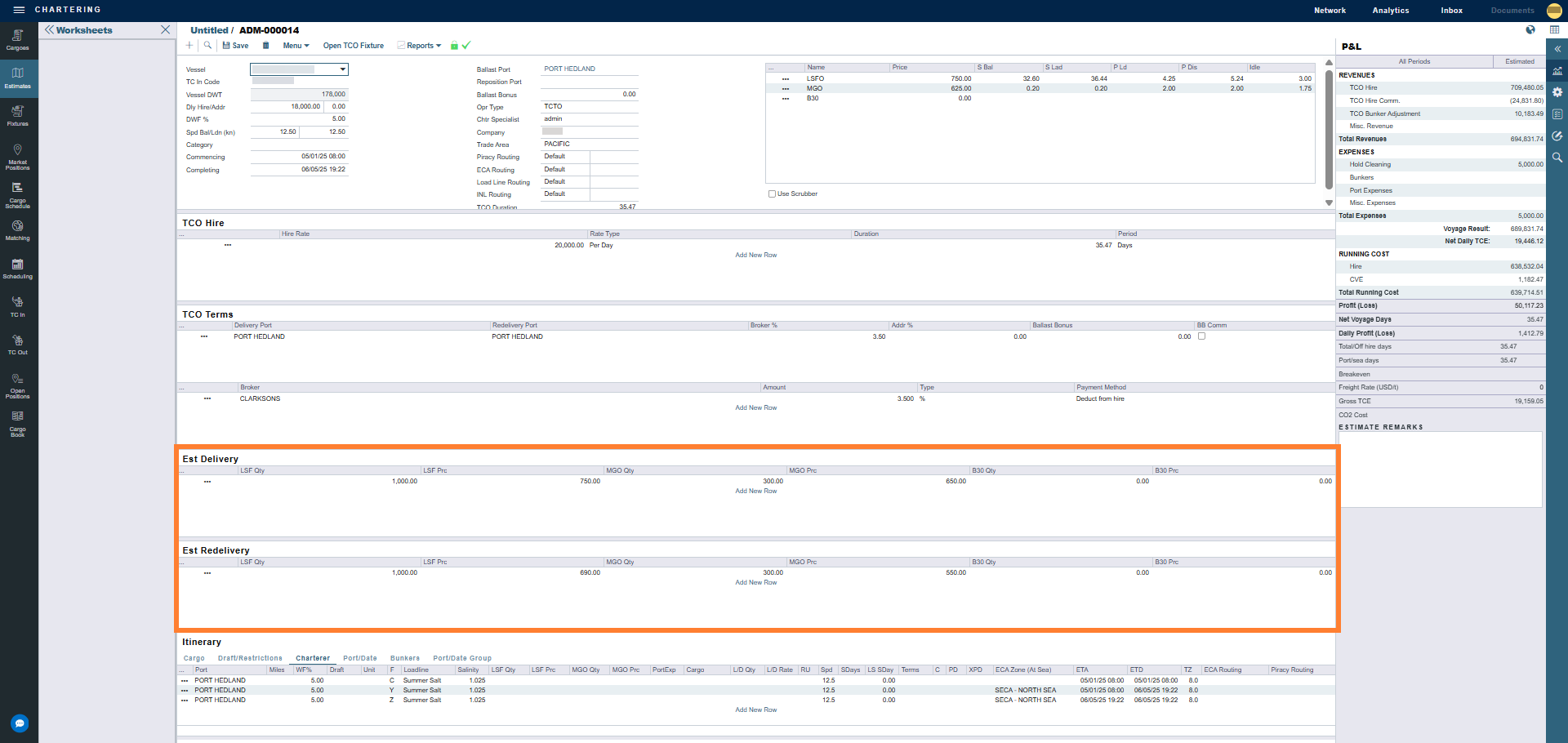
When you fix the estimate to a TCO contract, the values you entered are carried forward automatically. This reduces manual re-entry and improves data consistency across the chartering workflow.
Getting Started
-
This feature requires the configuration flag CFGEstimateTCOBnkrAdj and CFGAlwaysShowTCOBunkerAdj must also be enabled.
-
A schema update of 51.9 or higher is required.
The underlying TCO bunker adjustment calculation also depends on the following configuration flags being appropriately set for your workflow:
|
Flag |
Description |
|---|---|
|
CFGEstimateTCOBnkrAdj |
Enables the TCO Bunker Adjustment line in the Estimate P&L. |
|
CFGAlwaysShowTCOBunkerAdj |
Causes TC Out bunker redelivery adjustments to be calculated regardless of the status of the linked TC Out fixture. |
Using the Feature
Entering Estimated Bunker Values
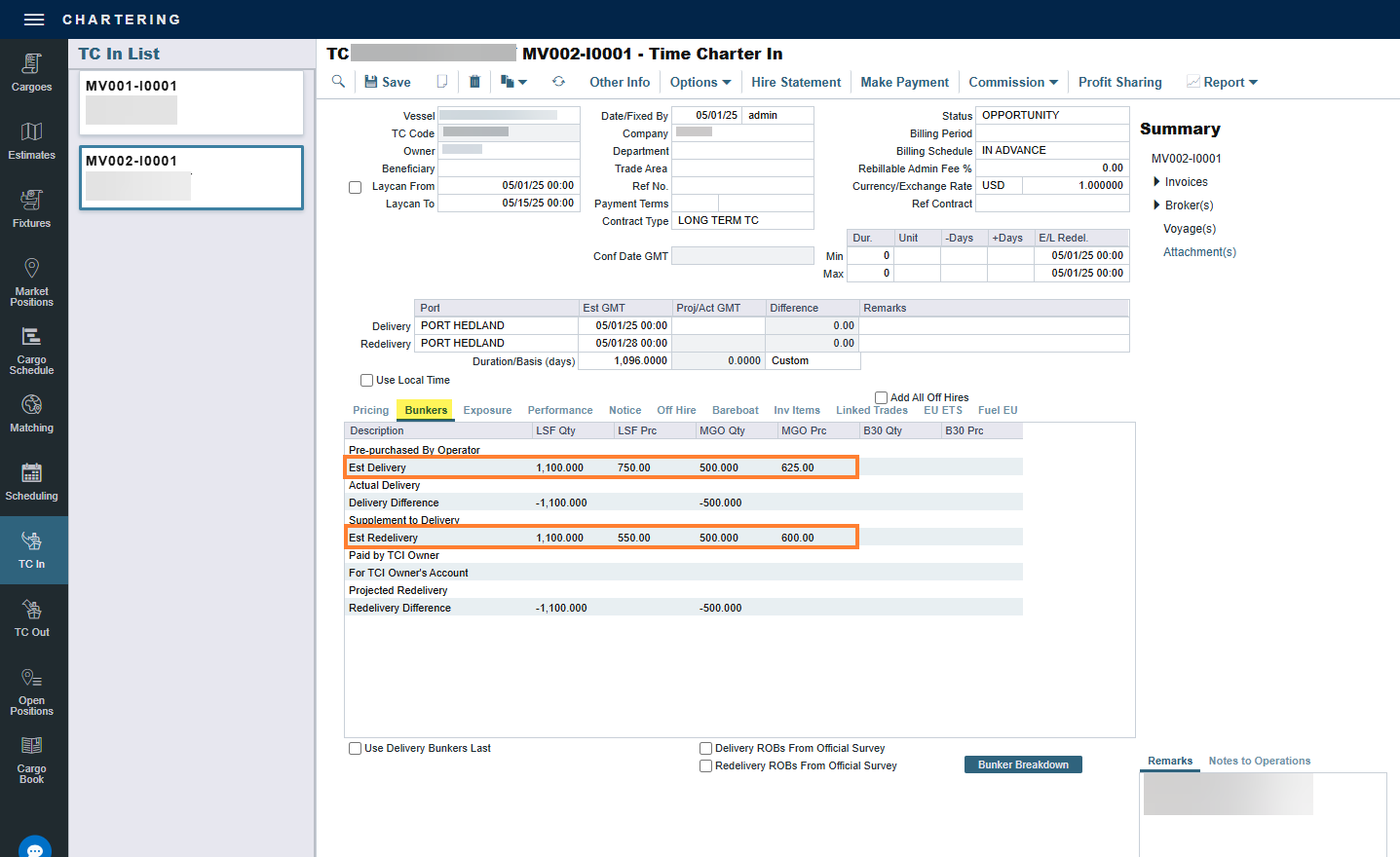
After CFGEstimateTCOBnkrAdj is enabled, two grids appear on the Bunkers tab of the TCO Estimate:
-
Est Delivery – Enter the estimated quantity and price per bunker grade transferred to the charterer at delivery.
-
Est Redelivery – Enter the estimated quantity and price per bunker grade returned by the charterer at redelivery.
These grids are available only on TCO Estimate types (for example, xxTO). They do not appear on Voyage Estimates.
To enter estimated bunker delivery and redelivery information, complete the following steps:
-
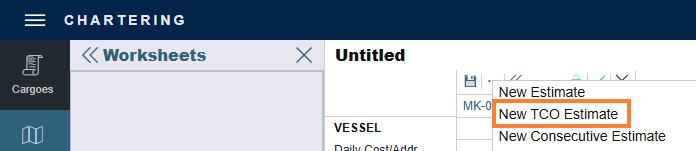
Open or create a TCO Estimate. For instructions, see Time Charter Out Estimates.
-
In the Est Delivery grid, add a row for each bunker grade you expect to deliver to the charterer.

-
In each row, enter the estimated Qty and Prc.
-
-
In the Est Redelivery grid, add a row for each bunker grade you expect to repurchase at redelivery, then enter the estimated Qty and Prc.

-
Save the Estimate.
Both grids support multiple rows, so you can record a separate entry for each fuel type and capture a complete bunker breakdown.
Notes:
-
The Qty and Prc fields in the Est Delivery and Est Redelivery grids are entered manually. They are not synced from the linked TCO Contract.
-
If you leave the Est Delivery grid empty, IMOS uses the delivery port bunker information to set the TC Estimated Delivery bunker values when the TCO Estimate is fixed. This is a pre-existing behavior.
-
When the columns in the grids extend beyond the form view, a horizontal scroll bar appears.
Viewing the Adjustment in the Estimate P&L
After you enter values in the Est Delivery and Est Redelivery grids, a TCO Bunker Adjustment line is calculated and displayed in the Estimate P&L. This line represents the estimated gain or loss between the contractual bunker value and the FIFO inventory value giving you a more complete picture of profitability at the estimate page.
Fixing to a Contract
When you fix an TCO Estimate to a TCO contract, the estimated delivery and redelivery bunker values are carried forward automatically to the corresponding bunker fields on the TCO contract. This eliminates the need to re-enter bunker terms and ensures continuity between the estimate and the contract.
How the TCO Bunker Adjustment is Calculated
The TCO Bunker Adjustment reflects the economic difference between the contractually agreed bunker transfer value and the actual FIFO inventory value of those bunkers at the time of transfer. In the Estimate P&L, the TCO Bunker Adjustment line is the sum of a Delivery Adjustment and a Redelivery Adjustment, calculated for each bunker grade and totaled. The calculation depends on whether the Bunkers on Consumption check box is selected on the TCO contract.
|
Component |
Calculation |
Required Flags |
|---|---|---|
|
Delivery Adjustment |
(Est Delivery Qty x Est Delivery Prc) - (Delivery Port Bunker Arrival Qty x Delivery Port Bunker Arrival Prc) |
CFGTcoBunkerAdj |
|
Redelivery Adjustment |
(Redelivery Port Bunker Departure Qty x Redelivery Port Bunker Departure Prc) - (Est Redelivery Qty x Est Redelivery Prc) |
CFGTcoBunkerAdj and CFGAlwaysShowTCOBunkerAdj |
For information about how the TCO Bunker Adjustment is calculated for an active voyage, see How is TCO bunker adjustment calculated?
How Values Carry Between the Estimate and the TCO Contract
The Est Delivery and Est Redelivery values are transferred between the TCO Estimate and the linked TCO Contract in both directions:
-
On Estimate Fixture: When you fix the TCO Estimate, the Est Delivery and Est Redelivery values carry over to the TCO Contract Bunkers tab.
-
On Estimate Back Creation: When you create a TCO Estimate from an existing TCO Contract, the delivery and redelivery bunker values carry over from the contract to the new Estimate.
If more than one row exists in the Est Delivery or Est Redelivery grid, IMOS treats the data as a bunker breakdown, in the same way as the TCO Contract bunker breakdown. For more information, see Delivery/Redelivery Bunker Breakdown.
After the values are transferred, edits made on the Estimate do not sync back to the TCO Contract, and edits on the TCO Contract do not sync back to the Estimate. This is an expected behavior so that the Estimate P&L TCO Bunker Adjustment is based on the estimated delivery and redelivery quantities and prices at the time of scheduling – not on later updates from the TCO Contract.
Behavior on a Copied Estimate
When you copy a TCO Estimate, the data in the Est Delivery and Est Redelivery grids is copied to the new Estimate. When you delete a TCO Estimate, the corresponding Est Delivery and Est Redelivery rows are removed from the database.
FAQs
1. Why does the TCO Bunker Adjustment exist?
The TCO contract defines specific quantities and prices for bunkers at delivery and redelivery. These contractual values almost always differ from the actual FIFO inventory price of those bunkers at the time of transfer. The adjustment captures the gain or loss from this difference and records it in the Voyage P&L as a revenue item.
2. When does the adjustment appear in the Voyage P&L?
This depends on the Bunkers on Consumption setting on the TCO contract:
-
Not selected: The delivery adjustment appears when the vessel is delivered.
-
Selected: The full adjustment appears when the vessel is redelivered and the Z port is actualized.
3. What happens to the estimate bunker values when the estimate is fixed?
Estimated delivery and redelivery bunker values entered in the TCO Estimate are carried forward automatically to the TCO contract on fixing. This ensures alignment between the estimate and the contract and reduces duplicated data entry.
4. Can the TCO Bunker Adjustment be shown regardless of fixture status?
Yes. The configuration flag CFGAlwaysShowTCOBunkerAdj causes TC Out bunker redelivery adjustments to be calculated regardless of the status of the linked TC Out fixture.
Configuration Flags
|
Name/Flag |
Description |
|---|---|
|
TCO Bunker Adjustment in Estimates CFGEstimateTCOBnkrAdj |
When enabled, Est Delivery and Est Redelivery bunker grids appear on the TCO Estimate, and a TCO Bunker Adjustment line can be included in the Estimate P&L. Schema version 51.9 or higher is required. |
|
Enable TCO Bunker Adjustment CFGTCOBunkerAdj |
Enables the TCO bunker adjustment calculation at the voyage level. |
|
Always Show TCO Bunker Adjustment CFGAlwaysShowTCOBunkerAdj |
Causes TC Out bunker redelivery adjustments to be calculated regardless of the status of the linked TC Out fixture. |