
What are Snapshots in IMOS?
Snapshots in IMOS are saved records of P&L data at specific points in time, allowing you to track and compare financial performance across different periods.
Snapshot data sets are used as sources for various downstream reports, including Pooling Distribution and custom financial and operational reports.
Initial Snapshot
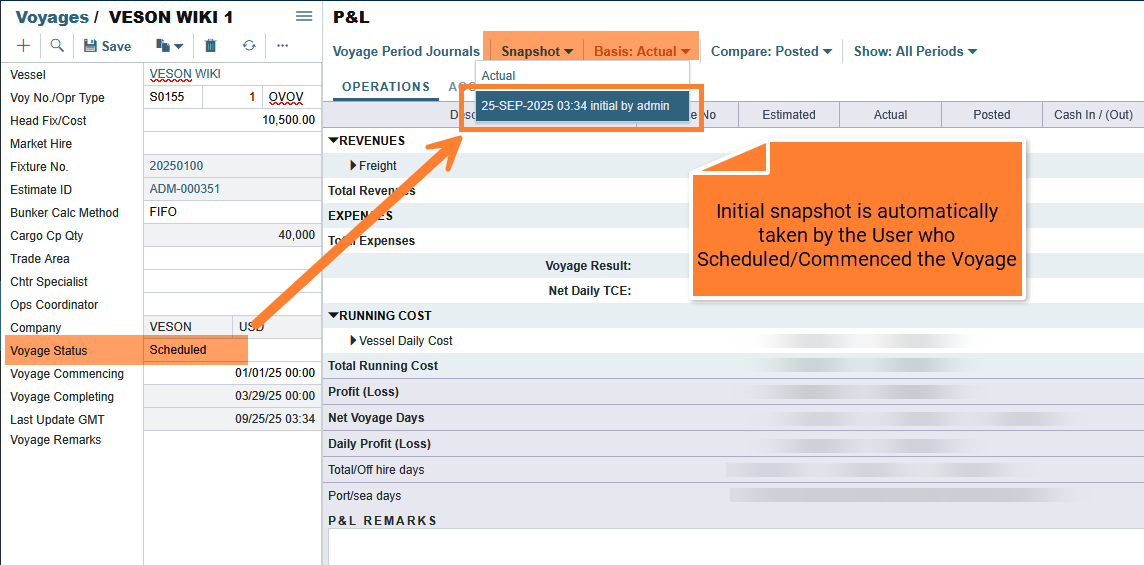
Initial snapshots are automatically taken when the voyage is scheduled or commenced by a user. The configuration for Initial Snapshot can be found in Data Center → Configuration Flag → CFGInitialSnapshotTimeSelect.
CFGInitialSnapshotTimeSelect
When set to "schedule", a snapshot of the Voyage PNL will be taken when the voyage is scheduled, and this snapshot will be used as the basis estimate for PNL analysis. Alternatively, if set to "commence", this basis estimate snapshot will be taken when the voyage is commenced.
Update Initial Snapshot
If the user wants to update the Initial Snapshot to reflect the final actualized data, they can do so using the "Update Initial Snapshot" feature.
Navigate to: Voyage P&L → Snapshot → Update Initial Snapshot.
Note: Only one Initial Snapshot can exist per voyage. Updating the Initial Snapshot will overwrite the existing data.
Current Snapshot
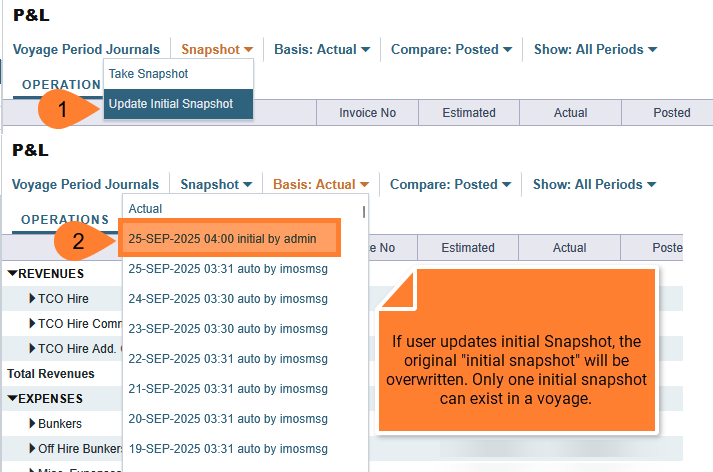
The Current Snapshot is a point-in-time view of your voyage's financials based on the most recent and available data. It updates automatically as new actuals come in and syncs the latest data into reports.
Purpose and Use
-
Real-Time Insight: It gives you a live, continuously updating picture of your voyage's profit and loss (P&L).
-
Decision-Making Tool: Since it reflects the latest data, it's useful for operational decisions, monitoring voyage performance, or spotting potential issues early.
-
Comparison Point: You can compare the Current Snapshot with the Initial Snapshot (which reflects the plan or forecast at the start of the voyage) to understand variances between expected and actual performance.
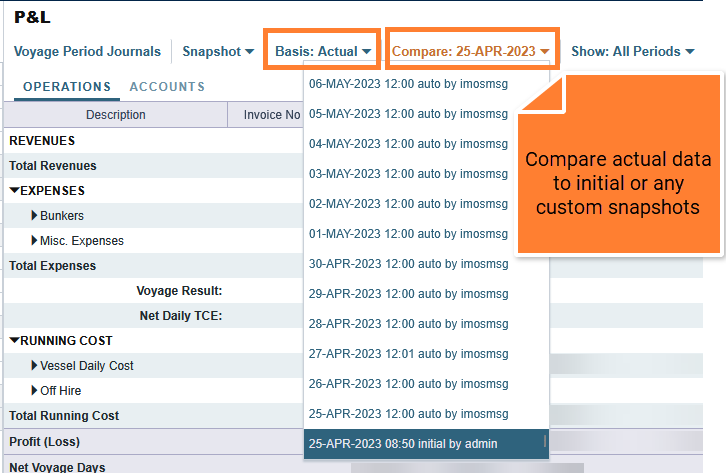
Kindly note that the comparison performed in this manner only considers the 'Actual' column values from the 'Basis' and 'Compare' snapshots.
It is not currently possible to compare the 'Posted' column values using this method.
Current Snapshots are automatically taken when:
-
Voyages are saved indirectly (e.g., Interface Update)
-
Current Snapshot Scheduled Task triggered (Raise Support Ticket to set up)
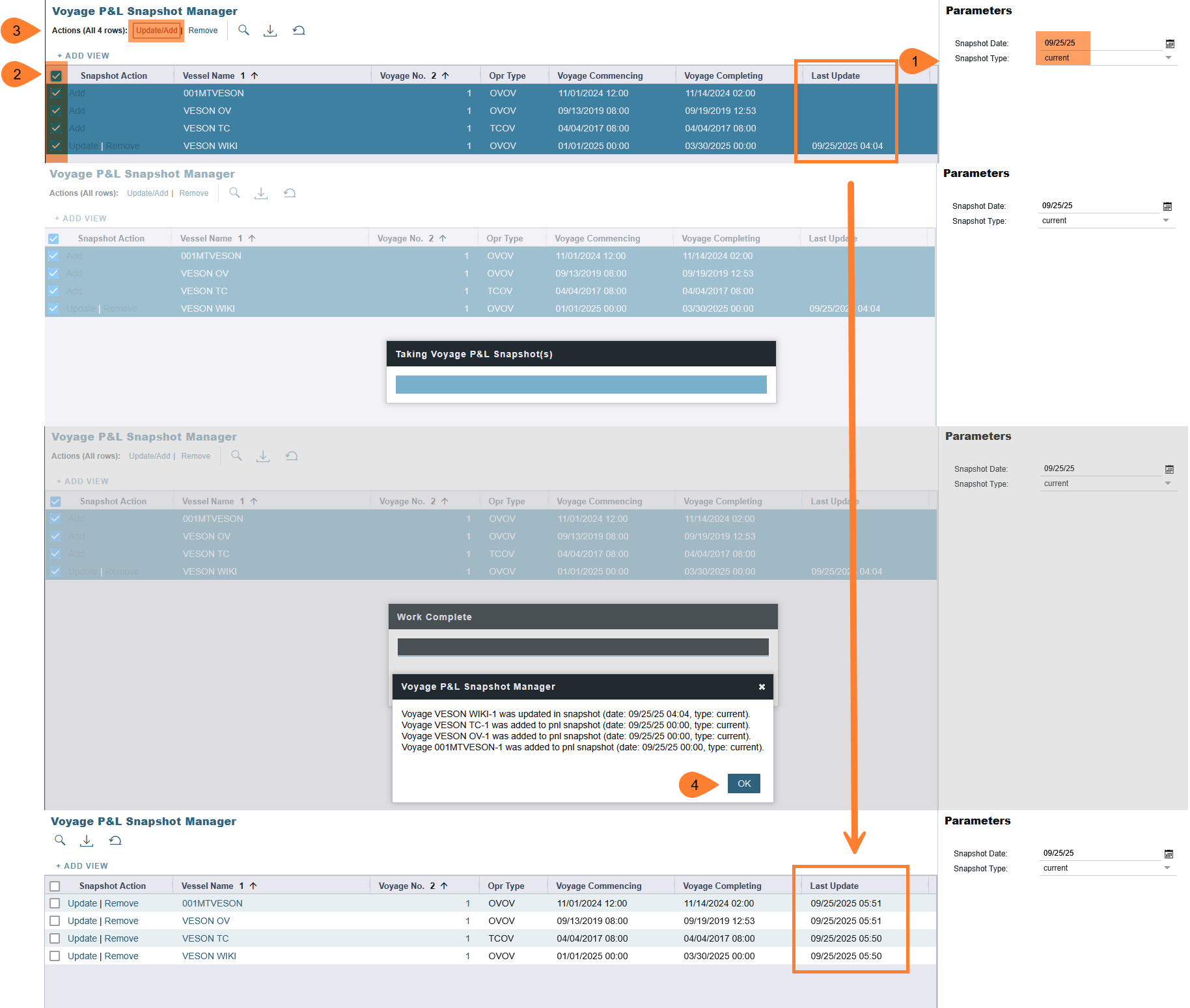
Current Snapshots can be manually taken by users when:
-
Save the Voyage
-
Voyage P&L Snapshot Manager
-
This feature can be found in the Financials Module → Under “Statements” → Voyage P&L Snapshot Manager
-
Custom Snapshot
A custom snapshot captures a point-in-time view of a voyage's financial data with more control and flexibility. Unlike the Initial Snapshot or the Current Snapshot, a custom snapshot can be generated manually at any time to preserve the state of the data at that specific moment.
Purpose and Use
-
Benchmarking: Useful for comparing financial performance at different stages of a voyage (e.g., mid-voyage check, post-discharge).
-
Audit Trail: Acts as a historical record to track how voyage economics evolved over time.
-
Reporting: Enables consistent reporting by locking in data that won't change, even as actuals continue to update in the Current Snapshot.
Custom Snapshots are automatically taken when:
-
Custom Snapshot Scheduled Task triggered (Raise Support Ticket to set up)
Custom Snapshots can be manually taken by users when:
-
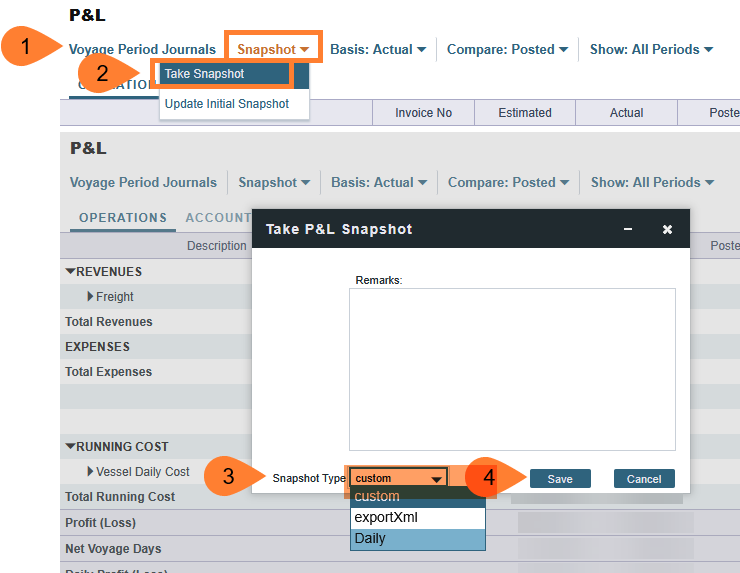
Take a snapshot from Voyage P&L
-
Voyage P&L Snapshot Manager
-
Change snapshot type to Custom

-
User Created Snapshots
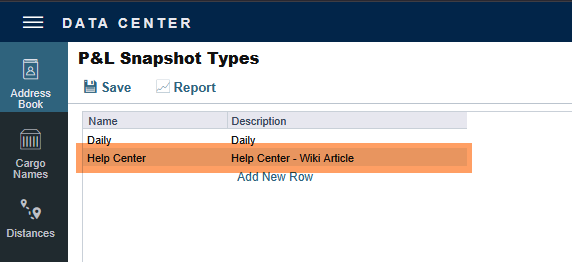
Users can create their own snapshot types in Data Center → P&L Snapshot Type.
Some common names for custom snapshots are:
-
Daily
-
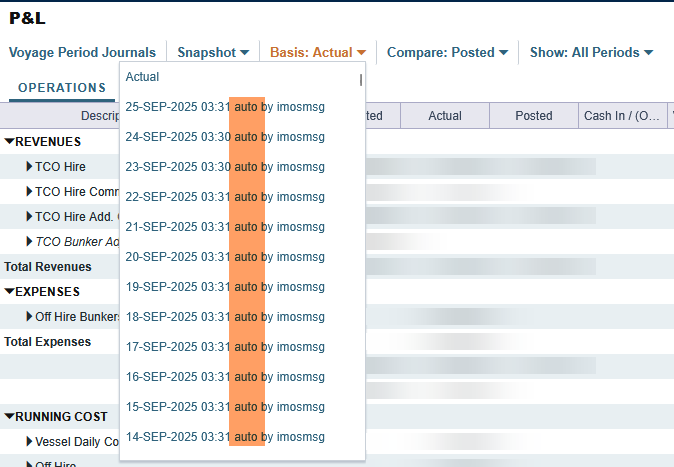
Auto
In the screenshot below, a new P&L Snapshot Type “Help Center” was added.
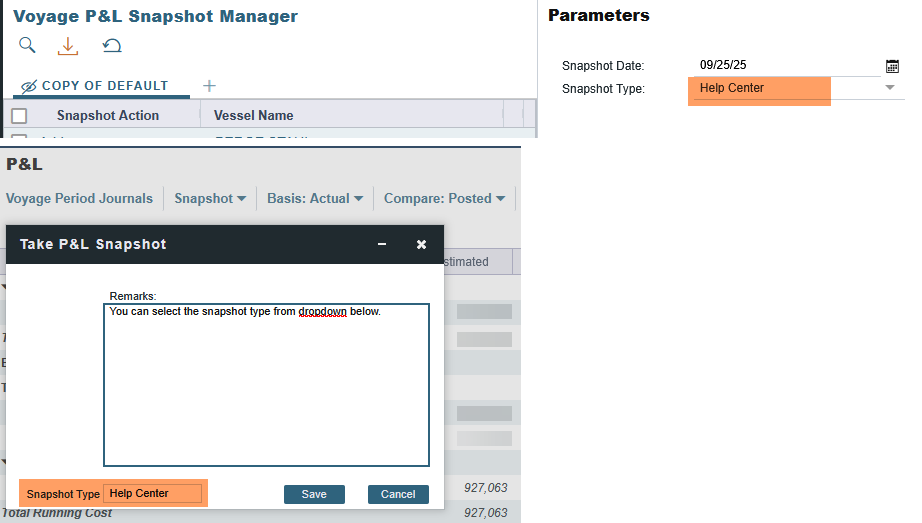
Once the new snapshot type is saved, users can manually take a snapshot using the new snapshot type from Voyage P&L or Voyage P&L Snapshot Manager.
User Created Snapshots - Run in scheduled tasks
User-created custom snapshot types are typically not included in the scheduled task list of commands. If it is a business requirement to have them included in a scheduled run, a support ticket needs to be created.
Closed Voyage P&L Snapshot
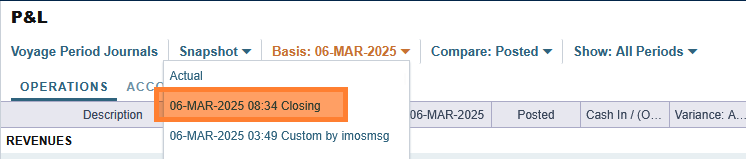
A voyage closing P&L snapshot is automatically created when you close a voyage in IMOS.
This snapshot captures the final P&L state at closure, displaying the date, time, and "Closing" text in the name. It serves as a permanent record of your voyage's financial performance at the time of closure.
You can view this snapshot later by clicking on the Actual or Posted column heading in the P&L and selecting the closing snapshot from the dropdown. This allows you to compare the voyage's closed state with current calculations.
If you have the CFGUseClosingSnapshotForClosedVoyages flag enabled, closed voyages will always display information from the latest closing snapshot on the P&L panel instead of current data.
CFGUseClosingSnapshotForClosedVoyages
When enabled, PNL on closed voyages will come from the latest closing snapshot when available.
Monthly Accrual Snapshot

Monthly accruals snapshots are automatically created when you run the Monthly Accruals.
These snapshots capture the P&L state at the time accruals are calculated and appear with the date, time, and "Accrual" text in the snapshot name.
These snapshots help you track how your voyage P&L looked at specific accrual calculation points, similar to how closing snapshots work for voyage closure.
In Summary
Kindly note that it is not possible to configure the Custom snapshot, and consequently the messaging service, to operate under a different user account, such as a system admin. All automatic snapshots will be taken under the name “imosmsg”.
|
Type of snapshots |
Description |
|---|---|
|
Initial Snapshot |
|
|
Current Snapshot |
|
|
Custom |
|
|
Closed voyage P&L snapshot |
|
|
Monthly accrual |
|