
Goal: Help operators safely revert Port Activities and Activity Reports when incorrect times/events were approved in Veslink Forms, while maintaining voyage data integrity and auditability.
This same process is used to set Voyage Status back to Commenced from Completed.
When to revert vs. edit
-
If Veslink Forms are considered the source of the truth for vessel reporting data and the error is caught early, revert the Port Activities and Activity Reports, then resubmit the forms with the correct data.
-
If the error is discovered after many subsequent forms have been approved, such as if the next voyage is already completed (large rework required), then edit the existing data in Port Activities or Activity Reports.
-
For clients not using Veslink Forms, correct the data directly in Port Activities or Activity Reports.
Key concepts
-
Activity Reports are generated when Port Activities are manually entered, or Veslink Forms are approved. The presence of an Activity Report, determines the Port Status (e.g. AR or SA)
-
Approving an Arrival Notice, or manually entering a Port Start (PS) activity automatically creates an Arrival Activity Report. This sets the Port Status to Arrived (AR).
-
Approving a Departure Notice, or manually entering a Port End (PE) activity automatically creates an Departure Activity Report. This sets the Port Status to Sailed (SA).
-
Completing a voyage sets the Port Status of the last port to Terminated (TE).
-
-
If you need to change a port call from Sailed (SA) or Terminated (TE), back to Arrived (AR) or Not Arrived (..), then Port Activities and Activity Reports must be deleted.
-
A Voyage Status cannot be changed from Completed to Commenced, until the final Port End (PE) date/time and terminating Activity Report is deleted.
If configuration allows activities before PS/ after PE, reverts may require additional ordering checks to avoid Port Activity Errors.
Example A: Arrival Notice was incorrect and vessel has departed port
-
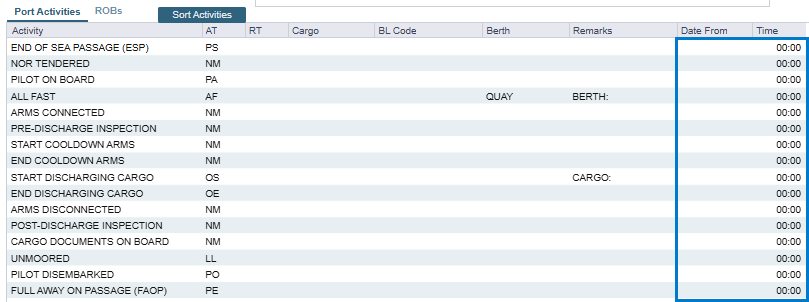
Open Port Activities, delete all Port Activity date and times including Port Start (PS) and Port End (PE).
-
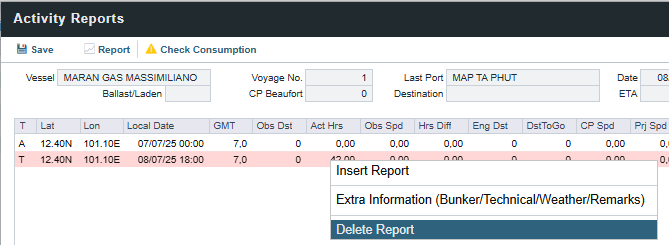
Open Activity Reports, delete the Departure (D) or the Terminating (T) report, then delete the Activity Reports in order - from the bottom-up.
-
If Noon Reports have been approved after Departure, then these must be deleted first.
-
If any bunkers have been lifted, open the Activity Report and delete the Received Qty.
-
If the port is a LNG cargo handling port, delete the BL data from Cargo Handling.
-
-
If correction is being made to the last port and the voyage was Completed, set the Voyage Status to Commenced.
-
Request an improved Arrival Notice from the Master, or the Operator can correct data in the form using “Open For Resubmit”.
-
Resubmit all Veslink Forms in the correct order, by Effective Date.
Date/time changes cannot be fixed using Open For Resubmit, this will require a new form from the Master.
Example B: Need to add a port to voyage itinerary, but the voyage is completed
-
Open Port Activities, delete date and time for Port End (PE) Port Activity.

-
Open Activity Reports, delete the Terminating (T) report.
-
Set the Voyage Status to Commenced.
-
Add next port to the Voyage Itinerary.
-
Open the Departure Notice for the current port, replay form using “Open For Resubmit”.