
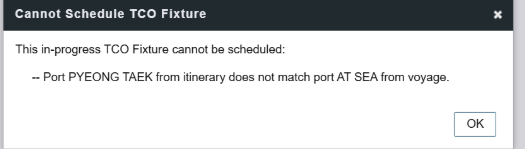
Clicking “Sched a Voyage” on a TC Out contract returns a save error when the commencing port on the active voyage does not match the port set in the estimate. This is a data validation issue, not a system bug—it can be resolved by aligning the two port values.
Example of error scenario:
The active voyage shows “AT SEA” as the commencing port, but the TC Out estimate has a named port (e.g. PYEONG TAEK). IMOS requires these to match before a voyage can be scheduled and saved.
Voyage has a generic or placeholder commencing port.
When a vessel is “AT SEA” at the time of scheduling, IMOS sometimes records that as the commencing port. If the TC Out estimate was built with a specific named port, the two values diverge and tigger a validation error on save.
Estimate was updated after the voyage commenced
If the estimate’s itinerary was edited after the voyage was already in progress, the commencing port in the estimate may no longer reflect what was actualized in the voyage, causing a mismatch.
To rectify this, you will need to follow the below steps:
the scheduling.
-
Open the TC Out contract that triggered the error.
-
Navigate to the voyage itinerary for the active voyage (e.g. voyage 52). Look for the commencing port line—it may show “AT SEA” or a placeholder value.
-
Update the commencing port on the voyage to match the port used in the TC Out estimate—or update the estimate to match the voyage. Either direction is acceptable as long as the two values agree exactly.
-
Save the voyage, then return to the TC Out contract and click “Sched a Voyage” again.
Port matching reference
The table below shows how the commencing port is populated depending on the voyage status and estimate configuration.
|
Scenario |
Expected commencing port |
|
Voyage scheduled, estimate has named port |
Must match the named port in the estimate |
|
Vessel is AT SEA at time of scheduling |
Update voyage to the estimate’s port, or update estimate to AT SEA |
|
TCOV in progress, TCTO being scheduled |
Port auto-populated from last port in TCOV itinerary |
|
Estimate updated after voyage commenced |
Re-align estimate port to the actualized voyage port |